T~uchCkmtrdI?and
TheTouchControlPanel
allowsyoutosettheovencontrols
electronicallywiththetouchofa
finger.It’sdesignedto beeasy
touseandunderstand.
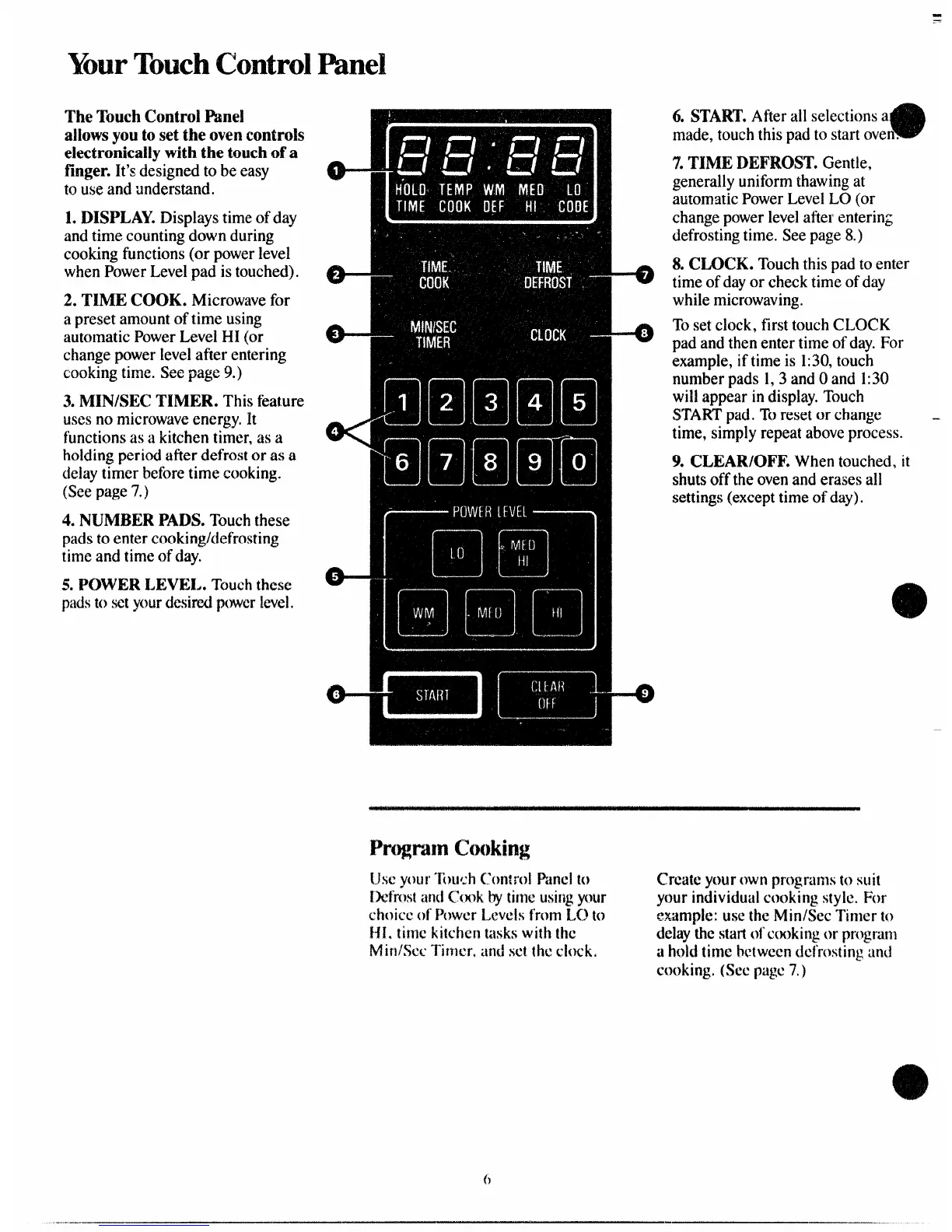
L DISPLAY.Displaystimeofday
andtimecountingdownduring
cookingfunctions(or powerlevel
whenPowerLevelpad istouched).
2. ‘1’lNIECOOK. Microwavefor
apresetamountoftimeusing
automaticPowerLevelHI (or
changepowerleveiafterentering
cookingtime.Seepage9.)
3.MIN/SECTIMER.Thisfeature
i.4sesnomicrowaveenergy.R
functionsasa kitchentimer,as a
holdingperiodafterdefrostor as a
delaytimerbeforetimecooking.
(Seepage7.)
4. NUNIBERPADS.Touchthese
padstoenter
timeandtimeofday.
5.POWER LEVE~#.
~t?isitil these
padstosetyourdesiredpovwrlevel.
e-
43--’
e-
e-
o’-
:
-0
-0
:
6. START.Afterallselectionsa
made,touchthispadto startoven.
7.TUVIEDEFROST.Gentle,
generallyuniformthawingat
automaticPowerLeveiLO(or
changepowerlevelafterenterin~
defrostingtime.Seepage8.)
8.CLOCK. Touchthispadtoenter
timeofdayor checktimeofday
whilemicrowaving.
Tosetclock,firsttouchCLC)CK
padandthenentertimeofday.For
example,iftimeis 1:30,touch
numberpads1,3andOand 1:30
willappearindisplay.Touch
STARTpad.TOresetor change .
time,simplyrepeataboveprocess.
9. CLEAR/OFF.Whentouched,it
shutsofftheovenanderasesall
settings(excepttimeofday).



 To Next Page