EasyManua.ls Logo

GE JGB660 - User Manual

GE JGB660
36 pages
Print Icon
To Next Page IconTo Next Page
Loading...
Write the model and serial
numbers here:
Model # _________________
Serial # _________________
You can find the rating label on the
front behind the range drawer.
ESPAÑOL
Para consultar una version en
español de este manual de
instrucciones, visite nuestro sitio de
internet GEAppliances.com.
OWNER’S MANUAL
RANGES
Self-Cleaning Gas
49-2000782 Rev. 3 04-21 GEA
GE is a trademark of the General Electric Company. Manufactured under trademark license.
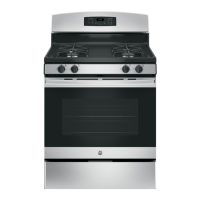
JGB660
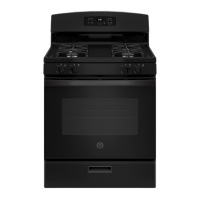
JGB735
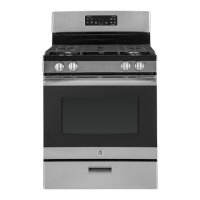
PGB935
SAFETY INFORMATION .......... 3
USING THE RANGE
In Case of a Power Failure ............... 8
Surface Burners ........................ 8
Griddle ................................10
Oven Controls ..........................12
WiFi Connect ..........................13
Special Features ........................14
Sabbath Mode - OU and CRC .............15
Sabbath Mode - Standard ................16
Oven Racks ............................17
Aluminum Foil and Oven Liners ...........17
Oven Cooking Modes ...................18
Oven Air Vents .........................18
Oven Cooking Guide ....................19
Air Fry Cooking Guide ...................21
CARE AND CLEANING
Range – Exterior ....................... 22
Range – Interior ....................... 23
Cooktop ..............................24
Door and Drawer ......................26
Oven Light ............................ 27
Oven Door ............................ 28
TROUBLESHOOTING TIPS .......29
LIMITED WARRANTY ............34
ACCESSORIES ....................35
CONSUMER SUPPORT ...........36

Questions and Answers

  • S
    Steve GrayAug 30, 2025
    What causes excessive smoke when broiling in my GE Ranges?
    • S
      seanwardAug 30, 2025
      If your GE Ranges are experiencing excessive smoking during broiling, it's likely because the food is too close to the burner element. Lower the rack position of the food to increase the distance from the burner.
  • W
    wphelpsSep 7, 2025
    Why don't the clock and timer work on my GE Ranges?
    • M
      megan62Sep 7, 2025
      If the clock and timer on your GE Ranges do not work, a fuse in your home may be blown, or the circuit breaker tripped. Replace the fuse or reset the circuit breaker.
  • A
    avillaAug 29, 2025
    Why is my food not baking properly in my GE JGB660 oven?
    • S
      Samuel JuarezAug 29, 2025
      If your GE Ranges oven isn't baking properly, there might be several reasons. The oven controls could be set incorrectly. Also, the rack position might be wrong, or the rack might not be level. You may be using the wrong cookware or cookware of an improper size. Finally, the oven temperature might need adjustment. Consult the Cooking Modes section, Cooking Guide, Cookware section, and Settings section for more details.
  • K
    Karen SolisSep 18, 2025
    Why GE JGB660 burners do not light?
    • T
      Travis WilliamsSep 18, 2025
      If your GE Ranges burners do not light, ensure the range is properly plugged into a grounded electrical outlet. Also, verify that the gas supply is connected and turned on. Check for blown fuses or tripped circuit breakers and replace or reset them if necessary. Ensure burner parts are correctly replaced after cleaning. Clear any clogs from burner slots near the electrode or the round lighter port on the oval burner. Finally, polish any food residue from the electrode with a nail file or sandpaper until shiny.
  • J
    Jared BrownSep 8, 2025
    What does "LOCK DOOR" flashing mean on GE Ranges?
    • S
      Scott MyersSep 8, 2025
      If you see "LOCK DOOR" flashing in the display of your GE Ranges, it means the self-clean cycle has been selected but the door is not closed. Close the oven door.
  • A
    Alexis ZimmermanSep 12, 2025
    What does 'F' and a number mean on my GE JGB660 Ranges display?
    • K
      Kevin BrownSep 12, 2025
      If “F— and a number or letter” flash in the display of your GE Ranges, it indicates a function error code. Press the Cancel/Off pad and allow the oven to cool for one hour. Then, try using the oven again. If the code repeats, disconnect power to the oven for at least 30 seconds and then reconnect it. If the error persists, call for service.
  • J
    jeffrey05Sep 16, 2025
    Why is there a strong burning or oily odor emitting from my new GE JGB660 Ranges?
    • P
      Patrick ReillySep 16, 2025
      A strong “burning” or “oily” odor from the vent of your GE Ranges is normal in a new oven and will disappear over time. To speed up the process, set a self-clean cycle. See the Care and Cleaning section. This is temporary.
  • M
    Mark TaylorSep 23, 2025
    Why GE Ranges oven light does not work?
    • B
      Brittany AdamsSep 23, 2025
      If your GE Ranges oven light does not work, the light bulb may be loose or defective. Try tightening or replacing the bulb. See the Maintenance section for instructions on how to replace the bulb.
  • L
    logan85Aug 26, 2025
    Why is my GE JGB660 oven not working?
    • P
      Patty SanchezAug 26, 2025
      If your GE Ranges oven and/or display appear not to work, check if a fuse in your home has blown or the circuit breaker has tripped and replace the fuse or reset the circuit breaker. Also, ensure the oven controls are properly set and that the oven is not in Sabbath Mode. Lastly, check if the clock is turned off.
  • D
    Darren WhiteheadAug 25, 2025
    How to unlock the oven door on my GE JGB660 Ranges?
    • M
      Martin OconnellAug 26, 2025
      If your GE Ranges oven door won't open and the LOCKED light is on, it means the oven temperature hasn't cooled down enough. Press the Cancel/Off pad and wait for the oven to cool below the locking temperature.

Summary

SAFETY INFORMATION

ANTI-TIP DEVICE

Instructions and warnings regarding the anti-tip device installation.

GENERAL SAFETY INSTRUCTIONS

General warnings and precautions for using the appliance safely.

KEEP FLAMMABLE MATERIALS AWAY FROM THE RANGE

Warnings about storing flammable materials near the range.

COOKTOP SAFETY INSTRUCTIONS

Specific safety guidelines for operating the cooktop.

OVEN SAFETY INSTRUCTIONS

Safety guidelines for using the oven.

SELF-CLEANING OVEN SAFETY INSTRUCTIONS

Precautions and instructions for the self-cleaning oven feature.

Remote Enable Equipment

FCC compliance and wireless communication equipment information.

How to Remove Protective Shipping Film and Packaging Tape

Instructions for removing protective film and tape from the appliance.

USING THE RANGE

In Case of a Power Failure

How to operate the surface burners during a power outage.

Surface Burners

Information on lighting, using, and types of surface burners.

Top-of-Range Cookware

Guidelines for selecting and using cookware on the range.

Stove Top Grills

Warning against using aftermarket stove top grills.

Using a Wok

Instructions and safety precautions for using a wok.

Griddle (on some models)

Instructions for using the cast iron griddle.

Using Your Nonstick Aluminum Griddle (on some models)

Instructions for using the nonstick aluminum griddle.

Oven Controls

Explanation of the oven control panel features and functions.

WiFi Connect

Instructions for connecting the oven to a WiFi network for remote control.

Special Features

Details on various special features like temperature adjustment and timer settings.

Sabbath Mode - OU and CRC

Information on Orthodox Union and Central Rabbinical Congress Sabbath mode.

Sabbath Mode - Standard

Instructions for using the standard Sabbath mode.

Oven Racks

Recommended rack positions and usage guidelines.

Aluminum Foil and Oven Liners

Warnings and guidelines for using aluminum foil and oven liners.

Oven Cooking Modes

Explanation of different oven cooking modes like Bake, Broil, Air Fry.

Oven Air Vents

Information on the location and importance of oven air vents.

Oven Cooking Guide

Guidelines for cookware selection and oven performance.

Air Fry Cooking Guide

Specific guidance and tips for using the Air Fry cooking mode.

CARE AND CLEANING

Range - Exterior

Instructions for cleaning the exterior surfaces of the range.

Range - Interior

Instructions for cleaning the interior of the oven manually or using modes.

Cooktop

Instructions for removing and cleaning surface burners and grates.

Door and Drawer

Instructions for cleaning the oven door and removable storage drawer.

Oven Light

Instructions for replacing the oven light bulb.

Oven Door

Detailed instructions for removing and replacing the oven door.

TROUBLESHOOTING TIPS

LIMITED WARRANTY

GE Appliances Gas Range Limited Warranty

Details of the limited warranty coverage and exclusions.

ACCESSORIES

CONSUMER SUPPORT

GE Appliances Website

Information on accessing the GE Appliances website for support.

Register Your Appliance

Instructions for registering the appliance online.

Schedule Service

How to schedule service appointments for the appliance.

Extended Warranties

Information on purchasing extended warranties for the appliance.

Remote Connectivity

Assistance for wireless network connectivity and remote enable features.

Parts and Accessories

Information on ordering replacement parts and accessories.

Contact Us

How to contact GE Appliances customer relations for feedback.

GE JGB660 Specifications

General IconGeneral
TypeFreestanding
Fuel TypeGas
Number of Burners5
Oven Capacity5.0 cu. ft.
Convection OvenYes
Self-CleaningYes
ColorStainless Steel
Cooktop SurfacePorcelain
Depth28.5 in.
Height47 in.
Ignition TypeElectronic
Width30 inches
Ignition SystemElectronic
BTU per BurnerUp to 15, 000 BTU
Cooktop MaterialPorcelain-Enamel

Related product manuals