10 49-80746 Rev. 2
USING THE COOKTOP:+RZ7R6\QFKURQL]H/HIW(OHPHQWV&RRNWRS/RFNRXW7LPHU
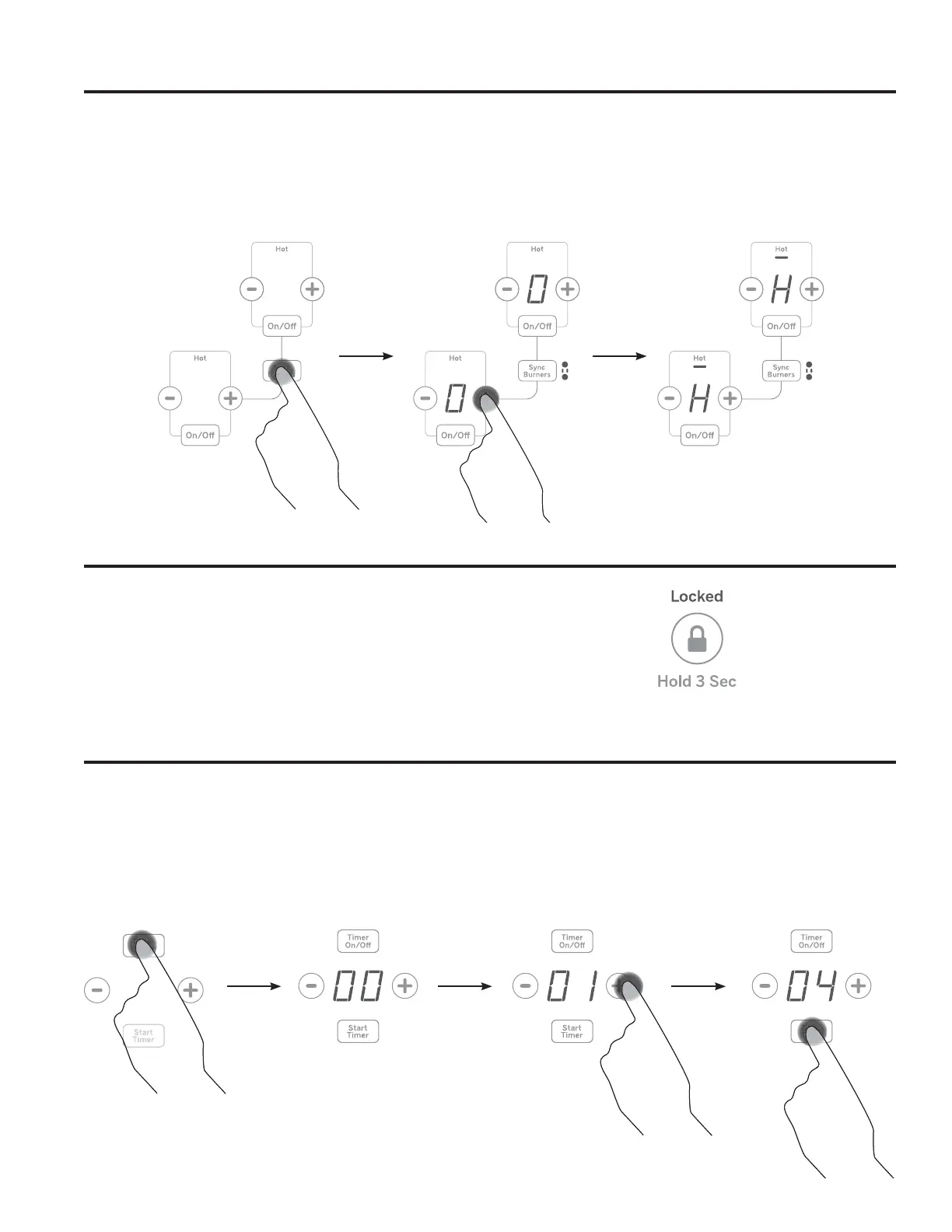
How To Synchronize Left Elements
To Turn On
Hold the Sync Burners pad for about half a second
to connect the two burners. Operate either element as
described on page 8 to adjust power level.
To Turn Off
1. Touch the On/Off pad on either burner to turn off the
6\QF%XUQHUV
or
2. Touch the Sync Burners to turn both burners off.
Cooktop Lockout
Timer
Lock
Hold control lock pad for 3 seconds.
Unlock
Hold control lock pad.
To Turn On
Touch the Timer On/Off pad. Touch the + or - pads to
FKRRVHWKHGHVLUHGQXPEHURIPLQXWHV3UHVVWKHStart
Timer pad to start timer.
To Turn Off
Hold Timer On/Off pad to cancel timer.
NOTE: 8VHWKHNLWFKHQWLPHUWRPHDVXUHFRRNLQJWLPH
or as a reminder. The kitchen timer does not control the
FRRNLQJHOHPHQWV7LPHUWXUQVRႇLIWKHUHLVQRDFWLYLW\
for 30 seconds.
Cooktop Lockout: locks operation of the controls


 To Next Page