EasyManua.ls Logo

GE JT3800 - User Manual

GE JT3800
32 pages
Print Icon
To Next Page IconTo Next Page
Loading...
49-2000954 Rev. 0 08-21 GEA
Write the model and serial
numbers here:
Model # _________________
Serial # _________________
You can find them on a label
on the side trim or on the front of
the (lower) oven behind the oven
door.
ESPAÑOL
Para consultar una version en
español de este manual de
instrucciones, visite nuestro sitio de
internet GEAppliances.com.
OWNER’S MANUAL
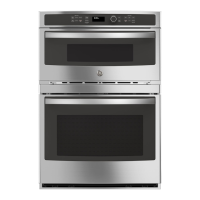
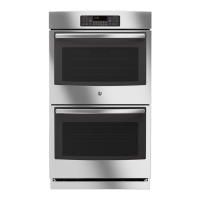
JT3800 - 30" Double Wall Oven
JK3800 - 27" Double Wall Oven
GE is a trademark of the General Electric Company. Manufactured under trademark license.
WALL OVEN
Built-In Combination Microwave/Thermal
SAFETY INFORMATION .......... 3
USING THE RANGE
Oven Controls ..........................10
Oven Settings ..........................11
Oven Options ..........................12
Microwaving ...........................13
Cooking Modes .........................17
Sabbath Mode ..........................18
Cooking Guide .........................19
Rack .................................20
Aluminum Foil/Oven Liners .............20
CARE AND CLEANING
Cleaning the Range .....................21
Oven Maintenance ..................... 23
Oven Door ............................ 23
TROUBLESHOOTING TIPS .......24
LIMITED WARRANTY ............30
ACCESSORIES .....................31
CONSUMER SUPPORT ........... 32

Questions and Answers

  • H
    Hannah LarsonSep 10, 2025
    What does SENSOR ERROR mean on my GE JT3800?
    • F
      Felicia RamirezSep 10, 2025
      If you see a SENSOR ERROR displayed on your GE Oven, press the Clear/Off pad and set the oven program to match the food or liquid you are cooking or heating. Also, ensure that if you are using plastic wrap, it is vented; if using a lid, it is not too tight; or if cooking liquids, they are uncovered, as steam not being sensed by the oven can cause this error.
  • M
    Madison CollinsAug 22, 2025
    Why does my GE JT3800 take so long to preheat?
    • M
      Mr. Lucas Campbell DDSAug 22, 2025
      If your GE Oven is taking longer to preheat, it could be due to cookware or food inside the oven, which slows down the preheating process—remove these items to reduce preheat time. Also, the number of racks in the oven can affect preheating time; adding more racks will cause the oven to take longer, so remove some racks if necessary.
  • T
    Timothy HicksAug 25, 2025
    What to do if my GE Oven will not start?
    • M
      marymclaughlinAug 25, 2025
      If the control display is lit but your GE Oven will not start, there are several possible reasons: * The clock may not be set - set the clock. * The door may not be securely closed - open the door and close it securely. * The Start/Pause pad or selector dial may not have been pressed after making a cooking selection - press the Start/Pause pad or selector dial. * Another selection may already be entered in the oven, and the Clear/Off pad was not pressed to cancel it - press the Clear/Off pad. * The size, quantity, or cooking time may not have been entered after the final selection - make sure you have entered the cooking time after selecting. * The Clear/Off pad may have been pressed accidentally - reset the cooking program and press the Start/Pause pad.
  • S
    sdaltonAug 26, 2025
    What to do if my GE Oven is smoking when I open the door?
    • C
      Crystal StarkAug 26, 2025
      Smoke is normal when cooking high-fat foods in your GE Oven.
  • D
    Denise SandovalAug 27, 2025
    Why won't my GE Oven start?
    • A
      Andrew JoyceAug 28, 2025
      Your GE Oven might not start because a fuse in your home may be blown, or the circuit breaker tripped. Replace the fuse or reset the circuit breaker.
  • C
    christinapriceAug 29, 2025
    What to do if my GE Oven door won't open after cleaning?
    • N
      nicole32Aug 29, 2025
      If your GE Oven door will not open after a clean cycle, it is likely because the oven is still too hot. Allow the oven to cool below the locking temperature.
  • L
    Laurie CochranSep 18, 2025
    What causes excessive smoke during the GE JT3800 Oven clean cycle?
    • D
      Dr. Cheryl ChristensenSep 18, 2025
      Excessive smoking during the clean cycle of your GE Oven is often due to excessive soil or grease. Press the Clear/Off pad, open the windows to rid the room of smoke, and wait until the OVEN IS COOLING DOOR IS LOCKED display goes off. Wipe up the excess soil and reset the clean cycle.
  • A
    Amber MendozaSep 12, 2025
    What to do if my GE JT3800 Oven pads on one side of the control do not function?
    • G
      gcastilloSep 12, 2025
      If the pads on one side of the control of your GE Oven are not functioning, the control has likely locked out the use of these pads and needs to be reset. Press and hold the Clear/Off pad on the other side of the display for 30 seconds. If this does not reset the control, it may be necessary to cycle the circuit breaker.
  • D
    David WangSep 8, 2025
    Why is the GE Oven display blank?
    • A
      Ashley DoyleSep 8, 2025
      The blank display on your GE Oven may be due to several reasons: the power saver mode might be activated—check the Settings menu for clock display settings and turn the display on. Alternatively, a fuse in your home may be blown, or the circuit breaker tripped—replace the fuse or reset the circuit breaker. Finally, a power outage or surge could be the cause—reset the clock; if the oven was in use, you must reset it by pressing the Clear/Off pad, setting the clock, and resetting any cooking function.
  • J
    Jean ParkerSep 5, 2025
    Why won't my GE JT3800 Oven self-clean?
    • C
      cooperrobinSep 5, 2025
      If your GE Oven will not self-clean, the temperature may be too high to set a self-clean operation. Allow the oven to cool and reset the controls.

Summary

Safety Information

Microwave Exposure Precautions

Specific warnings about potential risks and precautions for microwave exposure.

General Safety Instructions

Essential safety guidelines for operating the appliance, covering general usage and electrical safety.

Arcing Warnings

Information about preventing arcing and identifying causes like metal objects in the oven.

Food Safety Warnings

Safety precautions related to cooking and heating food in the microwave, including popcorn and eggs.

Superheated Water Risks

Warnings about the danger of superheated water and how to prevent scalding injuries.

Microwave-Safe Cookware

Guidelines for selecting and using microwave-safe cookware to prevent damage and ensure safety.

Flammable Materials Warning

Instructions to keep flammable materials away from the range to prevent fire hazards.

Fire Safety Procedures

Steps to take in case of a fire in the oven, including how to extinguish it safely.

Self-Cleaning Oven Safety

Safety precautions and preparation steps for using the self-cleaning function.

Using the Oven Controls

Upper Oven Controls

Explanation of the control buttons and functions specific to the upper oven.

Common Controls

Description of shared control buttons and their functions for both ovens.

Lower Oven Controls

Explanation of the control buttons and functions specific to the lower oven.

Oven Settings

Microwaving Features

Using Pre-Set Microwave Selections

Step-by-step guide on how to use the microwave's pre-programmed cooking features.

Defrost by Food Type

Using automatic defrost based on food type and weight for meats, poultry, and fish.

Defrost by Weight

Defrosting food by selecting its weight for automatic time and power level calculation.

Microwave Sensor Cooking

How the sensor feature automatically adjusts cooking time based on food humidity.

Lower Oven Cooking Modes

Broiling Modes

Instructions and tips for using Broil Hi and Broil Lo for searing and cooking food.

Cooking Guide

Cleaning the Oven

Self Clean Mode Operation

How to use the Self Clean mode, including preparation and safety warnings.

Lower Oven Maintenance and Door

Troubleshooting Upper Oven

Cooking Problems

Addresses issues like unusual sounds, smoke, and undercooked food during cooking.

Display Errors

Solutions for blank displays, locked controls, and ovens not starting.

Troubleshooting Lower Oven

Cooking Performance Issues

Addresses differences in cooking compared to old ovens and issues with baking or broiling.

Temperature and Operation Issues

Solutions for temperature inaccuracies, non-operation, and unusual sounds.

Self-Clean and Door Issues

Troubleshooting problems related to self-cleaning cycles and oven door operation.

Post-Clean Cycle and Errors

Resolving issues after a clean cycle, error messages, and door lock indicators.

Limited Warranty

What the Warranty Covers

Details on what the GE Appliances limited warranty covers, including parts and labor.

GE JT3800 Specifications

General IconGeneral
BrandGE
ModelJT3800
Fuel TypeElectric
Self-CleaningYes
Convection CookingNo
Interior LightYes
Number of Oven Racks2
Number of Burners4
BroilerYes
ClockYes
TimerYes
Width30 inches
ColorBlack

Related product manuals