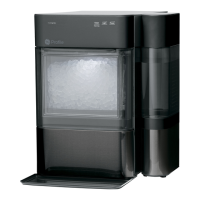
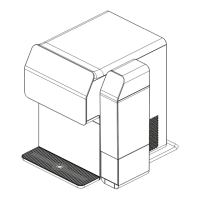
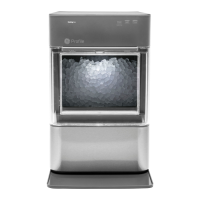
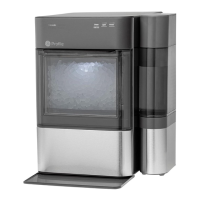
EasyManua.ls Logo

GE OPAL XPIO13BCBT - User Manual

GE OPAL XPIO13BCBT
20 pages
Print Icon
To Next Page IconTo Next Page
Loading...
Write the model and serial numbers here:
Model # _________________
Serial # _________________
Find these numbers on a label
on the back of the unit.
GE is a trademark of the General Electric Company. Manufactured under trademark license.
OWNER’S MANUAL
OPAL ICE MAKER
49-1000464 Rev. 0 03-20 GEA
XPIO13BCBT
XPIO13SCSS
XPIO23BCBT
XPIO23SCSS
ENGLISH/FRANÇAIS
SAFETY INFORMATION
.........3
PARTS INCLUDED ................5
GETTING STARTED ..............6
CARE AND CLEANING ...........7
DISPLAY SETTINGS .............10
MAKING ICE ......................10
DRAINING ........................10
WATER FILTER ..................10
SIDE TANK ACCESSORY ....... 11
TROUBLESHOOTING ............14
ICE MAKER PRODUCT
SPECIFICATIONS
................15
LIMITED WARRANTY ...........19
CONSUMER SUPPORT ......... 20
Question and Answer IconNeed help?

Do you have a question about the GE OPAL XPIO13BCBT and is the answer not in the manual?

Summary

Safety Information

Refrigerant and Foam Disposal

Proper disposal procedures for refrigerant and foam insulation materials.

Parts Included

Getting Started

Installation Requirements

Guidelines for correctly installing the ice maker for optimal performance and safety.

Prepare Opal For Use

Steps to unpack and ready the ice maker before its first use.

Care and Cleaning

System Cleaning; Sanitizing Procedure

Detailed steps for cleaning the internal components of the ice maker.

Removal of Mineral Deposits

Cleaning the Bin and Tray

Understanding the display

Making Ice with Opal

Draining Opal

Water Filter

Side Tank Accessory

Side Tank Use and Care

Side Tank Proper Installation and Location

Side Tank Mineral Deposit Removal

Side Tank Troubleshooting

Troubleshooting

Normal Operating Sounds

Description of normal sounds the ice maker may produce.

Radio Frequency Interference

Information on compliance with radio frequency device regulations.

WiFi Connect

Details on connecting the ice maker to a WiFi network and mobile app.

Ice Maker Product Specifications

GE Appliances Ice Maker Limited Warranty

What GE Appliances Will Not Cover

List of conditions and services not covered by the product warranty.

Exclusion of Implied Warranties

Limitations on implied warranties such as merchantability or fitness for a purpose.

Consumer Support

Service and Registration

Information on registering the appliance and obtaining service.

Contact Us

Contact details for customer service in the US and Canada.

Overview

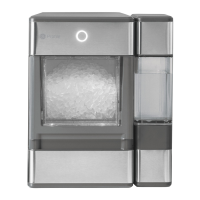
This document is a user manual for the GE Opal Ice Maker, a portable nugget ice maker. It provides comprehensive information on safety, installation, operation, maintenance, and troubleshooting for models XPIO13BCBT, XPIO13SCSS, XPIO23BCBT, and XPIO23SCSS.

Function Description:

The GE Opal Ice Maker is designed to produce nugget ice for home use. It operates by continuously recirculating water to create soft, chewable ice nuggets. The device is portable and can be placed on a flat, level surface indoors. It includes a water reservoir, an ice bin, and an optional side tank accessory for extended water capacity. The ice maker features a control panel with buttons for "Clean," "Light," and "Power," and indicators for "Making Ice," "Add Water," "Defrosting," and "Cleaning." It also has WiFi Connect capability, allowing for remote monitoring, control, and notifications via a smartphone app.

Important Technical Specifications:

  • Product Type: Portable nugget ice maker
  • Models: XPIO13BCBT, XPIO13SCSS, XPIO23BCBT, XPIO23SCSS
  • Voltage/Frequency: 120V AC/60Hz
  • Current: 3.0 A
  • Ice Storage Capacity: 3.0 lbs
  • Ice Making Rate: 24 lbs per day / 1 lb per hour (actual quantity may vary with environmental conditions)
  • Dimensions (width x depth x height): 13.43 x 17.5 x 16.5 inches
  • Installation Clearance (sides and back): 3 inches
  • Operating Environment: 55°F - 90°F
  • Weight (when empty): 38.6 lbs
  • Refrigerant: Contains a refrigerant (R600a) that must be removed prior to product disposal in accordance with federal and local regulations.
  • UV Radiation: Contains a UV lamp; power must be disconnected before removing external covers to avoid UV exposure.

Usage Features:

  • Getting Started: Requires placement on a flat, level surface with at least 3 inches of clearance around the sides and back for air circulation. It should be installed in a well-ventilated area with ambient temperatures between 55°F and 90°F, away from heat sources and direct sunlight. The drip tray should be installed under the front edge.
  • Making Ice: To make ice, the ice bin is removed, the reservoir is filled with potable water up to the "Max Fill" line (water hardness less than 12 grains per gallon), and the unit is plugged into a grounded outlet. Pressing the "Power" button starts the ice maker, and the "Making Ice" indicator lights up. Ice production typically begins within 15-30 minutes and continues until the bin is full or water runs out.
  • Display Settings: The control panel includes a "Power" button to turn the unit ON/OFF, a "Light" button to toggle between three lighting modes, and a "Clean" button for initiating the cleaning cycle. Indicator lights on the left-hand side display the current status: "Making Ice," "Add Water," "Defrosting," and "Cleaning."
  • Draining: The manual recommends draining the Opal when storing it, relocating it, turning it off for several days (e.g., vacation), or when not using much ice to prevent taste issues from recirculated meltwater.
  • Water Filter: An optional Opal Water Filter is available and is the only compatible filter. It snaps into place and should be removed and the screened intake cap reinstalled prior to cleaning the unit.
  • Side Tank Accessory: Specific models include a side tank accessory to increase water capacity. It connects to the ice maker via a drain tube (Tube B) and should be placed on the same level surface as the ice maker. Care must be taken to ensure the tube lies flat for proper water flow. The side tank is hand-wash only and should not be washed in a dishwasher.

Maintenance Features:

  • Regular Cleaning/Sanitizing: Recommended weekly to maintain ice freshness and unit appearance. The exterior can be cleaned with a soft cloth dampened with soapy water or a stainless steel cleaner for stainless surfaces. The water reservoir should not be cleaned with soap.
  • System Cleaning Procedure: Involves unplugging the Opal, removing the water filter (if present) and replacing it with the screened intake cap, draining the unit, and then circulating a solution of five cups of water and one teaspoon of household bleach. After the cleaning cycle, the unit needs to be drained and rinsed multiple times with fresh water. The "Clean" button is held for 3 seconds to initiate or exit the cleaning process.
  • Removal of Mineral Deposits: For hard mineral deposits, a solution of five cups of water and one teaspoon of household bleach can be used, or a mixture of two quarts of water and two quarts of white vinegar, or the Opal Cleaning Kit. This solution is poured into the reservoir, and the cleaning cycle is initiated. Stubborn deposits may require multiple treatments.
  • Drainage System: The unit has two drain tubes at the back. For draining, these tubes are unhooked and laid down into a sink or bucket below the ice maker's level, allowing water to completely drain. Plugs are then re-inserted, and tubes are replaced.
  • Troubleshooting: The manual describes normal operating sounds (whir, buzz, rattle, gurgle, hum, click, squeak) and their causes. It also provides guidance on radio frequency interference and how to correct it. For issues with water flow from the side tank, checking for bubbles or kinks in the connecting tube is advised.
  • UV Lamp: Users are warned not to attempt to repair or replace the UV lamp and to disconnect power before removing external covers to avoid UV exposure.

GE OPAL XPIO13BCBT Specifications

General IconGeneral
BrandGE
ModelOPAL XPIO13BCBT
CategoryIce Maker
LanguageEnglish

Related product manuals