Consumer SupportTroubleshooting TipsOperating InstructionsSafety Instructions
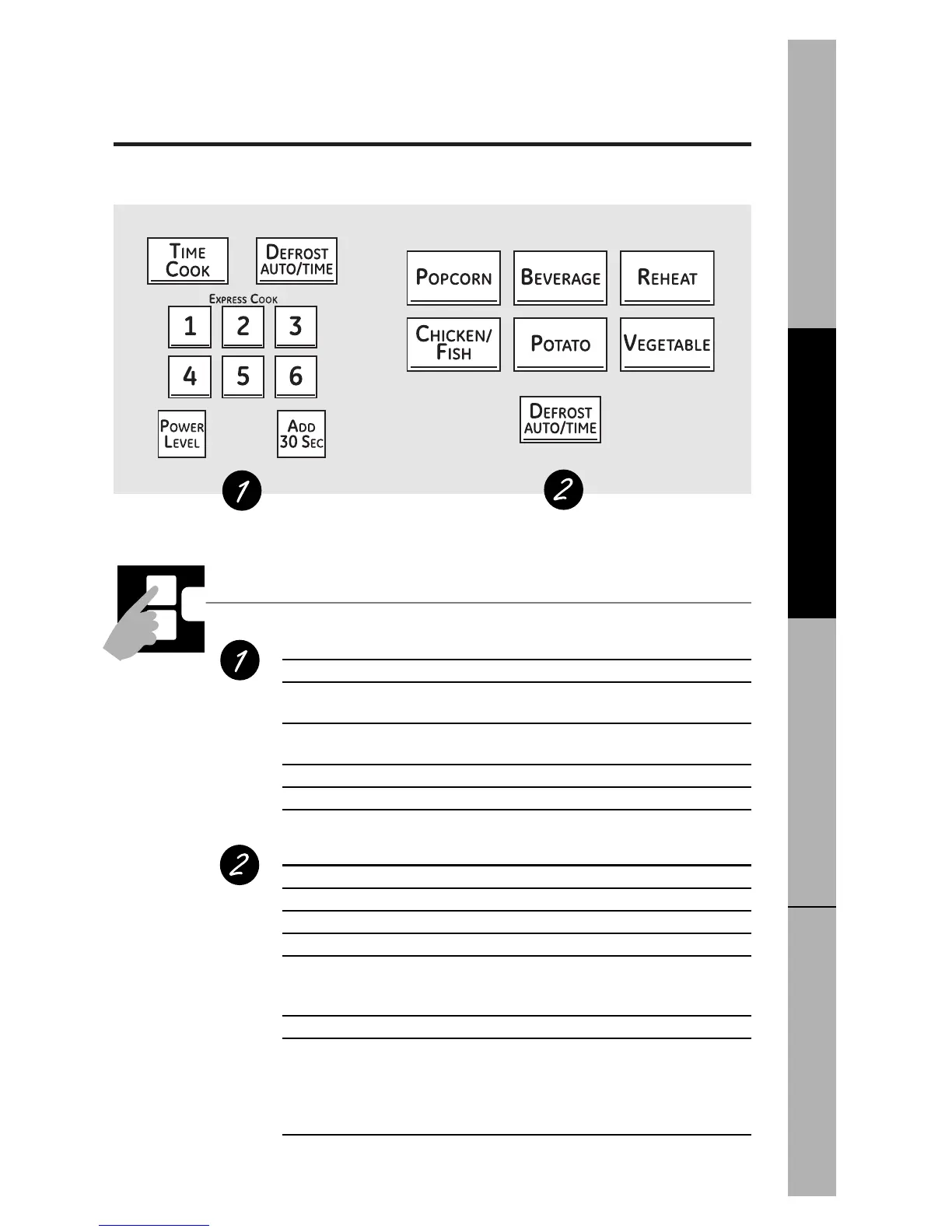
You can microwave by time, with the sensor features or with the auto feature.
ge.com
Cooking Controls
Check the Convenience Guide before you begin.
Time Features
Press Enter
TIME COOK Amount of cooking time
Press once or twice
DEFROST AUTO/TIME Amount of defrosting time
Press twice
EXPRESS COOK Starts immediately!
ADD 30 SEC Starts immediately!
POWER LEVEL Power level 1–10
Sensor Features and Auto Feature
Press Enter Option
POPCORN Starts immediately! more/less time
BEVERAGE Starts immediately!
REHEAT Starts immediately! more/less time
CHICKEN/FISH Starts immediately! more/less time
Press once (chicken pieces)
Press twice (fish fillets)
POTATO Starts immediately! more/less time
VEGETABLE Starts immediately!
Press once (fresh vegetables) more/less time
Press twice (frozen vegetables) more/less time
Press three times (canned vegetables) more/less time
(on some models)
DEFROST AUTO/TIME Food weight
Press once
11


 To Next Page