EasyManua.ls Logo

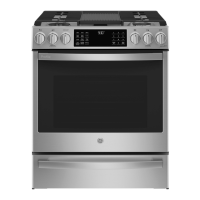
GE Profile PGB965YPFS - User Manual

GE Profile PGB965YPFS
32 pages
Print Icon
To Next Page IconTo Next Page
Loading...
ESPAÑOL
Para consultar una version en
español de este manual de
instrucciones, visite nuestro sitio de
internet GEAppliances.com.
OWNER’S MANUAL
49-2000884 Rev. 1 02-22 GEA
GE is a trademark of the General Electric Company. Manufactured under trademark license.
PGB965
Write the model and serial
numbers here:
Model # _________________
Serial # _________________
You can find the rating label on a
metal flag behind the rear control
panel. From the front of the range,
reach behind the middle of the rear
control panel and rotate the rating
label up.
RANGES
Self-Cleaning Gas
SAFETY INFORMATION .......... 3
USING THE RANGE
In Case of a Power Failure ............... 8
Surface Burners ........................ 8
Griddle ................................10
Oven Controls ..........................11
WiFi Connect ..........................12
Special Features ........................13
Sabbath Mode - Standard ................14
Oven Racks ............................15
Aluminum Foil and Oven Liners ...........15
Oven Cooking Modes ...................16
Oven Air Vents .........................17
Oven Cooking Guide ....................18
Air Fry Cooking Guide ...................19
CARE AND CLEANING
Range – Exterior .......................20
Range – Interior ........................21
Cooktop .............................. 22
Oven Door ............................24
Oven Light ............................ 26
TROUBLESHOOTING TIPS ....... 27
LIMITED WARRANTY ............30
ACCESSORIES .....................31
CONSUMER SUPPORT ........... 32

Questions and Answers

  • J
    jonathon16Sep 8, 2025
    What to do when power outage makes the clock flash on my GE Profile PGB965YPFS?
    • T
      Tonya MurraySep 9, 2025
      In case of a power outage or surge affecting your GE Ranges, reset the clock. If the oven was in use, you must reset it by pressing the Cancel/Off pad, setting the clock, and resetting any cooking function.
  • B
    Brenda WallaceAug 23, 2025
    Why won't my GE Ranges oven self-clean?
    • P
      pmyersAug 23, 2025
      If your GE Ranges oven won't self-clean, it might be because the temperature is too high. Allow the oven to cool and reset the controls. Also, make sure the oven controls are properly set. See the Cleaning the Oven section.
  • K
    Kimberly ThomasAug 25, 2025
    What to do if GE Profile PGB965YPFS oven door will not open or LOCKED light is on?
    • B
      Brittney MillerAug 26, 2025
      If the oven door of your GE Ranges won't open or the LOCKED light is on when you want to cook, it's because the oven door is locked because the temperature inside the oven has not dropped below the locking temperature. Press the Cancel/Off pad and allow the oven to cool below the locking temperature.
  • G
    gjohnsAug 27, 2025
    Why is my food not baking properly in my GE Ranges oven?
    • J
      james04Aug 27, 2025
      If food isn't baking properly in your GE Ranges oven, several factors could be the reason. First, ensure that the oven controls are set correctly. Also, check that the rack position is correct and the rack is level. The type and size of cookware can also affect baking, so make sure you're using the right kind. Finally, the oven temperature might need adjustment. See the Cooking Modes, Cooking Guide, Cookware and Settings sections for detailed instructions.
  • J
    jsmithAug 27, 2025
    Why won't the burners light on my GE Profile PGB965YPFS?
    • J
      Jason HicksAug 28, 2025
      If the burners on your GE Ranges aren't lighting, start by checking that the range is fully plugged into a live, properly grounded electrical outlet. If you have a gas range, ensure the gas supply is connected and turned on. Also, check for a blown fuse or tripped circuit breaker. Improperly replaced burner parts or clogged burner slots near the electrode can also be the cause. Additionally, food residue on the electrode can prevent ignition; lightly polish the flat tip of the electrode with a nail file or sandpaper until shiny. For gas supply, see the Installation Instructions. For burners parts, see the Care and Cleaning of the range section.
  • D
    Daniel WarnerSep 22, 2025
    Why does my GE Ranges oven door glass appear to be "tinted" or have a "rainbow" color?
    • C
      Caitlin SimmonsSep 22, 2025
      If your GE Ranges oven door glass appears to be "tinted" or have a "rainbow" color, the inner oven glass is coated with a heat barrier to reflect the heat back into the oven to prevent heat loss and keep the outer door cool while baking. This is normal. Under certain light or angles, you may see this tint or rainbow color.
  • J
    justin79Sep 16, 2025
    What does it mean when “F— and a number or letter” flash in the display on my GE Profile PGB965YPFS?
    • P
      Paul RasmussenSep 16, 2025
      If “F— and a number or letter” flash in the display of your GE Ranges, you have a function error code. Press the Cancel/Off pad, allow the oven to cool for one hour, and put the oven back into operation. If the function code repeats, disconnect all power to the oven for at least 30 seconds and then reconnect power. If the function error code repeats again, call for service.
  • S
    Stacy MartinSep 18, 2025
    Why doesn't the drawer slide smoothly on my GE Profile PGB965YPFS?
    • A
      Angelica BrooksSep 18, 2025
      If the drawer of your GE Ranges does not slide smoothly or drags, the drawer might be out of alignment. Fully extend the drawer and push it all the way in. Also, the drawer could be overloaded or the load unbalanced. Reduce weight or redistribute drawer contents. See the Care and Cleaning of the range section.
  • B
    bmedinaSep 7, 2025
    How to fix the oven light if it does not work in my GE Ranges?
    • N
      nhuntSep 7, 2025
      If the oven light in your GE Ranges isn't working, the bulb might be loose or defective. Try tightening or replacing the bulb. For instructions on how to replace the bulb, see the Maintenance section.
  • A
    Amy GarciaSep 4, 2025
    What does it mean when “LOCK DOOR” flashes in the display of my GE Profile PGB965YPFS?
    • J
      Joseph ScottSep 4, 2025
      If “LOCK DOOR” flashes in the display of your GE Ranges, the self-clean cycle has been selected but the door is not closed. Close the oven door.

Summary

Safety Information

Anti-Tip Device

Instructions for installing and securing the range to prevent tipping.

Using the Range: Power Failure & Surface Burners

In Case of a Power Failure

What to do if the range loses power and how to light burners.

Surface Burners

How to light, adjust flame size, and use the surface burners safely.

Griddle Operation

Griddle

Instructions for positioning, preheating, and using the cast-iron griddle.

Oven Controls Overview

Oven Controls

Overview of the oven control panel and its functions.

WiFi Connect Setup

WiFi Connect

Instructions for connecting the oven to a smart device via WiFi.

Special Features and Modes

Special Features

Explanation of various special features like temperature adjustment and sound volume.

Sabbath Mode - Standard

How to set and use the Sabbath mode for continuous or timed baking.

Oven Racks and Liners

Oven Racks

Rack positions, removal/replacement, and guidelines for foil/liners.

Aluminum Foil and Oven Liners

Guidelines for using foil and oven liners safely.

Oven Cooking Modes and Guides

Oven Cooking Modes

Descriptions of Bake, Convection Bake, Roast, Broil, Air Fry, and Warm modes.

Oven Air Vents

Importance of air vents for proper operation and cooling.

Oven Cookware Guidelines

Guidelines for selecting and using cookware for best results.

Air Fry Cooking Guide

Specific instructions and tips for using the Air Fry mode.

Care and Cleaning: Exterior

Range - Exterior

Instructions for cleaning the exterior surfaces of the range.

Care and Cleaning: Interior

Range - Interior

Instructions for cleaning the interior surfaces of the oven.

Manual Cleaning

Steps for manually cleaning the oven interior.

Steam Clean Mode

How to use the Steam Clean feature for light oven soils.

Self Clean Mode

Instructions for using the Self Clean feature for heavy oven soils.

Racks

Information on cleaning oven racks and their care after self-cleaning.

Care and Cleaning: Cooktop

Removal of Surface Burners for Cleaning

Steps to remove and clean burner components.

Cleaning the Burner Caps

How to wash and clean burner caps.

Cleaning the Burner Heads

How to wash and clean burner heads and ports.

Replacing Surface Burners

How to properly reassemble burner parts after cleaning.

Cooktop Grates and Griddles

Burner Grates

Instructions for manual cleaning and self-cleaning burner grates.

Griddles

Instructions for cleaning aluminum and cast-iron griddles.

Oven Door Care

Cleaning the Oven Door

How to clean the interior and exterior of the oven door.

Lift-Off Lower Oven Door

Instructions for removing and replacing the lower oven door.

Upper Oven Door Removal

Lift-Off Upper Oven Door

Instructions for removing and replacing the upper oven door.

Oven Light Replacement

Oven Light Maintenance

Instructions for replacing the oven light bulb and cleaning the cover.

Troubleshooting Oven Issues

Troubleshooting Tips

Common problems and their solutions before calling for service.

Troubleshooting Burners and Display

Troubleshooting Tips

More common problems and solutions for oven and burner issues.

Troubleshooting Other Issues

Troubleshooting Tips

Additional troubleshooting for burner issues, door glass, and drawers.

Limited Warranty Information

GE Appliances Gas Range Limited Warranty

Details of the warranty coverage, exclusions, and terms.

Available Accessories

Accessories and Cleaning Supplies

List of available accessories and cleaning supplies for the range.

Consumer Support Resources

Consumer Support Contact

Information on website, registration, service scheduling, and contact details.

GE Profile PGB965YPFS Specifications

General IconGeneral
BrandGE Profile
Model NumberPGB965YPFS
Product TypeRange
Fuel TypeGas
Number of Burners5
Oven Capacity5.6 cu. ft.
Self-CleaningYes
Convection OvenYes
ColorStainless Steel
Wi-Fi EnabledYes
Width30 in
Cooktop SurfacePorcelain
Height47 inches

Related product manuals