EasyManua.ls Logo

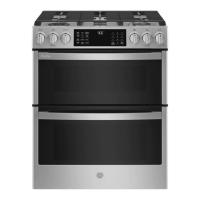
GE PROFILE PGS960 - User Manual

GE PROFILE PGS960
64 pages
Print Icon
To Next Page IconTo Next Page
Loading...
Write the model and serial
numbers here:
Model # _________________
Serial # _________________
You can find the rating label on
the front under the control panel
above the door.
ESPAÑOL
Para consultar una version en
español de este manual de
instrucciones, visite nuestro sitio de
internet GEAppliances.com.
OWNER’S MANUAL
RANGES
Self-Cleaning Double Oven Gas
49-85242 Rev. 2 07-19 GEA
SAFETY INFORMATION .......... 3
USING THE RANGE
In Case of a Power Failure ............... 8
Surface Burners ........................ 8
Griddle ................................10
Oven Controls ..........................11
Options ...............................12
Settings ...............................12
Sabbath Mode ..........................14
Oven Racks ............................15
Aluminum Foil and Oven Liners ...........16
Cookware .............................16
Cooking Modes .........................16
Oven Air Vents .........................17
Oven Probe ............................18
Cooking Guide .........................19
CARE AND CLEANING
Range – Exterior .......................20
Range – Interior ........................21
Cooktop .............................. 22
Door .................................24
Oven Probe ...........................24
Oven Light ............................ 25
Oven Door ............................ 26
TROUBLESHOOTING TIPS ....... 27
LIMITED WARRANTY ............30
ACCESSORIES .....................31
CONSUMER SUPPORT ........... 32
GE is a trademark of the General Electric Company. Manufactured under trademark license.
PGS960

Questions and Answers

  • L
    leeannaSep 23, 2025
    Why is the oven light not working on my GE Ranges?
    • E
      Evelyn MorrisSep 23, 2025
      If the oven light does not work, the light bulb may be loose or defective. Tighten or replace the bulb. Refer to the Maintenance section for instructions on how to replace the bulb.
  • D
    David HoldenAug 23, 2025
    What to do if my GE PROFILE PGS960 Ranges oven door will not open and the LOCKED light is on?
    • B
      Brandon McintoshAug 23, 2025
      If the oven door won't open and the LOCKED light is illuminated, it means the oven door is locked because the temperature inside the oven has not dropped below the locking temperature. Press the Cancel/Off pad and allow the oven to cool down until it is below the locking temperature.
  • J
    Jason BurnsAug 25, 2025
    How to reset clock on GE PROFILE PGS960 Ranges after a power outage?
    • C
      Christina GreenAug 25, 2025
      After a power outage, if the clock is flashing, reset it. If the oven was in use, you must reset it by pressing the Cancel/Off pad, setting the clock, and then resetting any cooking function.
  • A
    Andrew PopeAug 27, 2025
    What does "LOCK DOOR" flashing on my GE Ranges display mean?
    • M
      Mary Farley MDAug 27, 2025
      If "LOCK DOOR" flashes in the display, it means the self-clean cycle has been selected, but the oven door is not closed. Close the oven door to resolve this.
  • B
    Brian RoseAug 27, 2025
    What to do if my GE PROFILE PGS960 Ranges oven is not clean after a clean cycle?
    • K
      Kevin WeaverAug 27, 2025
      If your oven isn't clean after running a clean cycle, it could be due to improperly set oven controls or a heavily soiled oven. Consult the Cleaning the Oven section for proper settings. For heavily soiled ovens, clean up heavy spillovers before starting the clean cycle. You may need to run the self-clean cycle again or for a longer period of time.
  • W
    woodsamanthaSep 18, 2025
    Why won't my GE PROFILE PGS960 surface burners light but bake and broil burners do?
    • R
      Riley MirandaSep 18, 2025
      If the surface burners light but the bake and broil burners do not, the gas to the oven burners may have been shut off. The oven gas shut-off is located on the gas regulator near the gas line attachment to your range. Locate it and flip the lever.
  • V
    Victoria GeorgeSep 15, 2025
    What to do if my GE PROFILE PGS960 food does not broil properly?
    • L
      Lindsey ShepardSep 15, 2025
      If your food is not broiling properly, ensure that you have selected the appropriate broil mode. Also, check the Cooking Guide for rack location suggestions and make sure you are using the proper rack position. If using aluminum foil on the broil pan, wrap it tightly and add slits conforming to those in the pan to allow grease to drain.
  • V
    Vanessa OlsonSep 16, 2025
    What does “F— and a number or letter” mean on my GE Ranges display?
    • K
      Kevin GreenSep 16, 2025
      If you see "F— and a number or letter" flashing in the display, it indicates a function error code. Press the Cancel/Off pad, allow the oven to cool for one hour, and then put the oven back into operation. If the error code repeats, call for service.
  • C
    crystalhernandezSep 6, 2025
    Why is my GE Ranges oven not self-cleaning?
    • D
      David BuchananSep 6, 2025
      If your oven will not self-clean, it could be due to the temperature being too high. Allow the oven to cool, then reset the controls. Also, make sure that the oven controls are properly set by referring to the Cleaning the Oven section.
  • P
    Paul MartinezSep 4, 2025
    What to do if Lock Controls or Control Lockout is activated on GE Ranges?
    • R
      racheledwardsSep 4, 2025
      If LOC ON appears in the display, the range control is locked. Turn this feature off to use the range. See the Lock Control feature in the Oven Controls section.

Summary

Safety Information

Gas Leak Safety Procedures

Instructions for handling and responding to gas leaks.

Anti-Tip Device Installation

Information and steps for securing the range to prevent tipping.

General Appliance Safety

Essential safety guidelines for operating the gas range.

Fire Prevention and Flammable Materials

Precautions for preventing fires related to flammable items and grease.

Cooktop Safety Precautions

Specific safety instructions for using the cooktop surface.

Oven Operation Safety

Guidelines for safe use of the oven, including vents and general operation.

Self-Cleaning Oven Safety

Important safety measures for using the self-cleaning function.

California Proposition 65 Warnings

State-mandated warnings regarding chemicals in the product.

Using the Range

Power Failure Operation

How to operate the range during a power outage.

Surface Burner Operation

Lighting, flame adjustment, and usage of surface burners.

Cookware and Wok Guidelines

Recommendations for cookware, and safe wok usage.

Griddle Usage and Care

Instructions for using and preheating the griddle.

Oven Control Overview

Explanation of oven controls, modes, and basic functions.

Oven Options: Cook Time and Delay

Setting cooking times and delaying oven start.

Oven Settings: WiFi and Connectivity

Connecting the oven to WiFi for remote control.

Remote Oven Connectivity

Setting up and using remote start and WiFi features.

Oven Settings & Customization

Adjusting clock, sound, temperature, and other oven preferences.

Sabbath Mode Operation

How to set and use the Sabbath cooking mode.

Oven Racks: Placement and Removal

Guide to rack positions, removal, and replacement.

Cooking Modes and Oven Vents

Using Bake, Warm, Broil modes, specialty modes, and understanding air vents.

Oven Probe Operation and Care

How to use, place, and care for the oven temperature probe.

Cooking Guide

Baked Goods and Meats Recommendations

Rack positions and suggestions for baking and roasting.

Poultry and Fish Cooking Tips

Rack positions and suggestions for poultry and fish.

Frozen Foods and Casseroles Guide

Rack positions and tips for frozen items and casseroles.

Care and Cleaning - Range Exterior

Control Panel and Exterior Cleaning

How to clean the control panel, oven exterior, and painted surfaces.

Stainless Steel Surface Care

Tips for cleaning stainless steel finishes, including Black Stainless.

Care and Cleaning - Range Interior

Manual Oven Interior Cleaning

Methods for manual cleaning of oven interior and glass.

Steam and Self-Clean Modes

Instructions for using steam and self-cleaning cycles.

Care and Cleaning - Cooktop

Surface Burner Removal and Cleaning

Steps for removing, cleaning, and replacing burner caps and heads.

Burner Grates and Griddle Care

Cleaning burner grates and griddles, including self-clean options.

Care and Cleaning - Oven Door

Oven Door Interior and Exterior Cleaning

Methods for cleaning the oven door glass, gasket, and surfaces.

Care and Cleaning - Oven Light

Oven Light Bulb Replacement

Steps for safely replacing the oven light bulb.

Care and Cleaning - Oven Door

Removing and Replacing Oven Doors

Instructions for removing and reinstalling lift-off oven doors.

Troubleshooting Tips

Oven Cooking Performance Issues

Solutions for problems like incorrect cooking temperature or settings.

Oven Operation and Display Problems

Troubleshooting display errors, clicking sounds, and oven not working.

Oven Cleaning and Light Troubleshooting

Solutions for cleaning issues, smoking, and oven light problems.

Control and Burner Issues

Troubleshooting control lockouts, error codes, and burner ignition problems.

Burner Performance and Door Glass

Addressing uneven burner flames, lighting issues, and oven door glass appearance.

Drawer Operation Problems

Solutions for drawers that do not slide smoothly or drag.

Limited Warranty

Gas Range Limited Warranty Details

Information on the one-year warranty, coverage, and exclusions.

Extended Warranty Options

Information on purchasing extended warranty coverage.

Accessories

Available Oven and Cooktop Accessories

List of optional accessories for enhancing cooking and maintenance.

Recommended Cleaning Supplies

Cleaning products for maintaining appliance finish and performance.

Consumer Support

Online Resources and Registration

Accessing website, registering appliance, and finding service online.

Service, Parts, and Contact Information

Scheduling repairs, ordering parts, and contacting customer relations.

GE PROFILE PGS960 Specifications

General IconGeneral
BrandGE
ModelPROFILE PGS960
CategoryRanges
LanguageEnglish

Related product manuals