About the ice and water dispenser. (on some models) GEAppliances.com
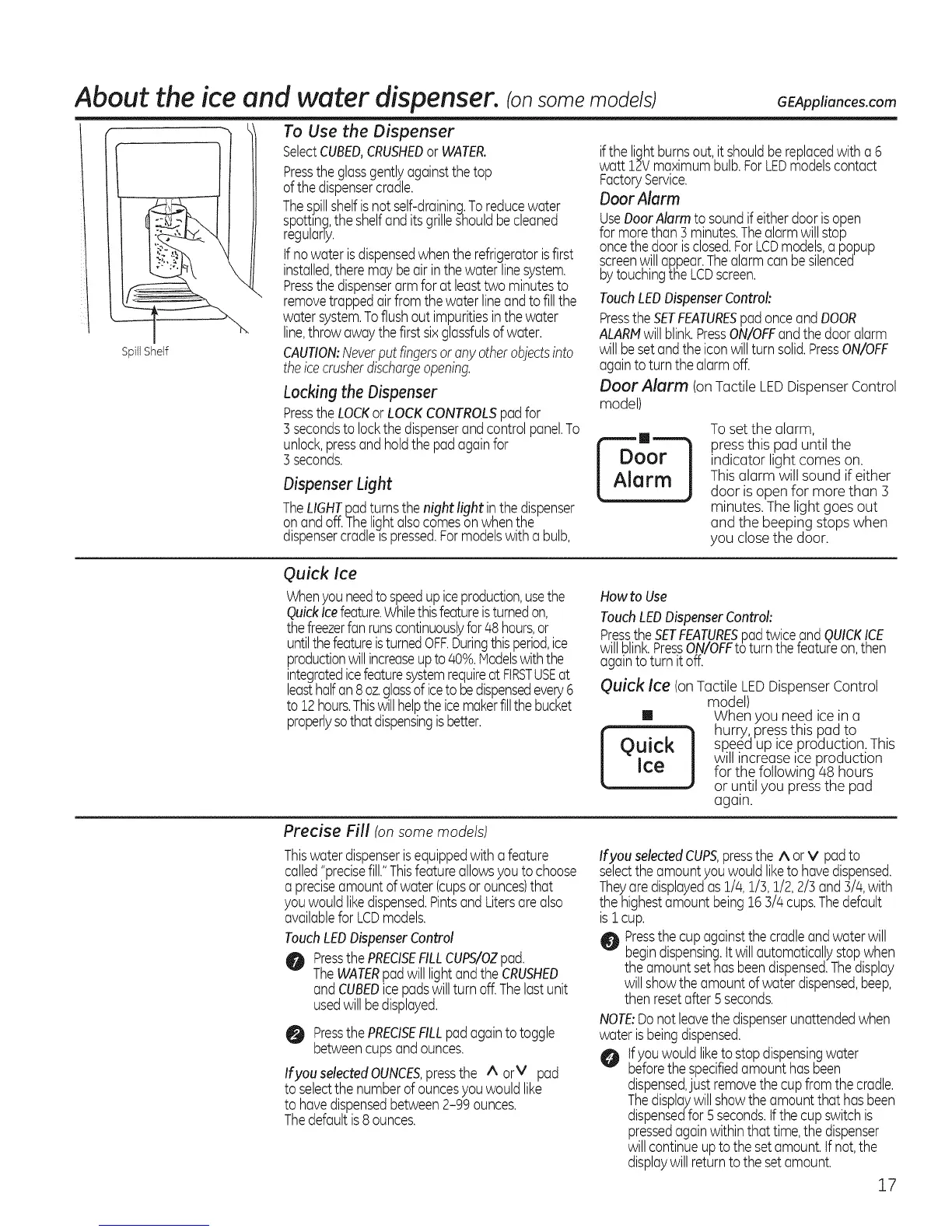
SpillShelf
To Use the Dispenser
SelectCUBED,CRUSHEDor WATER.
Presstheglassgentlyagainstthe top
ofthedispensercradle.
Thespillshelfis notself-draining.To reducewater
spot!ing,theshelfand itsgrilleshouldbecleaned
regulany.
tfnowater isdispensedwhenthe refrigeratorisfirst
installed,theremaybeair inthewater linesystem.
Pressthedispenserarm forat leasttwo minutesto
removetrappedairfromthe waterlineandto fillthe
water system.Toflushoutimpuritiesin thewater
line,throwawaythefirst sixglassfulsofwater.
CAUTION:Neverput fingersor anyotherobjects into
theicecrusherdischargeopening.
Locking the Dispenser
PresstheLOCKorLOCKCONTROLSpadfor
3secondsto lockthedispenserandcontrolpanel.To
unlock,pressand holdthe padagainfor
3seconds.
Dispenser Light
TheLIGHTpadturnsthenight light inthe#spenser
onandoff.Thelightalsocomesonwhenthe
dispensercradleis pressed.Formodelswith a bulb,
ifthe lightburnsout,it shouldbereplacedwith a 6
watt 12Vmaximumbulb.ForLEDmodelscontact
FactoryService.
Ooor Alarm
UseDoorAlarm to soundif eitherdoorisopen
formorethan 3 minutes.Thealarmwill stop
oncethe door isclosed.ForLCDmodels,a popup
screenwillaRpear.Thealarmcan besilenced
bytouchingthe LCDscreen.
TouchLEDDispenserControl:
PresstheSETFEATURESpadonceandDOOR
ALARMwill blink.PressON/OFFandthedooralarm
willbesetandthe iconwillturn solid.PressON/OFF
againtoturn thealarmoff.
Door Alarm (onTactile LEDDispenserControl
model)
Toset the alarm,
press this pad until the
indicator light comes on.
Thisalarm will sound if either
door is open for more than 3
minutes. The light goesout
and the beeping stops when
you closethe door.
Quick Ice
Whenyouneedto speedupiceproduction,usethe
QuickIcefeature.Whilethisfeatureisturnedon,
thefreezerfanrunscontinuouslyfor48hours,or
untilthe featureisturnedOFF.Duringthisperiod,ice
productionwillincreaseupto 40%.Modelswiththe
integratedicefeaturesystemrequireat FIRSTUSEat
leasthalfan8oz.glassof iceto bedispensedevery6
to12hours.Thiswillhelptheicemakerfillthebucket
properlysothatdispensingisbetter.
Howto Use
TouchLEDDispenserControl:
PresstheSETFEATURESpadtwiceand QUICK!CE
willblink.PressON/OFFtoturn theteatureon then
ago ntoturn toff.
Quick Ice (onTactile LEDDispenserControl
model)
[] When you need icein a
I '_ hurry, pressthis pad tO .
Quick J speed up ice production.This
will increase ice production
_ce tar the following 48 hours
or until you pressthe pad
again.
Precise Fill (on some models)
Thiswaterdispenserisequippedwitha feature
called"precisefill."Thisfeatureallowsyou tochoose
a preciseamountof water(cupsor ounces)that
youwouldlikedispensed.Pintsand Litersarealso
availableforLCDmodels.
TouchLEDDispenserControl
0 PressthePRECISEFILLCUPS/OZpad.
TheWATERpadwill lightandthe CRUSHED
andCUBEDicepadswill turnoff.Thelastunit
usedwill bedisplayed.
O PressthePRECISEFILLpadagaintotoggle
betweencupsandounces.
Ifyou selectedOUNCES,pressthe A arM pad
to selectthe numberof ouncesyouwouldlike
to havedispensedbetween2-99 ounces.
Thedefaultis 8ounces.
Ifyou selected CUPS, press the A or v pad to
select the amount you would liketo have dispensed.
They are displayedas 1/4, 1/3, 1/2, 2/3 and 3/4, with
the highest amount being 16 3/4 cups.The default
is i cup.
O Pressthe cup against the cradle and water will
begin dispensing. It will automatically stop when
the amount sethas beendispensed. The display
will show the amount of water dispensed,beep,
then reset after 5 seconds.
NOTE:Do not leavethe dispenser unattended when
water is being dispensed.
If you would liketo stop dispensing water
before the specified amount has been
dispensed,just remove the cup from the cradle.
Thedisplay will show the amount that has been
dispensed for 5 seconds. Ifthe cup switch is
pressed again within that time, the dispenser
will continue up to the set amount. If not, the
display will return to the set amount.
17


 To Next Page
 Loading...