19
GPF400/600/700 Series Trim Kits
Door and Access Panel Change
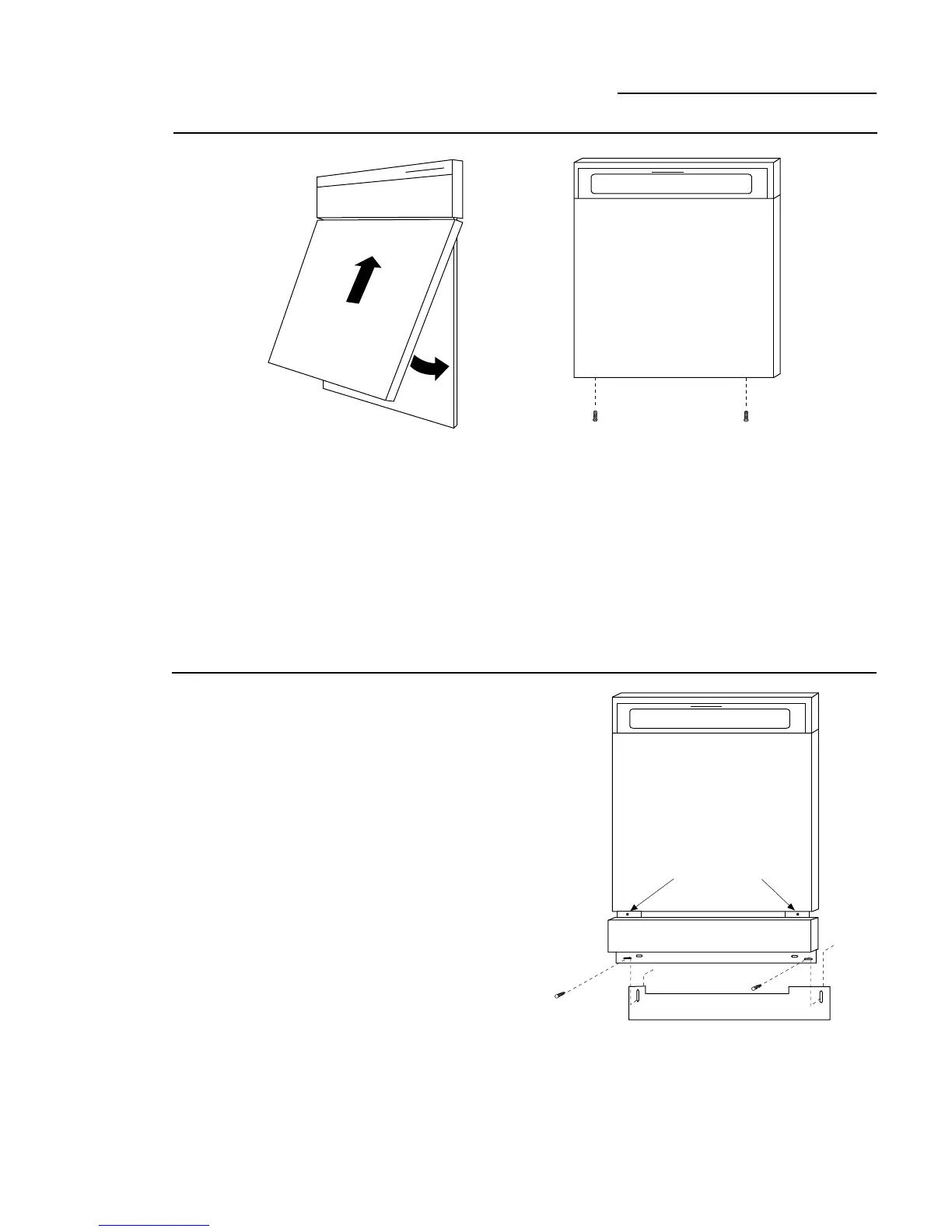
Step 2:
Install New
Door Panel Cover
Step 3:
Install New
Access Panel
Assembly And
Toekick
•Remove protective plastic film.
•Place the toekick against the bottom of the
dishwasher.
•Place the new access panel assembly against
the dishwasher and tighten the attached
screws. (GPF600, re-install original access
panel.)
•Re-install two original bottom screws loosely.
Adjust the toekick up or down and tighten
screws.
Note:
The new door panel cover will completely cover the
existing door. Do not remove the original door panel.
For GPF400 and GPF600 Kits:
•Remove protective plastic film.
•Tip door panel and slide up and under
bottom and sides of escutcheon.
•Snap door panel over the door and slide
upwards, under the escutcheon.
•Drive 2 screws into the bottom of the panel
using a phillips head screwdriver.
New
Door Panel
Cover
Tighten 2 Screws



 To Next Page