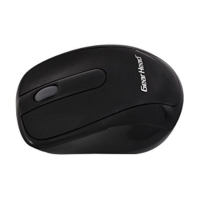
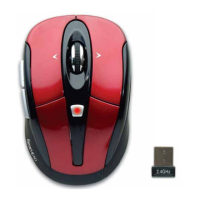
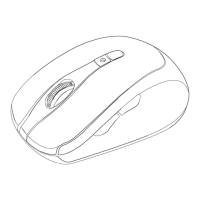
This document is a user manual for the Gear Head Optical 2.4GHz Wireless Nano Mouse, available in multiple models: MP2175BLU, MP2275RED, MP2375BLK, and MP2475PUR. It provides comprehensive instructions for installation, usage, and troubleshooting, along with important regulatory and warranty information.
Function Description:
The Gear Head Optical 2.4GHz Wireless Nano Mouse is a peripheral device designed for computer navigation. It operates wirelessly using 2.4GHz radio frequency technology, providing freedom of movement without the constraints of a wired connection. The "Nano" designation likely refers to its compact size, particularly its receiver, which is small enough to be left plugged into a laptop's USB port without protruding significantly. As an optical mouse, it uses an optical sensor to detect movement relative to a surface, offering precise tracking for various computing tasks. The mouse is compatible with a wide range of operating systems, including Windows (XP, Vista, 7, 8, 10), Mac OS X (10.3 and Above), and Chromebook™ notebooks, making it a versatile option for different users and platforms.
Important Technical Specifications:
- Connectivity: 2.4GHz Wireless technology.
- Interface: USB (for the Nano Receiver).
- Power Source: 2 AAA Batteries.
- Tracking Technology: Optical.
- Compatibility:
- Operating Systems: Windows® XP, Windows® Vista, Windows® 7, Windows® 8, Windows® 10, Mac OS X® 10.3 and Above.
- Computer Types: PCs, Mac® computers, Chromebook™ notebook computers.
- Required Port: An available USB Port.
- Models: MP2175BLU (Blue), MP2275RED (Red), MP2375BLK (Black), MP2475PUR (Purple).
Usage Features:
- Wireless Operation: The primary feature is its wireless capability, allowing for a clutter-free workspace and increased mobility compared to wired mice. The 2.4GHz frequency ensures a stable and responsive connection.
- Nano Receiver: The mouse comes with a compact Nano Receiver that plugs into a USB port. Its small size minimizes the risk of damage when left plugged into a laptop, making it convenient for on-the-go use. The receiver is stowed inside the battery compartment when not in use, preventing loss.
- Easy Installation (Plug and Play): Installation is straightforward. Users simply install the batteries, plug the Nano Receiver into an available USB port on their computer, and the mouse is ready for use. No additional drivers or software are typically required for basic functionality.
- Battery Installation Guide: The manual provides clear instructions for installing two AAA batteries, including a guide in the battery bay to ensure correct orientation and easy removal. An LED indicator at the bottom of the mouse flashes once upon proper battery installation and remains on when the Nano Receiver is connected to the computer, confirming power and connectivity.
- Adjustable Mouse Speed: Users can customize the cursor speed and scroll button features to suit their preferences.
- Windows® Operating Systems: Adjustments are made via the "Control Panel" > "Mouse" > "Pointer Options."
- Mac OS X® Operating Systems: Adjustments are made via "System Preferences" > "Keyboard & Mouse" > "Mouse" tab. This allows for personalized control over the mouse's responsiveness, enhancing user experience for different tasks like gaming, graphic design, or general browsing.
- Ergonomic Design (Implied): While not explicitly detailed, the visual representation of the mouse suggests a contoured design, likely for comfortable handling during extended use. The presence of a scroll wheel and left/right click buttons are standard features for navigation.
Maintenance Features:
- Battery Replacement: The manual provides clear instructions for replacing the two AAA batteries, including how to access the battery compartment by pulling a release latch and gently removing the cover. It also advises on the proper orientation of the batteries within the bay.
- Troubleshooting (Implicit): The installation section implicitly guides users through basic troubleshooting steps, such as ensuring batteries are correctly installed and the Nano Receiver is properly plugged into a USB port. The LED indicator serves as a visual cue for power and connection status.
- User Record Keeping: The manual encourages users to record the date of purchase, model number, serial number, and product revision number, along with keeping their store receipt. This information is crucial for warranty claims and technical support.
- Technical Support: Gear Head offers multiple channels for technical support:
- Web Support: Users can access technical support online.
- Email Support: Contact via info@pcgearhead.com.
- Phone Support: Available Monday - Friday, 9:00 am - 5:30 pm Eastern Time, at 866-890-7115. Users are advised to have their model number and computer's operating system information ready when calling.
- Lifetime Limited Warranty: The product comes with a lifetime limited warranty, ensuring that it is free from defects in materials and workmanship for its reasonable lifetime. This warranty covers repair or replacement of defective parts, subject to specific terms and exclusions.
- Return Merchandise for Service: For warranty claims, users must submit a written claim to Gear Head, LLC within 30 days of discovering the issue. This must include a copy of the warranty document, proof of purchase (receipt or invoice), and the original packaging. Users can contact Gear Head via their website or email to receive service or a return service authorization.
- FCC Compliance: The device complies with FCC Rules (Part 15), indicating it has been tested to meet standards for electromagnetic interference. The manual includes warnings about unauthorized modifications and provides guidance on how to resolve potential interference issues (e.g., reorienting antennas, increasing separation, connecting to different circuits). This ensures the device operates safely and without causing undue interference to other electronic equipment.

 Need help?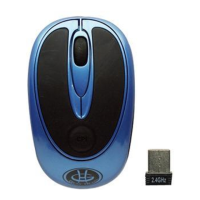

 To Next Page
 General