Need help?
Do you have a question about the Gear4music DD400+ and is the answer not in the manual?
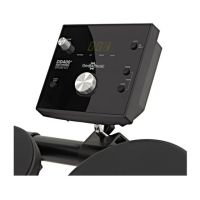
Adjusts the master volume level for the entire drum kit module.
Starts or stops the drum kit's built-in rhythms and patterns.
Controls tempo click and demo mode, requiring a long press for certain functions.
Switches between different operational modes: pattern, kit, voice, and click.
Allows adjustment of the tempo, often requiring a long press for adjustments.
Details the power connection and the main on/off switch for the module.
Describes various input/output ports for headphones, MP3 players, and computer connectivity.
Allows selection of different pre-programmed drum patterns or rhythms.
Controls the overall volume level of the drum sounds played.
Enables the selection of different drum kit sound sets.
 General
| Type | Electronic Drum Kit |
|---|---|
| Number of Pads | 5 |
| Hardware Included | Yes |
| Drum Throne Included | No |
| Sounds | 200+ |
| Connectivity | Headphone, MIDI, AUX |
| Included Accessories | Drum Sticks |
| Power | AC Adapter |
| Cymbals Included | No |
| Kick Pedal Included | No |
| Snare Stand Included | No |
| Hi-Hat Stand Included | No |
| Cymbal Stands Included | No |

 To Next Page