
 Need help?
Do you have a question about the GEARGO H2 and is the answer not in the manual?
Lists the key features of the GEAGRO H2 projector, including design, lamp life, zoom, and interfaces.
Provides essential safety guidelines and warnings for using the projector, covering power, handling, and maintenance.
Details the items included in the projector package, such as the manual, remote control, power line, and video line.
Details technical specifications like resolution, lamp type, input voltage, power consumption, and dimensions.
Lists supported audio, picture, and video file formats, including their file extensions and decoding capabilities.
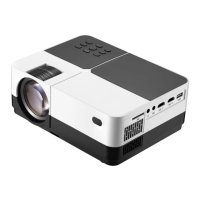
Diagram showing top controls, focusing ring, keystone correction, and rear ports like SD, AV, HD, USB.
Illustrates the projector's lens, IR receiver, and VGA port on the front and side panels.
Diagram and explanation of buttons on the projector body, including navigation, menu, and power.
Details the buttons on the remote control, such as power, mute, menu, OK, and navigation keys.
Instructions on how to place the projector horizontally on a stable surface for initial setup.
Guide to adjusting the focusing ring and keystone correction for optimal image clarity and shape.
Details how to adjust image position horizontally, vertically, and angularly for correct screen projection.
Steps for powering on the projector after 5 seconds and safely powering it off, including unplugging the power line.
Instructions on how to use the 'source' button and navigation keys to select input signals like Computer, HD, USB, or SD.
Step-by-step guide to navigate the menu, select 'video', choose storage, and play video files.
Instructions for selecting 'Music' and playing audio files from storage devices, including navigation and playback.
Guide to selecting 'Images' and displaying image files from storage, covering navigation and file selection.
Steps to select 'Texts' and display text files from storage devices, including navigation and file opening.
Configuration options for image modes, color temperature, scaling pattern, noise reduction, and projection direction.
Adjustments for acoustic pattern, balance, autovolume, and surround sound effects to enhance audio output.
Configuration for sleep timer and standby mode to save energy and manage projector operation automatically.
Options for language, factory restore, background transparency, and software updates via USB.
Steps to power off the projector correctly using the power button and prompts.
Instructions on protecting the lens with a cap and storing the device in a cool, dry place.
Table providing recommended projection distances for various screen sizes and corresponding dimensions.
 General
| Brightness | 4500 lumens |
|---|---|
| Contrast Ratio | 10000:1 |
| Bluetooth | Yes |
| Projection Size | 40" - 300" |
| Wi-Fi | Yes |
| Battery | No |
| Native Resolution | 1920x1080 |
| Resolution | 1920 x 1080p |
| Aspect Ratio | 16:9 |
| Lamp Life | 30000 hours |
| Input Ports | HDMI, USB, AV |
| Operating System | Android |
| Built-in Speaker | Yes |

 To Next Page