Error Detection and Recovery
22
GeBE E + F GmbH • www.oem-printer.com • SMAN-E-471-V2.5 • Thermal Printer GPT-4378 /-4379
15 Error Detection and Recovery
Not every error means that there is a printer error that cannot be cleared by the user.
Users will save time and money by recognizing and clearing simple errors on their own.
The following tips are meant to help with this:
Hardware RESET: Triggered by holding down the OFF/NEXT key for more than 3 seconds.
This causes the printer to be set to the parameters in the batch file TINIT-F or TINIT-E.
Test printout: Is triggered by holding down the FEED feed key for more than 3 seconds after reactivation from po-
wer OFF (switching off with the OFF/NEXT key).
Hexdump mode: Is triggered by holding down the FEED key for more than 3 seconds after reactivation from
power OFF, if no paper is inserted. After the paper has been inserted, the printer prints the data it receives as hex
numbers with the appropriate ASCII code without interpreting the data. This shows, which information the printer
"reads" from the receiving data. In order to leave the HEXdump mode, the FEED key has to be held down for at
least 3 seconds, while there is no paper inserted. After it leaves the HEXdump mode, the printer will process TINIT
for a reinitialization.
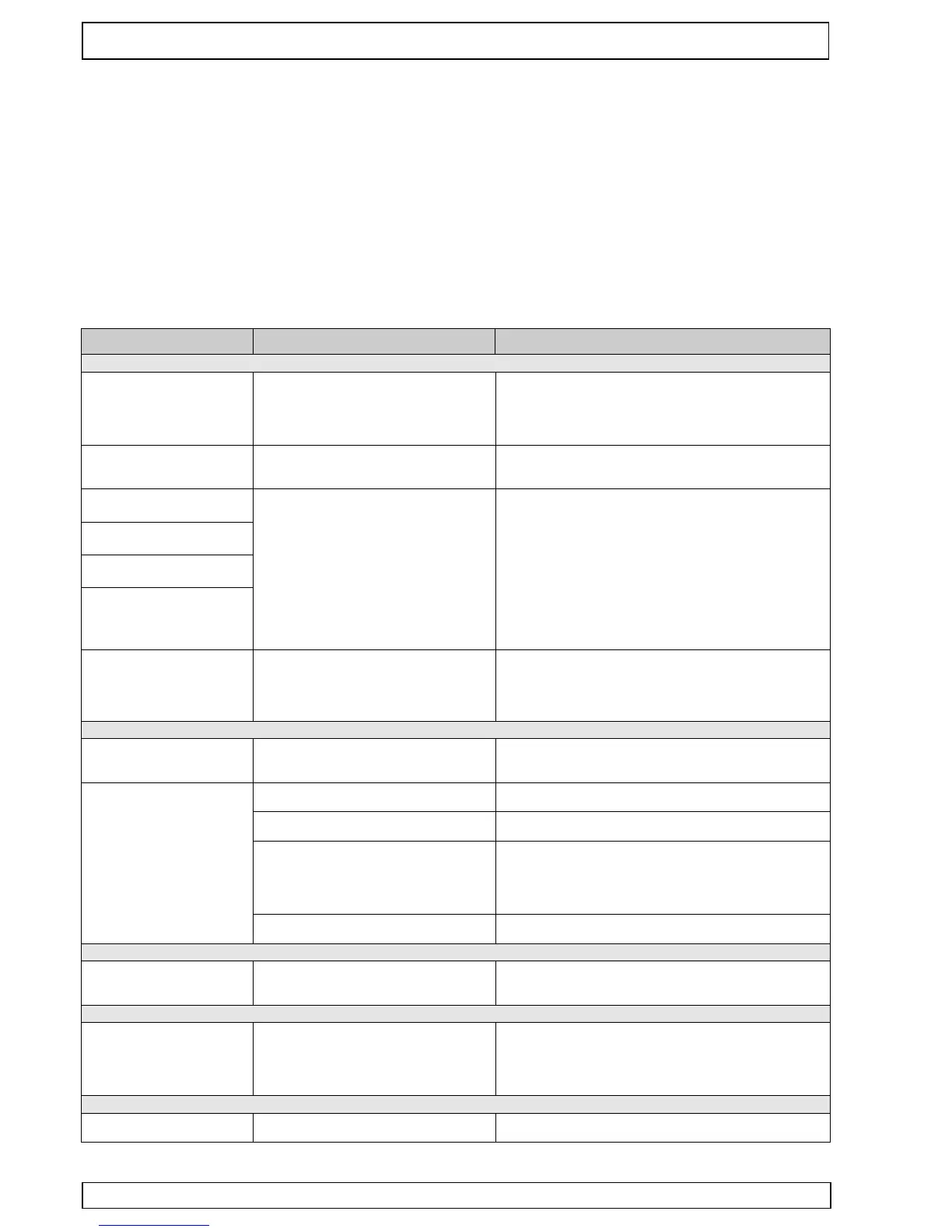
The printer seems to be prin-
ting. Paper is transported, but
is not blackened.
Paper: Wrong side toward print head. Only
one side of the paper can be printed on.
Insert paper correctly. The thermosensitive side should be
turned to the outside of the roll (most of the time). Try the
finger nail test: Drag the tip of a finger nail across the paper,
pressing down. The friction heat causes the thermosensitive
side to blacken.
Printer can not be reactivated
by pressing the FEED key.
At the beginning of printing, the
LED goes out just briefly
The printer only prints a few
dots in one line.
The paper feed works, but the
self test does not.
No power.
Rechargeable battery: not charged.
Batteries: not inserted orare empty
The power supply is not optimal.
Rechargeable battery: not charged.
Batteries: empty, bad quality,
no batteries inserted.
External power supply: Cross-section of
power feeding lines to small, Current output
of the power supply too low.
Check power supply.
Recharge battery. The green LED should light up no later than
after 1 minute.
Batteries: Different qualities are available. Only use batteries
that are able to supply high currents, and that have a high
energy capacity.
External power supply: Use power supply with sufficient
dimension and short feed lines. Check all connections for
possible transfer resistances. Since high peak currents occur
with thermal printers, even the smallest transfer resistances
can result in intolerable voltage drops. In this case, no power
supply would be strong enough.
The printer only prints a few
characters in one line. If more
is entered, it stops printing
completely.
The printer loaded over night
however it prints only few or not
After a few characters, the
printout starts to be incomplete
.
The rechargeable battery is used up or was
not correctly loaded. Each over-discharging
damages the battery strongly and leads to a
loss of capacity.
Fully discharged batteries can disturb the charging in such a
way that it breakes in at less than 30 minutes and switches to
preservation charge. In this case please start to charge again
by reputting. Please always switch off the printers if they
lengthen are not used and please load them every 3 months.
The printer buffer is "over-run" (256 bytes),
causing a loss of data. The print data trans-
mitter shows no reaction to handshake.
Use or check handshake. (software: Xon/Xoff or hardware:
CTS). If necessary: slow down transmission speed, e.g. down
to 1,200 baud.
The printer prints the wrong
characters.
Interface problem. The transmission is faulty.
(Characters of the upper area are printed.).
Wrong data format was set. ( "?" is printed
repeatedly.)
Use correct interface level (RS232, TTL?).
Is the transmission cable too long?
Select the correct baud rate through the menu. Check data
format.
External power supply: Bad ground con-
nection that causes a part of the printing cur-
rent to flow through the interface cable. This
leads to an increase in potential there, which
causes data corruption.
Host sends a break signal after print job
(only "?" are printed).
Check and improve ground connection. Feed current through
short, thick lines.
Turn off "framing error ".
The print speed is extremely
slow with high baud rate
settings.
The printer cannot be found in
the BT network.
The host ignores the "turn-around time" set
by the printer.
Host sends a break signal after print job (only "?" are printed).
- Possible undervoltage at the BT transmitter
or the printer.
- wrong entry of pin code
- Restart transmitter/ printer, recharge accu
Turn off printer and wait for app. 5 seconds. Switch printer on
and wait for app. 10 seconds. Then search again.
- restart printer and type in right pin code (0000).
The printout stops after a short
time or is constantly repeated.
Set virtual COM port according to installation instructions.


 To Next Page
 Loading...