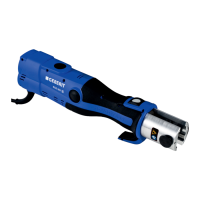
Operating instructions ACO 201
Automatic pressing function
An automatic pressing function ensures that the pressed joint is
completely finished. For safety reasons, the automatic pressing
function is not activated until a certain press capacity has been
attained (after approx. two seconds). Following this, the pressing
operation takes place automatically and can only be interrupted by
pressing the stop button.
LED indicator
The two LEDs show the operating statuses of the pressing tool:
• Green LED lights up: The pressing tool is ready for operation
• Green LED flashes: Fault
• Red LED lights up or flashes: Fault
In the event of a malfunction, please see the "Troubleshooting"
chapter.
Stop button
The stop button has two functions:
• Switching off the motor
• Cancelling the malfunction indicator
Signal tone
A signal tone sounds six times in case of malfunctions or if the
pressing has not been completed correctly.
Standby mode
If the pressing tool is not used for about one hour, it switches over to
standby mode automatically. The LEDs are switched off. The
pressing tool can be restarted by pressing the start button for
about two seconds.
Technical data
Nominal voltage 14.4 V DC
Power input 375 W
Nominal force 32 kN
Net weight 3.1 kg
Noise level at user's ear 68 dB(A)
Vibration value ≤ 2.5 m/s²
Temperature range during operation -20 °C - +60 °C
Ampere-hour capacity 2.4 Ah
B310-001&BDC © 02-2006
16


 To Next Page