EN
21
B971-003 © 06-2015
965.598.00.0 (02)
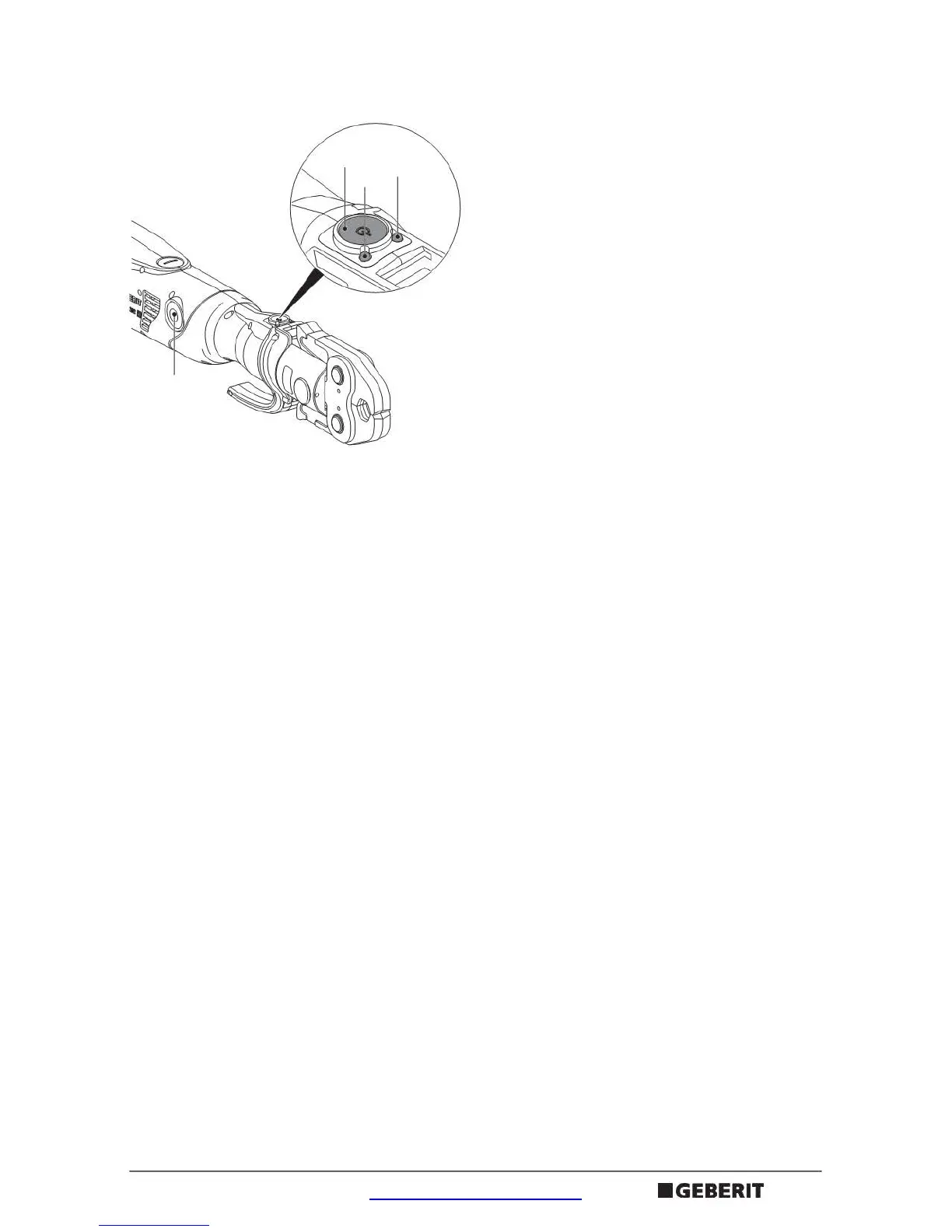
Function
1Green LED
2Red LED
3 Start button
4 Unlocking button
0
The Geberit pressing tool functions electrohydraulically. An automatic pressing function
makes sure that the press connection is completely finished. For safety reasons, the
automatic pressing function is not activated until a certain press capacity has been attained
(after approx. two seconds). The pressing sequence then continues automatically and can
only be interrupted by pressing the unlocking button [4]. Pressing the start button [3] again
restarts the pressing sequence. If the pressing sequence is interrupted, the pressing tool
stops in the position that has been reached. Pressing the unlocking button [4] causes the
piston in the pressing tool to return. The pressing tool can then be released from the pipeline.
The two LEDs [1] [2] show the operating states of the pressing tool. The pressing tool is
ready for operation when the green LED [1] is lit. The red LED [2] or the flashing green
LED [1] indicate malfunctions. If the Geberit pressing tool is not used for 30 minutes, it
switches to standby mode. No LED is lit. To start the pressing tool, briefly press the start
button [3].
4
3
1
2


 To Next Page