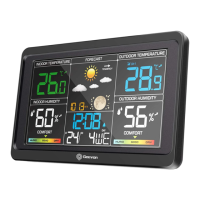
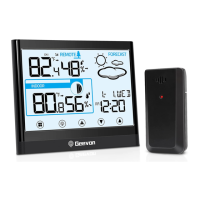
1.Controls and displays:
1.Tendency of indoor temperature
2.Indoor temperature
3.Tendency of indoor humidity
4. Indoor humidity
5. Indoor comfortable index
6. Barometer display
7. Icons of weather forecast
8. Trend of barometric
9. Moon phase
10.Outdoor temperature alert
11.Outdoor sensor signal strength
12.Channel external sensor
13.Tendency of outdoor temperature
14.Outdoor temperature max/min
record
15.Outdoor temperature
16.Outdoor humidity
17.Tendency of outdoor temperature
18. Low battery indicator
19.Outdoor comfortable index
20. Time display
21.Calendar
2.Package Contents:
1. Color weather station display unit
2. Outdoor Sensor
3. Power supply unit
4. Instructions Manual
3.Getting started:
3.1 Inserting the batteries/connecting the power supply
• Connect the power supply unit to the power supply unit socket on
the back of the color weather station.
• Place 3xAAA batteries into the color weather station.
• Place 2xAAA batteries into the wireless weather sensor.
• Place or hang the sensor outdoors.
3.2. Replacing Batteries:
• The range is 200 ft. (60m) unobstructed. The wireless range may be
22.Weekday
23. Alarm and snooze icons
24.MODE button
25.UP button
26.DOWN button
27. SNZ/LIGHT button
28. ALERT button
29.CH button
30.ALARM button
31.USB Charging port
32.External power supply
socket
33. Stand bracket
34. Battery Compartment
3xAAA (batteries not included)
35. Wireless signal indicator
(Flashes when data is being
sent to the display unit)
36.Integrated hang hole
37.Compartment 2xAAA
batteries (batteries not included)
38. TX channel selector,
select external sensor
channel (Maximum 3 channels
available)
1.MODE button
a. Hold for 3 seconds during the normal mode to enter setting mode.
b. Press button during the normal mode to check year.
2.UP button
a. Increase the current setting value.
b. In normal display mode, press this button to switch between
Celsius and Fahrenheit at any time.
3.DOWN button
a. Decrease the current setting value.
b. Press this button to display max/min temperature/humidity.
c. Press and hold the button for 2 seconds to clear the record of
MAX/MIN temperature/humidity.
4.SNZ/LIGHT button
a. Turn on/off the backlight
b. Stop the alarm for 5 minutes
5.ALERT button
Enter the alert mode, use UP or DOWN to open or close alert function.
6.CH button
a. Press this button to select the channel.
b. In normal display mode, press and hold to search RF.
7.ALARM button
a. Check the alarm time.
b. Set the alarm
5.Manually Setting the Time, Date & Units:
Press and hold down the "MODE" button for 2 seconds until the
display begins to flash.
• Set the following information in the order listed:
•12/24 hour format.
• Hours
• Minutes
• Year
•Date
• Month/Day or Day/Month format
• Month
• Day
• Day of the week language
• Air pressure unit
• To select individual values, press UP button or the DOWN button
and confirm each selection by pressing the MODE button.
Note:
You will automatically exit settings mode if no buttons are pressed for
10 seconds. Under normal mode, press MODE button to check the year.
6.Alarm Clock:
Setting the alarm
• Hold the ALARM button for about 3 seconds to set the alarm time.
The display begins to flash. Set the following information in the order
listed: Hours→Minutes→Exit.
• To select individual values, press UP button or the DOWN button
and confirm each selection by pressing the ALARM button.
• If you do not make an entry for 20 seconds, setting mode is exited
automatically.
Activating/deactivating the alarm
To turn the alarm ON or OFF, press the ALARM button to enter alarm
mode, press the ALARM button again to ON or OFF the alarm. The
“ ” symbol should show next to the clock display when alarm is set
to ON. Press the ALARM button again to turn off the alarm, when the
alarm is set to OFF, the “ ” symbol should not display.
Stopping the alarm/snooze function
• When the alarm is triggered, the alarm symbol begins to flash and
an alarm sounds.
• By pressing any button(except the SNOOZE/LIGHT button to stop
the alarm. Otherwise, it will stop automatically after 2 minutes.
Note:
While the alarm signal is sounding, press the SNOOZE/LIGHT button
to activate the snooze function. The alarm will sound after 5 minutes.
7.Temperature and humidity
7.1 Temperature
• Indoor temperature 0°C ~ 50°C (32°F ~ 122°F), display LL.L when
below 0°C and display HH.H when higher than 50°C.
• Outdoor temperature -40°C ~ 60°C (-40°F ~ 140°F), display LL.L
when below -40°C and display HH.H when higher than 60°C.
• Temperature resolution: 0.1°C
7.2 Humidity
• Indoor humidity range: 20%-95%, display 20% when below 20%
and display 95% when higher than 95%.
• Outdoor humidity range: 20%-99%, display 20% when below 20%
and display 99% when higher than 99%.
• Humidity resolution: 1 %RH
• When alarm ringing, temperature and humidity test will be stopped.
Note:
Accuracy
• Temperature accuracy:
-40°C ~ -20°C: ± 4°C
-20°C ~ 0°C: ± 2°C
0°C ~ +50°C: ±1°C
• Humidity accuracy:
±5% from 35% to 75% and ±10% from 20% to 35% & 75% to 95%.
7.3 Setting the Temperature Units:
To switch the temperature measurement between Celsius and
Fahrenheit, press the “UP” button which is also the C/F option button.
You can switch between Celsius and Fahrenheit at any time (except
when setting other setting options.)
7.4 Checking the MAX/MIN temperature and humidity
• Press the “DOWN” button to check MAX/MIN temperature and humidity.
• Hold the “DOWN” button to clear the record of MAX/MIN temperature
and humidity.
7.5 Temperature Alert
• In standard mode, press “ALERT” to enter alert mode, use “UP” or
“DOWN” to turn on or off temperature alert function.
Smart Color Weather Station
Item No.W208665
User Manual
Thank you for purchasing W208665 Smart Color Weather
Station.Please take a moment to read this guide and store it for future
reference.
reduced by trees, walls, windows, etc.
• Do not place sensor in direct sunlight as this will give you an
inaccurate temperature reading.
Note:
•We recommend using high quality batteries for the best product
performance.
•Heavy duty or rechargeable batteries are not recommended.
•The outdoor sensor requires lithium batteries in low temperature
conditions. Cold temperatures can cause alkaline batteries to
function improperly.
•Do not mix old and new batteries. Do not mix alkaline, standard,
and/or rechargeable batteries.
3.3.Low Battery Indicator:
If the low battery indicator is displayed on the LCD for either the
outdoor sensor or the display unit, immediately change the batteries
to prevent disruptions in communications of the devices.
3.4.Default settings
1.Default time: 12:00(US) 0:00(EU)
2. Default date: 01/01 (Year: 2019, date form: M/D[US],date form:
D/M[EU])
3. Default week: TU(Language: ENG, 7 languages can be selected,
[US]) MIT (Language: GER, 7 languages can be selected,[EU])
4. Weather forecast: Partly Sunny
5. Default temperature: °F(US)/ °C(EU)
6. Barometer unit: inHg(US)/HPA(EU)
7. Default alarm: AM 7:00, default snooze time: 5min. The LCD
display fully for 3 seconds when changing new battery or resetting,
then with a sound BI into the normal state, after testing temperature and
barometer, then receiving RF for 3 minutes.
4.Display / Keys Details:
There are totally 7 keys for this color weather station including
MODE, UP,DOWN, SNZ/LIGHT,ALERT,CH,ALARM.


 To Next Page
 Need help?
 General