• In standard mode, hold “ALERT” to set temperature alert function.
• Setting order:
• outdoor temperature upper limit
• outdoor temperature lower limit
• indoor temperature upper limit
• indoor temperature lower limit
• To select individual values, press UP button or the DOWN button
and confirm each selection by pressing the ALERT button.
• If you do not make an entry for 10 seconds, setting mode is exited
automatically.
Note:
• In temperature alert status, alert temperature icon will flash and
temperature will always display.
• Temperature alarm sounds for every minute, and it will not stop until:
• Press any button to stop alarm but temperature and alert icon will
continuously flash.
• When temperature out of the alert range.
7.6 Ice alert
When the outdoor temperature in the range of -1°C ~ +2.9°C
(+30.2°F ~ +37.3°F), the ice icon will flash, when the temperature out
of the range, the icon will disappear.
Note:
The ice alert not needs setting, as long as the temperature in the alert
range, the icon will be displayed.
7.7 Temperature and humidity trend
• The device checks the temperature for trends every 30 minutes,
comparing the current temperature with the temperature from 3
hours ago.
• If the temperature rises 1 °C / 2 °F, the device will display an
upward arrow.
• If the temperature drops 1 °C / 2 °F, the device will display a
downward arrow.
• If the temperature stays within 1 °C / 2 °F, the device will display a
horizontal arrow.
8. Backlight:
• Sustained backlight is only possible by power supply unit.
• Press the SNZ/LIGHT button to switch the brightness from HI→LOW
→OFF.
• When powered by battery only, the backlight will be off (to conserve
power). Press the SNZ/LIGHT button to active the backlight for 10 seconds.
9. Weather forecast:
The unit predicts weather condition of the next 12-24 hours based on
the change of atmospheric pressure. The weather forecast is based on
atmospheric pressure change and is about 70-75% correct.
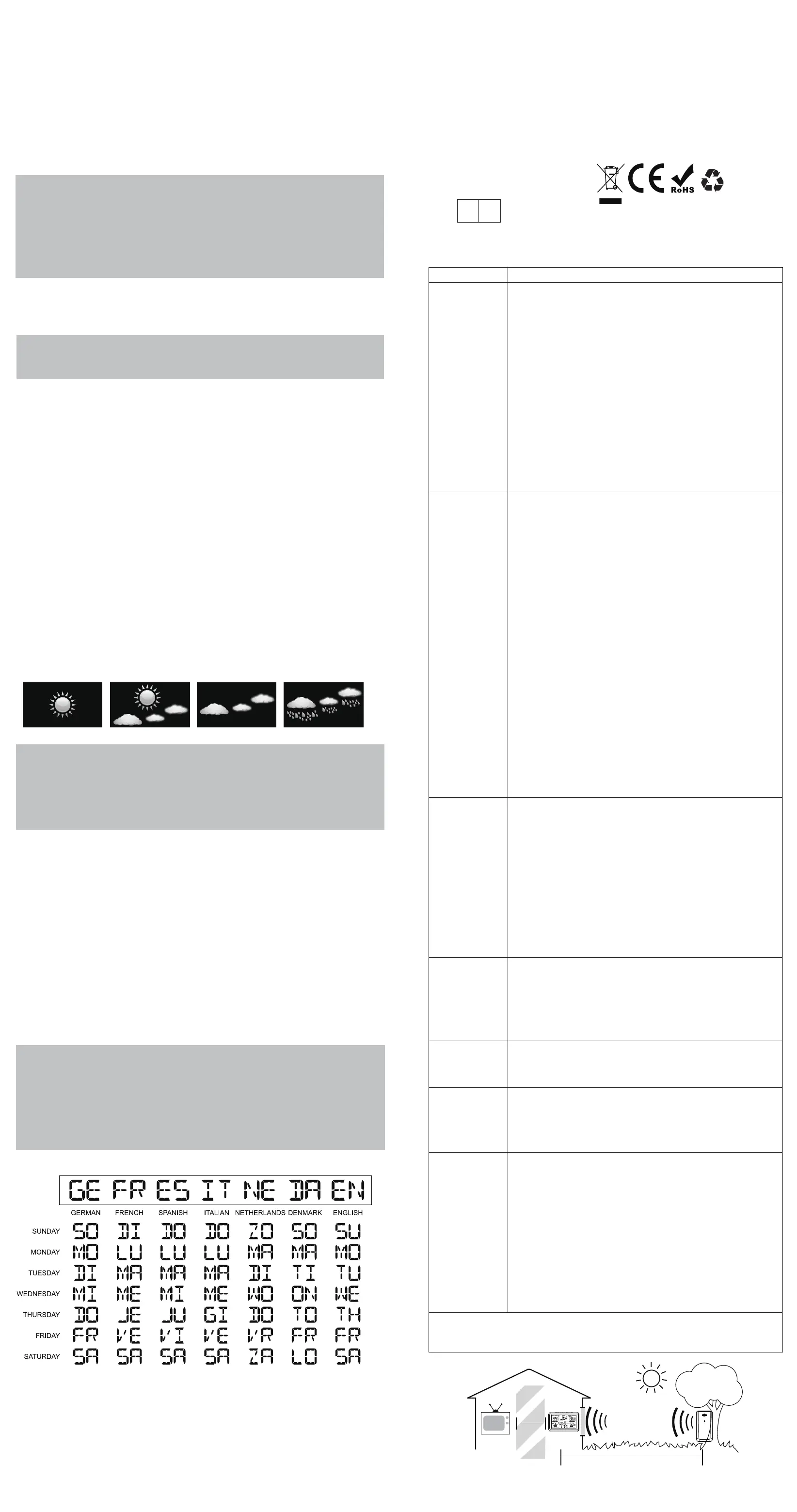
The following are icons that will show:
Note:
After setting up, weather forecast readings should be disregarded
for the next 24 hours. This will allow sufficient time for the
weather station to collect data and therefore result in a more
accurate forecast. Common to weather forecasting, absolute
accuracy cannot be guaranteed.
Trend of barometric
The trend of barometric: Barometer rise or down at 1 HPA within 1
hours, the arrow will rise or down, if barometer rise or down less than 1
HPA, the arrow displays horizontal.
10. Remote sensor transmission:
This weather station is arranged to communicate with three external
sensors. One of these comes with the unit, the remaining two are
optional.
• Power the weather station as described in Getting started.
• Insert the batteries in the external sensor, set the selector to the
desired transmission channel (1, 2 or 3). Automatic weather station
data will be transmitted.
• Press the CH button more times to select the channel set on the
external sensor. Sequentially selects the channel 1, channel 2,
channel 3 or sequential display of 3 channels (icon flashing channel).
Notes:
• Place the weather station away from equipment that generates
magnetic fields such as mobile phones, televisions etc.
• In case of non receipt of the display, signal it is shown the character
-. Press and hold the DOWN button to receive RF signal.
• Always make sure the channel chosen on the display unit matches
the channel option chosen on the outdoor sensor.
11. Week display
12. Care and maintenance Placement of the Device:
Proper placement of both the display unit and the outdoor sensor
are critical to the accuracy and performance of this product.
Display unit placement
Place the display unit in a dry area free of dirt and dust. Display unit
right for tabletop/ countertop use.
Important Placement Guideline
Sunny Partly sunny Cloudy Rainy
• To ensure accurate temperature measurement, place units out
of direct sunlight and away from any heat sources or vents.
• Display unit and outdoor sensor must be within 200 ft. (60m) of
each other.
• To maximize wireless range, place units away from large metallic
items, thick walls,metal surfaces, or other objects that may limit
wireless communication.
• To prevent wireless interference, place both units at least 3ft(1 m)
away from electronic devices (TV, computer, microwave,radio, etc)
TROUBLE SHOOTING
Problem Possible Solution
Flashing of the outdoor reading is generally an
indication of wireless interference:
1. Relocate both of main unit and outdoor sensor.
Power the weather station as
described in Getting started. (Please refer to the
SENSOR SETUP section.)
2. Display unit and outdoor sensor must be
within 200ft (60m) of each other.
3. Press and hold the "DOWN" button to receive
RF signal.
4. Place units out of direct sunlight and AWAY
FROM any heat/moisture sources
or vents.
5. Place units away from large metallic items,
thick walls, metal surfaces, or other
objects that may limit wireless communication.
6. Place both units at least 3ft(1 m) away from
electronic devices (TV, computer, microwave,
radio, etc.)
Outdoor
reading
is flashing
or
showing
dashes
No outdoor
sensor
reception
Inaccurate
temperature/
humidity
Inaccurate
Weather
Forecast
Backlight
doesn't
stay on
Care and
maintenance
TV
(200 feet maximum)
(60 meters)
(0.9 m)
3 feet
AT
LEAST
APART
1. Place the display unit in a dry area free of
dirt and dust.
2. The remote sensor is totally wireless but has to
avoid direct sunlight and rain.
3. Please immediately change the batteries if
the low battery indicator is displayed on the
LCD screen of main unit.
4. Never immerse the product in water. This
will damage the product.
5. Do not subject the product to extreme force,
shock, or fluctuations in temperature.
6. Do not clean any part of the product with
benzene,thinner or other solvent chemicals.
When necessary, clean it with a soft cloth.
If the temperature is higher than the detection
range, HH.H will display on
screen for indication;If lower than the detec-
tion range, LL.L will display on
screen for indication.
The backlight turns off after 10s to save energy
when powered by batteries. If you want the
weather station always lights on, please plug in
with power adaptor.
1. Weather forecast readings should be disre-
garded for the next 24 hours.
This will allow sufficient time for the weather
station to collect data andtherefore result in a
more accurate forecast.
2. Common to weather forecasting, absolute
accuracy cannot be guaranteed.
1. When it is first stalled,it takes at least 1
Hour to have accurate temperature and
humidity data.
2. Make sure both the main unit and sensor are
placed out of direct sunlight and AWAY
FROM any heat sources, vents or moisture
sources.
3. Do not tamper with the internal components.
Temperature Accuracy:-40°C ~ -20°C: ± 4°C
-20°C ~ 0°C: ± 2°C
0°C ~ +50°C: ±1°C
Humidity Accuracy:
±5% from 35% to 75% and ±10% from
20% to 35%& 75% to 95%.
1. Relocate both of main unit and outdoor
sensor. Power the weather station and
outdoor sensor again as described in Getting
started. (Please refer to the SENSOR
SETUP section.)
2. Display unit and outdoor sensor must be
within 200ft (60m) of each other.
3. Press and hold the DOWN button to
receive RF signal.
4. Press the "CH" button more times to select
the channel set on the external sensor.
Sequentially selects the channel 1, channel
2, channel 3 or sequential display of 3 chan-
nels (icon flashing channel).
5. Always make sure the channel chosen on
the display unit MATCHES the channel option
chosen on the outdoor sensor.
6. Do not use heavy duty or rechargeable
batteries. The outdoor sensor requires lithium
batteries in low temperature conditions. Cold
temperatures would cause alkaline batteries
work improperly.
7. Do not mix old and new batteries.
8. Place the weather station away from
equipment that generates magnetic fields
such as mobile phones, televisions etc.
"HH.H/LL.L"
display
in indoor
and/or
outdoor
temperature
If your Geevon product does not operate properly after trying
the troubleshooting steps, please contact the seller on your
order page or shoot an email to : support@geevon.com.
Web: www.geevon.com
E-mail:support@geevon.com
Prolinx GmbH MADE IN CHINA
Brehmstr.56,40239 Duessldorf
Germary
EC REP


 To Previous Page
 Loading...