13
IR REMOTE CONTROL UNIT CONFIGURATION
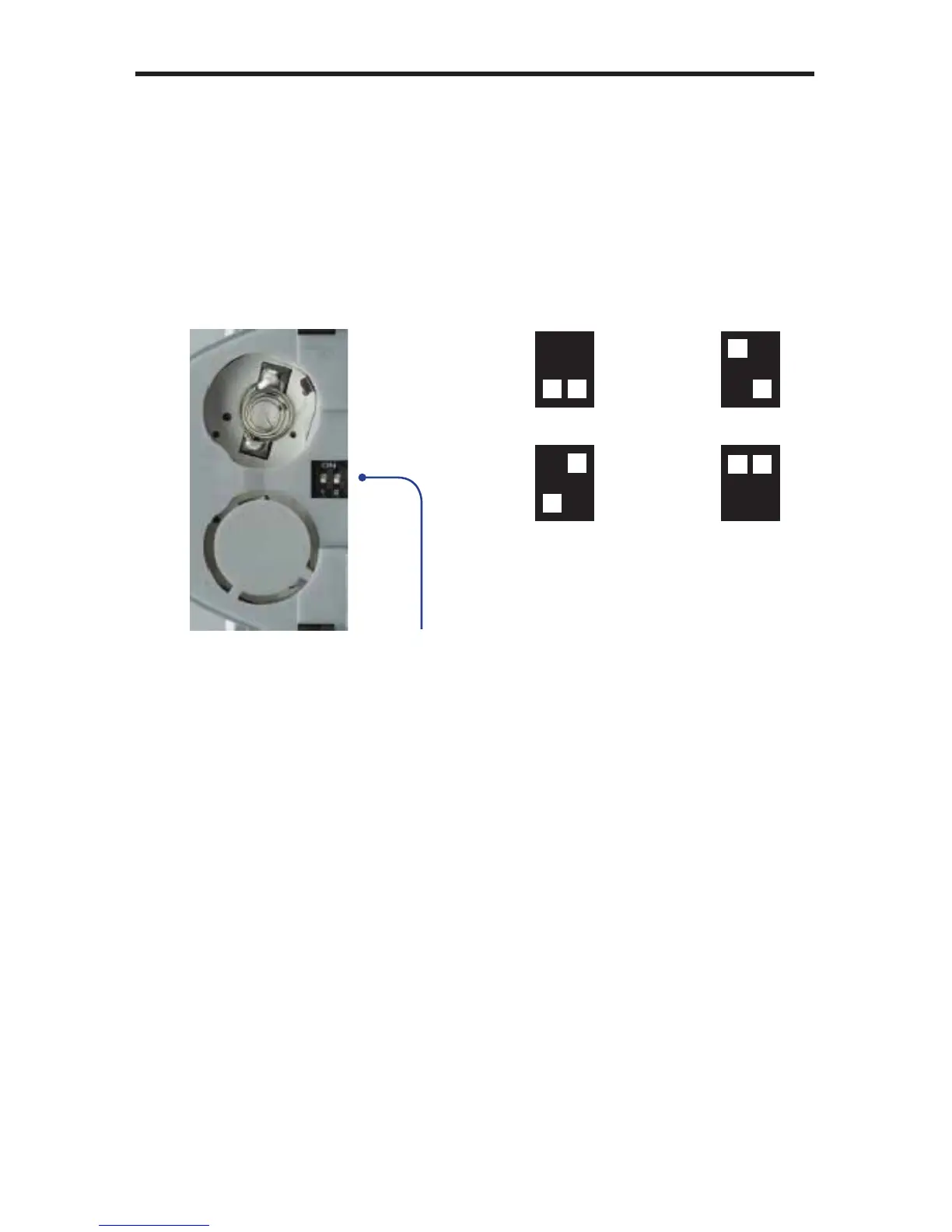
Setting the IR Remote Control Channel
In the event that IR commands from other remote controls interfere with the
supplied IR Remote Control unit, changing the IR Remote Control’s IR channel
will fi x the problem. The IR Remote Control unit has a bank of DIP switches used
for setting the IR channel.
The DIP switch bank is located underneath the battery cover.
1 2
1 2
1 2
1 2
Channel 2:
Channel 0:
Default
Channel 1:
Channel 3:
Battery compartment of the IR remote
showing the exposed DIP Switch bank
between the battery chambers.
It is important that the IR channel on the Remote Control unit, matches the IR
channel set on the Gefen A/V Conference Room Processor. For example, if
both DIP switches on the IR Remote Control unit are set to IR channel 0 (both
DIP switches down), then the A/V Conference Room Processor must also be
set to IR channel 0. See page 36 on how to change the IR channel on the A/V
Conference Room Processor.



 To Next Page