1. Turn the key to the ON position. Use the MODE button to toggle to the clock
display.
2. Press and hold the MODE button until the hour segment flashes. Release
the button.
3. With the segment flashing, tap the MODE button to advance to the desired
setting.
4. Press and hold the MODE button until the next segment flashes. Release the
button.
5. Repeat steps 3-4 twice to set the 10-minute and 1-minute segments. After
completing the 1-minute segment, step 4 will save the new settings and exit
the clock mode.
6. Turn the key to the OFF position.
ODOMETER
The odometer displays the distance traveled by the vehicle since manufacture.
TRIP METER
The trip meter displays distance traveled since the last reset of the trip meter. To
reset, toggle to the trip meter display. Press and hold the MODE button until the
meter resets to zero.
BATTERY STATE OF CHARGE
This mode displays the remaining system voltage level in percentage format.
RANGE METER
The range meter displays the approximate distance the vehicle could travel on
the remaining battery voltage level.
EFFICIENCY RATE (EFF)
This mode displays the rate at which electrical power (Wh) is consumed per mile
or per kilometer. A higher number indicates less desirable efficiency. A lower
number indicates better efficiency.
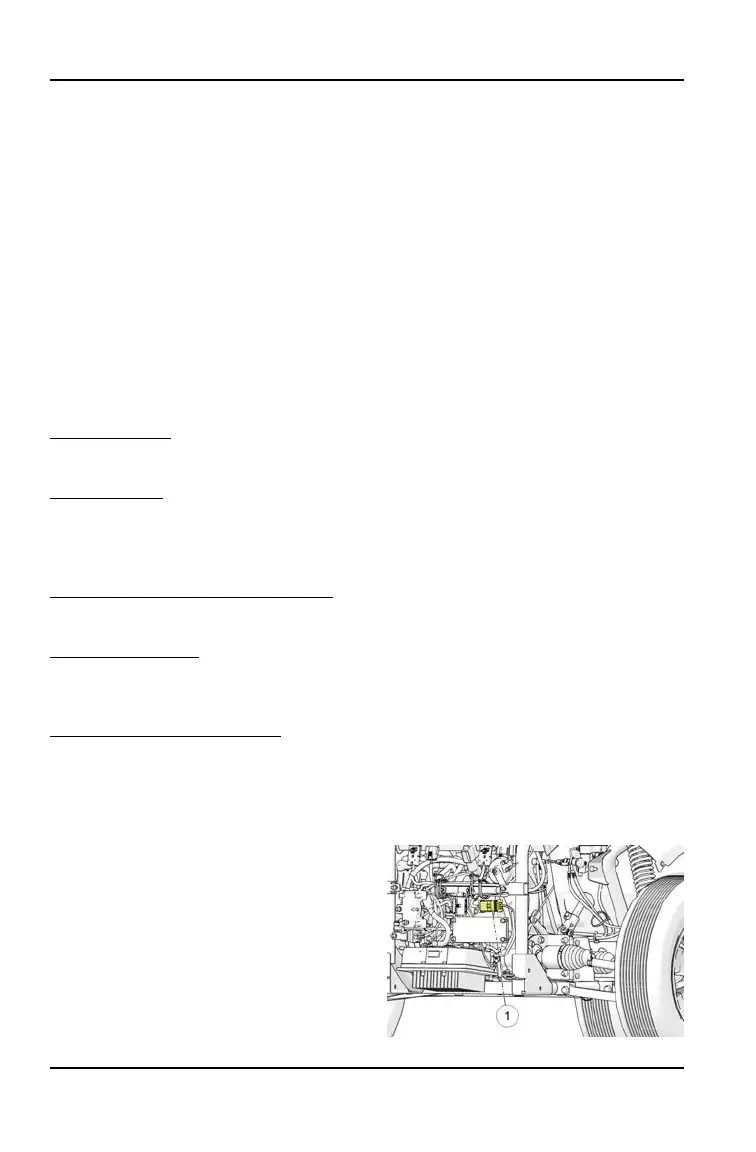
MAIN POWER CONNECTOR
When the main power connector is
unplugged, the battery pack is
disconnected from all electrical
components, with the exception of the
contactor. After servicing the vehicle,
the main power connector should be the
last connection to be made.
32
FEATURES AND CONTROLS


 To Next Page