EasyManua.ls Logo

Gemilai CRM3200D - Page 6

Gemilai CRM3200D
8 pages
Print Icon
To Next Page IconTo Next Page
To Previous Page IconTo Previous Page
Loading...
3. Automatic making coffee (double cup)
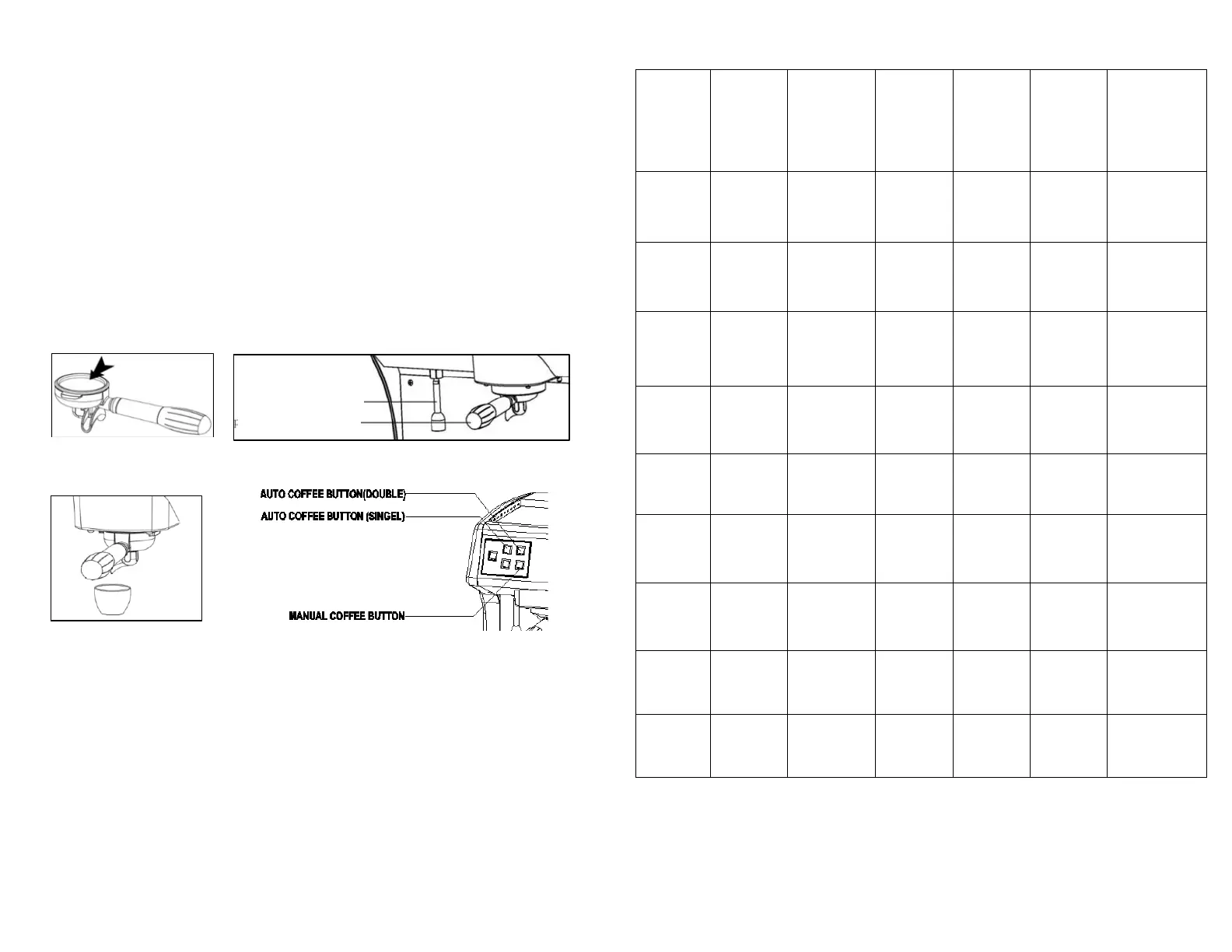
a) Put the coffee powder into porta filter holder and press it tight (Image 5);
b) Put the porta filter holder into machine, and rotate right to lock the filter
holder (Image 6);
c) Put the cup under porta filter mouth (Image 7);
d) Press auto coffee button (double), machine start to work (Image 8);
e) Machine will automatic stop after brewing 30ml coffee, coffee is ready.
Note: Brewing capacity can setting (see 5.2 for specific operation)
f) Remove the porta filter holder after used, and clean it for next use.
Note: Too much coffee powder will cause brewing speed is very low or
no coffee come out; too much coffee powder will cause the leakage from
the porta filter.
*MAKING HOT WATER
1. Put a container under hot water outlet.
2. Press hot water button, hot water will come out immediately (image 9);
(The default setting for auto stop time is 5 seconds)
Warning: Do not touch the hot water pipe immediately after making hot
water to avoid scald.
*INDICATOR TIPS

Manual
Coffee
Button
Indicator
Auto
Coffee
Button
(Single)
Indicator
Auto
Coffee
Button
(Double)
Indicator
Hot
water
Button
Indicator
Descale
Button
Indicator
Steam
button
indicator
Machine
State
Lights on
Lights on
Lights on
Lights on
Lights on
Lights on
Power on/
Preheating
finished
Lights on
Lights off
Lights off
Lights off
Lights on
Lights off
Making
coffee
( Manual)
Lights
off
Lights on
Lights off
Lights off
Lights on
Lights off
Making
coffee
( Single)
Lights
off
Lights off
Lights on
Lights off
Lights on
Lights off
Making
coffee
( Double)
Lights
off
Lights off
Lights off
Lights on
Lights on
Lights off
Making hot
water
Lights
off
Lights off
Lights off
Lights off
Flashing
Lights off
Coffee soft
shutdown
Flashing
Flashing
Flashing
Flashing
Lights off
Lights off
Abnormal
flowing
Flashing
Flashing
Flashing
Flashing
Flashing
Lights off
NTC failure
Lights
off
Lights off
Lights off
Lights off
Lights off
Lights on
Ready steam
Image 5
Image 6
Hot water pipe
Porta filter holder
Image 7
Image 8
5
10

Related product manuals