4
17
18
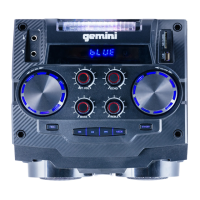
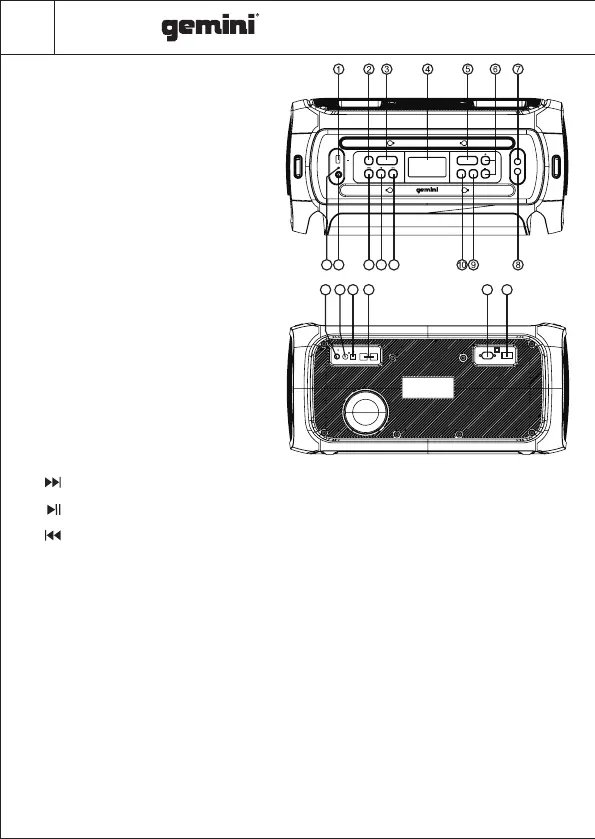
Panel
19
1.USB: USB drive port. Charge USB devices or
play audio files.
2. STANDBY:To suspend operations and save power
when not in use, press to enter STANDBY mode.
Press again to resume operation.
3. SOURCE: Press this key to change the sources
between BT, LINE,COAXIAL,OPTICAL, FM,
USB .
4. LED DISPLAY: Displays speaker status.
5.X DRIVE: Press the key to turn X DRIVE bass
boost ON/OFF.
6.-/+: Adjusts Volume & FX Parameters.
7. MIC1 IN: 1/4" Mic input socket
8.MIC2 IN: 1/4" Mic input socket
9.EFFECTS: Press this key to toggle the menu
between MIC VOLUME, ECHO EFFECT, BASS,
TREBLE, Adjust with +/- keys
10.LIGHT :Press to toggle through lighting modes:
LED1, LED2, LED3, LED4, OFF
11. : Skip to the next song in USB/BT mode. Skip to next station in FM mode.
12. : In USB/BT input mode: Press to PLAY/PAUSE a track. In FM mode: Press to scan FM frequencies .
13. : Skip to previous song at USB/BT input mode.Skip to previous station in FM mode.
14. LINE-IN: 1/8” Auxiliary audio input
15. POWER INDICATOR LED
16. FM Antenna Port
17. DIGITAL AUDIO COAXIAL INPUT
18. AUDIODIGITAL OPTICAL INPUT
19. SPEAKER OUTPUT JACK
20. AC INPUT : AC 100V-240V~,50/60Hz.
21. POWER SWITCH: Press this switch to turn the unit ON or OFF
11
12
1314
15
16
20 21
5V 200mA
USB
POWER
LINE IN
STANDBY SOURCE
X DRIVE
LIGHT EFFECTS
MIC2 IN
MIC1 IN
AC100V-240V,50/60Hz
POWER
ON OFF
SPEAKER OUTPUT
DIGITAL INPUT
FM
COAXIAL OPTICAL
I
I
I
I
I
I
I
I
I
I
I
I
I
I
I
I
I
I
GSYS Series



 To Next Page
 Loading...