5
GSYS Series
Remote Control
/C H+/C H-
/T U+
/T U-
SOURCE
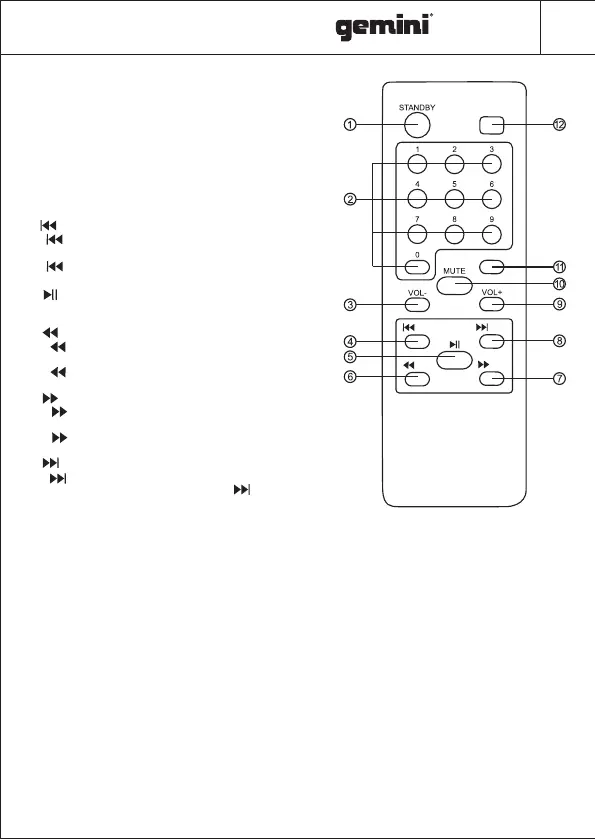
1. STANDBY : Standby ON/OFF .
2. 0~9 NUMERIC KEYS: These keys are used
to play a track directly in USB source mode
or a frequency directly in FM mode.
Eg:To play 12th track in the USB playlist
press the numeric key"1" followed by"2".
3. VOL- : To decrease the volume.
4. /CH- : Play the previous song by pressing
" /CH-" in USB/BT input mode.
Choose previous channel by pressing
" /CH-" in FM input mode.
5. : Play / pause in USB/BT mode. In FM
mode press for full automatic search.
6. /TU- : Fast rewind a song by pressing
" /TU-" in USB input mode.
Choose tuning channel by pressing
" /TU-" in FM input mode.
7. /TU+ : Fast forward song by pressing
" /TU+" in USB input mode.
Choose tuning channel by pressing
" /TU+" in FM input mode.
8. /CH+ : Play the next song by pressing
" /CH+" in USB/BT input mode.
Choose next channel by pressing " /CH+"
in FM input mode.
9. VOL+ : To increase the volume.
10. MUTE : Press to switch audio mute ON/OFF.
11. EQUALIZER:Press to change the equalizer between EQ 1(NORMAL), EQ2(ROCK), EQ 3(POP),
EQ 4(CLASSIC), EQ 5(JAZZ), EQ 6(COUNTRY)
12. SOURCE : Press to change the source between ,COAXIALBT, LINE ,OPTICAL, FM, USB .
EQ



 To Next Page
 Loading...