III. APP operation
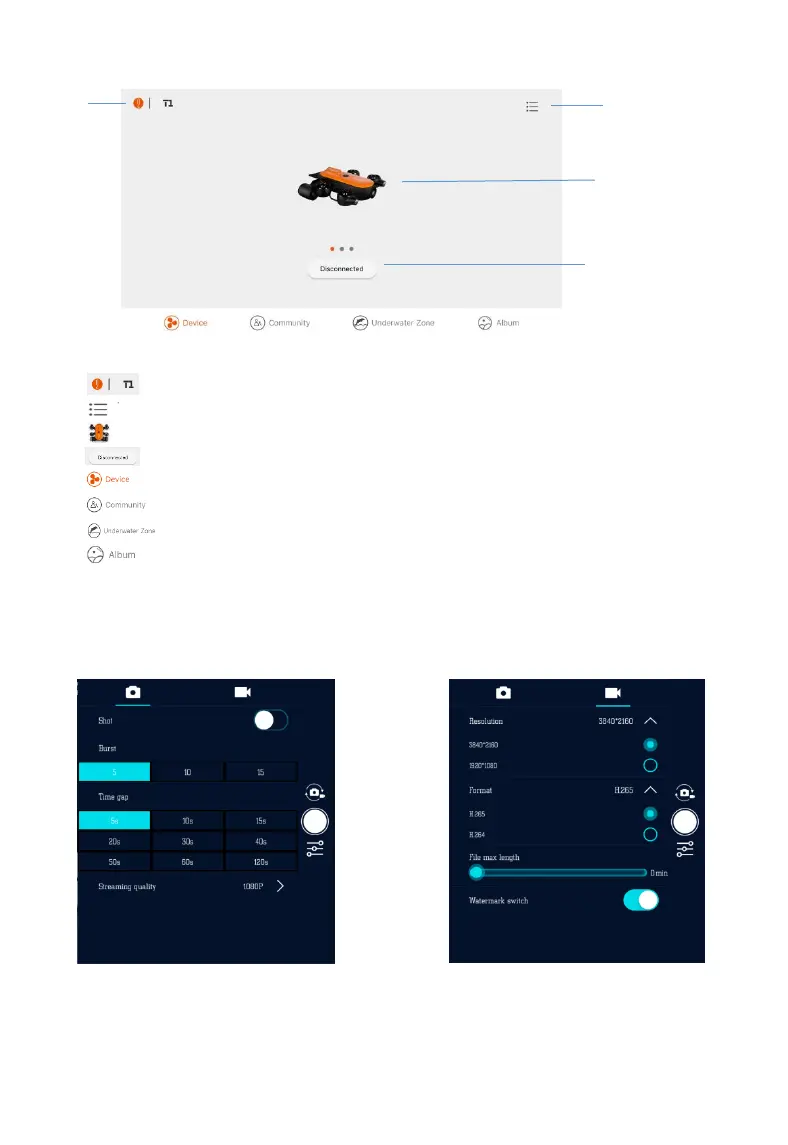
APP main interface
:Product type
:Menu (APP update, hardware update, Bluetooth controller, about and help options)
:Product picture
:Current connection status and entrance of operation interface
:Device
:Forum
:Underwater City
:Album
1
2
3
4
5
6
7
8
[1]
[2]
[3]
[4]
[5]
[6]
[7]
[8]
App camera settings (in APP operation interface)
Camera settings are composed of photo settings and recording settings, as shown below:
Photo settings are composed of three parts:
1. Single-shot mode
2. Burst-shot mode
3. Live stream resolution: activate after reboot
Photo settings
Recording settings
Recording settings are composed of four parts:
1. Resolution:4K / 1080P
2. Video Format:H265/H264,
Video will be saved as MP4
3. File time length: range from 0-30min,
unsegmented division when time length is 0
4. Watermark switchers: add depth, temperature,
time and other info on photo/video
Copyright © 2018-2020 GENEINNO All Rights Reserved.
6


 To Next Page