USING THE MODEL CINEMA
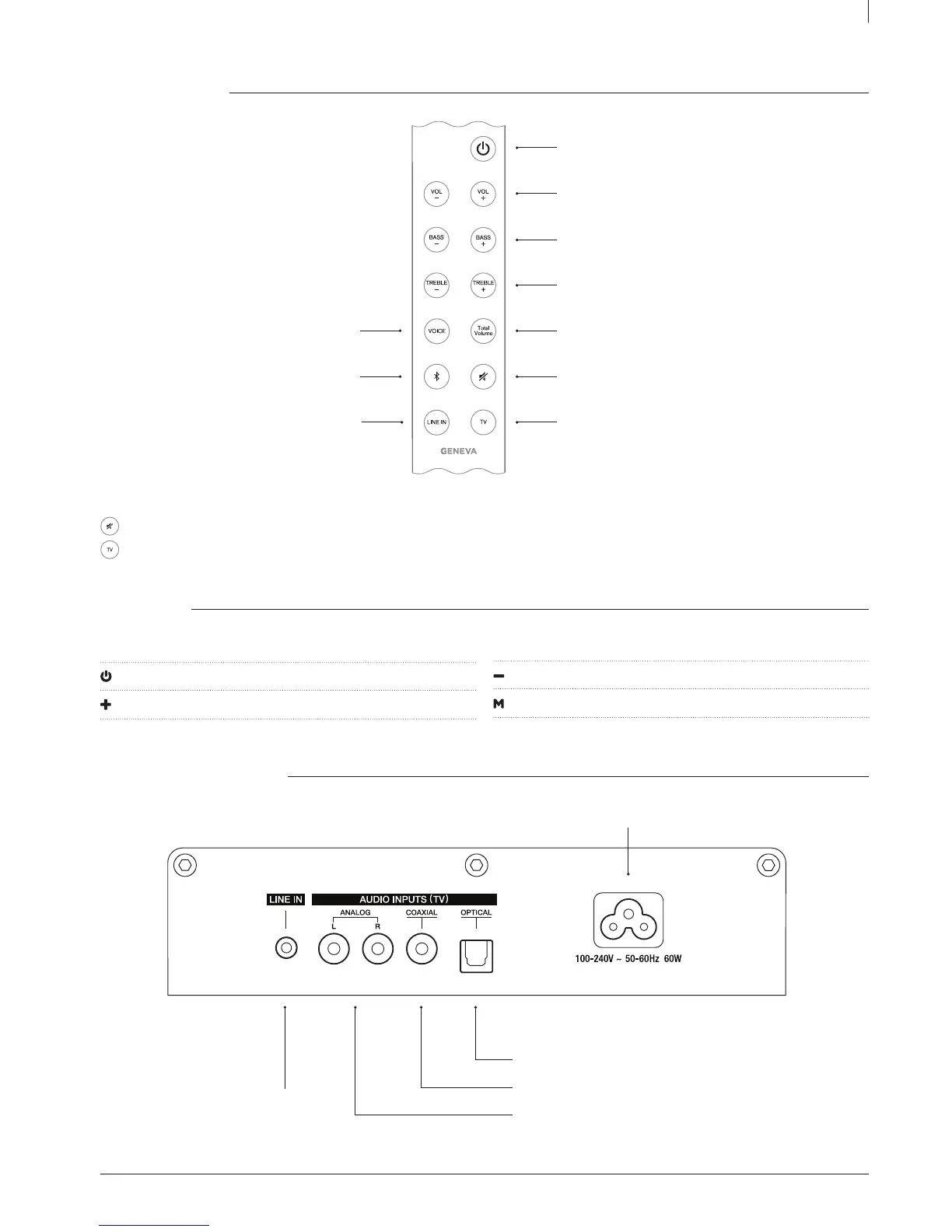
REMOTE CONTROL
Advanced functions ( hold key for 3 sec )
Disable / enable automatic Power On & Auto selection functions.
Selecting TV inputs manually.
TOUCH KEYS
Above the display there are the following touch keys:
Power On / Off
Volume up
Volume down
Change the different audio sources: TV, Bluetooth, Line In
CONNECTORS ON THE BACK
Power On / Off
Volume control
Bass control
Treble control
Total Volume
TM
On / Off
Mute
Audio from TV
Voice Enhancement On / Off
Bluetooth
Line In
AUDIO INPUTS ( TV ):
Optical digital audio input ( TOSLINK / SPDIF )
Coaxial digital audio input ( SPDIF, RCA connector )
Analog audio input ( RCA connectors )
LINE IN:
Analog audio input ( 3.5 mm connector )
AC power input (100 – 240 V AC, 50 / 60 Hz )



 To Next Page