2
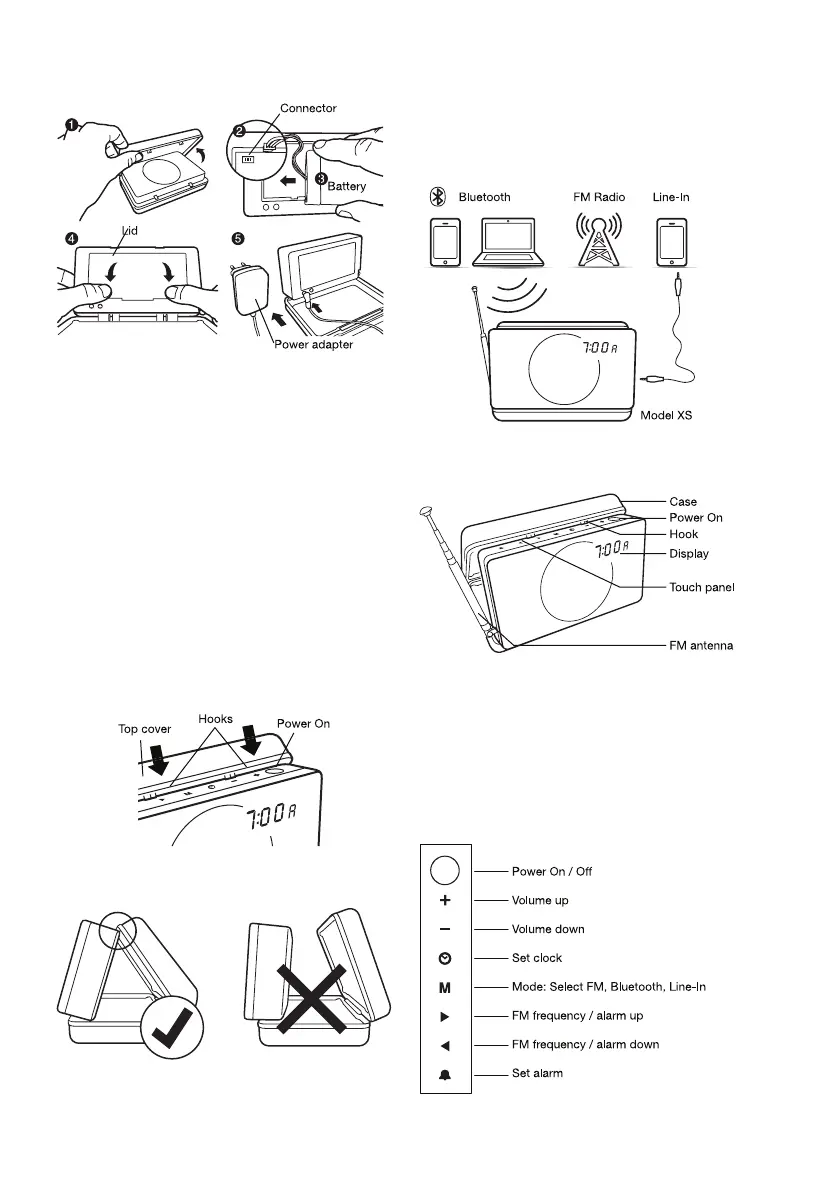
1.OpenthecaseandturnyourModelXSsoyoucan
accessthebatterycompartmentontheback.
2.Plugthebatterycableintothesmallwhiteconnector
intheupperleftcornerofthebatterycompartment.
3.Placethebatteryintothebackcompartment.
Carefullyfoldthecablenexttothebattery.
4.Takethelidandpushituntilitsnapsin.
5.Oncethebatteryisinplace,plugthepower
adaptercordintoyourModelXS(“DC5.5V”).
Formaximumbatterylife,chargethebatteryatleast
8hourscontinuouslywhenusingyourModelXSfor
thersttime.
1.Openthecase.
2.InsertthetwohooksofthetopcoverintotheModelXS.
CorrectpositionTurnsoffautomatically
Youcanplaymusicfromthefollowingsources:
•FMRadio
•MobilephoneorcomputerviaBluetooth
•OtherdeviceswithaLine-Incable
•Poweradapter
•Line-Incable
•Protectivebag
•Usermanual


 To Next Page