English
3
1.Touch untilthedisplayshowsanFM
frequency,forexample“103.2”.
2.SelectanFMstationwith
and :
•Useasingletouch:changefrequencyby0.1MHz.
•Holddownforashorttime:automaticallysearch
foranotherstation.
MobilephonesandcomputerswithBluetoothcan
connecttotheModelXSandplaymusic.Themobile
phoneorcomputermustsupportBluetoothA2DP.
1.Touchthe keyuntilthedisplayshows“Blue”.
Waitfor20secondsuntilthedisplayshowsa
blinking“P”.
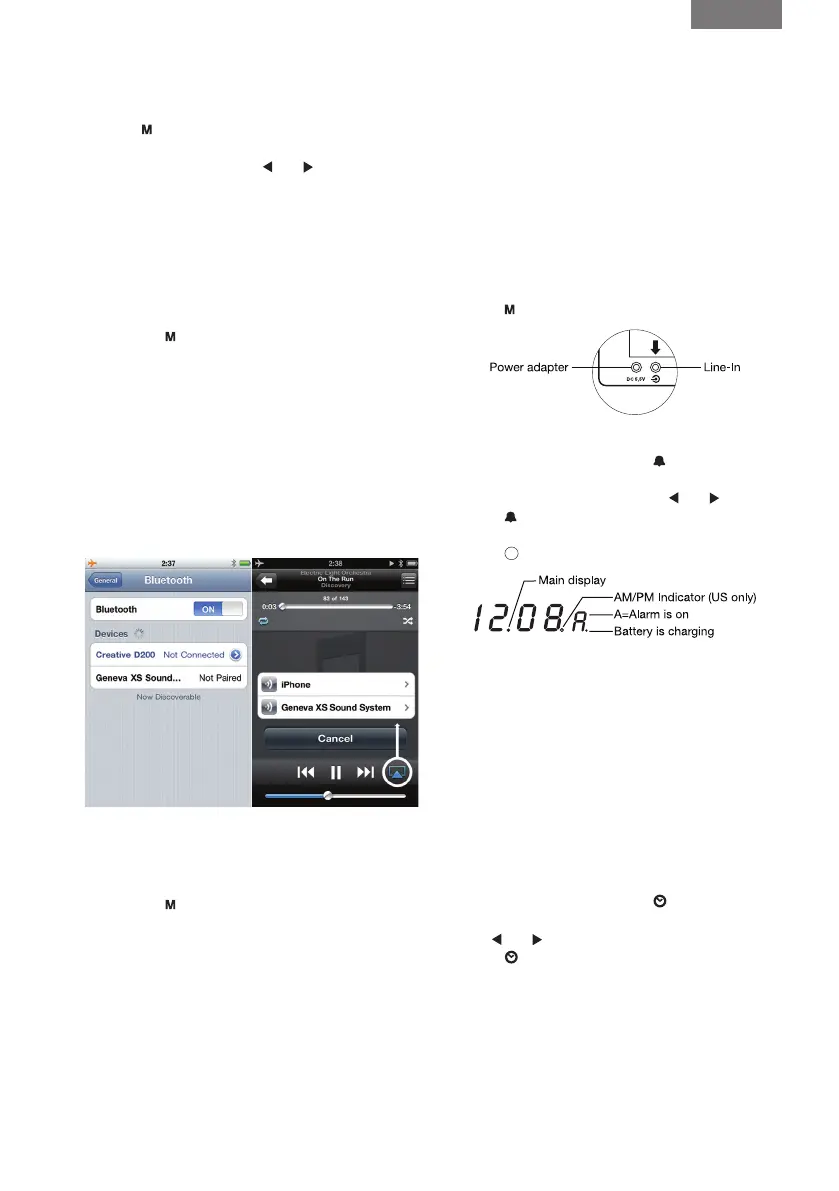
2.Select“settings”onyouriPhone
®
.Select“General/
Bluetooth”.TurnonBluetooth.NewBluetoothdevices
arediscoveredautomatically.Afterafewseconds
“GenevaXSSoundSystem(NotPaired)”willappear.
3.Select“GenevaXSSoundSystem”.Thephoneis
nowconnecting(“pairing”)totheModelXS.
4.IfthephoneasksforaPIN:enter“0000”(fourzeros).
5.NowyoucanplaymusiconaniPhone
®
App
“iPod”andlistentoitontheModelXS.
SettingoniPhone
®
PlayingmusicwithApp“iPod”
MostphonesconnectautomaticallytotheModelXS
aftertheinitialsetup(“pairing”).
1.Touchthe
keyonyourModelXSuntilthedisplay
shows“Blue”.WhenModelXSconnects,thedisplay
shows“C”forafewseconds.
2.Playmusiconthemobilephone,musicwillstart
playingonModelXSautomaticallyafterafewseconds.
Gotowww.genevalab.comandselect“Support.”
Searchingforpreviouslypaireddevices.
Connectionsuccessful.
Pairing.IfModelXSdidnotmakeasuccessful
connectionwithin20seconds,ModelXSwillgo
intothepairingmodefor2minutes.
1.ConnectoneendofthesuppliedLine-Incableto
theaudiodevice(headphoneorLine-Outplug).
2.ConnecttheotherendofthecabletotheLine-In
plugonthebackofModelXS.
3.Touch
untilthedisplayshows”Line”.
1.TurnonModelXS,thentouch :ablinking“A”
appearsonthedisplay.
2.Setthedesiredalarmtimeusing
and .
3.Touch
againtosavethealarmtime.“A”
indicatesalarmisnowon.
4.Touch
toturnModelXSoff.
TurnoffModelXS,thentouchanykeyonthetouch
paneltotogglethealarm.“A”onthedisplayindi-
catesthealarmison.
Touchanykeyonthetouchpaneltomutethealarm.
Thealarmwillautomaticallyturnoffafter20minutes
ifnokeyonthetouchpanelistouched.
Therearetwoalarmsounds:FMradioandabeeping
sound.Ifyousetthealarmandthecurrentmodeis
FM,theFMradiowillplaywhenthealarmgoesoff.
Otherwisethebeepingsoundisused.
1.TurnonModelXS,thentouch
.Theletter“C”
startsblinkingonthedisplay.
2.Use
and tosetthecurrenttime.
3.Touch
tocompletetheprocedure.
Thedottotherightoftheminutedigitsindicates
AMorPM:•Off:AM•On:PM


 To Next Page