Page 2
DIP SWITCH / FIXED CODE PROGRAMMING
DIP SWITCH / FIXED CODE PROGRAMMINGDIP SWITCH / FIXED CODE PROGRAMMING
DIP SWITCH / FIXED CODE PROGRAMMING
If the opener has a group of switches with 3 positions per switch (TRINARY):
Switch in the UP (+) position = press button 1
Switch in the MIDDLE (0) position = press button 2
Switch in the DOWN (-) position = press button 3
In this example, the code would be:
If the opener has a group of switches with 2 positions per switch (BINARY):
Switch in the UP (+) position = press button 1
Switch in the DOWN (-) position = press button 3
In this example, the code would be:
Step 1: Record Switch Positions
Each shaded box below represents a switch position. In these boxes, write in the number 1, 2 or 3 as
it corresponds to the +, 0, or – switch position shown on the remote, opener or receiver. If you have
less than 12 switches, only fill in what you have. You will reference this section in STEP 3.5 below.
Step 2: Determine Specifications
Find your specification from CHART B below and record the number here:
This box should say 1, 2, 3, 4 or 5. You will reference this in STEP 3.3 below.
Step 3: Programming
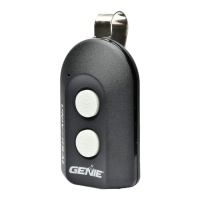
1. Remove activation tab from inside battery compartment.
2. Press and hold down the DELAY button for @10 seconds until only a green LED
lights on the top button - then release. The green LED will continue flashing.
3. Press your DOOR
button of choice the required number of times that corresponds
with your opener from Chart B above (recorded answer from STEP 2).
4. Press the DELAY button one time to signal the entry is complete. The green LED will blink rapidly indicating it is
ready to receive the recorded switch positions from STEP 1.
5. Enter the switch positions that you determined in STEP 1 above (a series of DOOR button presses – 1, 2 or 3).
6. After you have entered the final switch position, press and release the DELAY button ONE time to signal the
entry is complete.
7. Test the button – the next DOOR button press should activate the opener.



 To Next Page
 Loading...