ENGLISH
17
4.7. Start-up
ATTENTION: Cut power before any job on the system or on the operator.
Carefully observe points 10, 11, 12, 13 and 14 of the SAFETY GENERAL RULES.
With reference to the indications in Fig.3, set the ducts and carry out the electrical connections of the control board and of the
chosen accessories.
Always separate power cables from control and safety cables (push button, receiver, photocells, etc.). To avoid any electrical noise
whatever in the unit, use separate sheaths.
1) Power up the system and check the LED condition as shown in the table of the control board instructions.
2) Program the control board according to the needs by following the given instructions.
5. TESTING THE AUTOMATED SYSTEM
• Carefully check operating efficiency of the automated system and of all accessories connected to it, paying special attention
to the safety devices.
• Hand the “User’s Guide” to the final user together with the Maintenance sheet.
• Explain correct operation and use of the automated system to the user.
• Indicate the potentially dangerous areas of the automated system to the user.
6. MANUAL OPERATION
If the automated system needs to be moved manually due to a power lack or to an operator malfunction, proceed as follows:
1) Cut power by means of the safety circuit breaker (even in the event of a power lack).
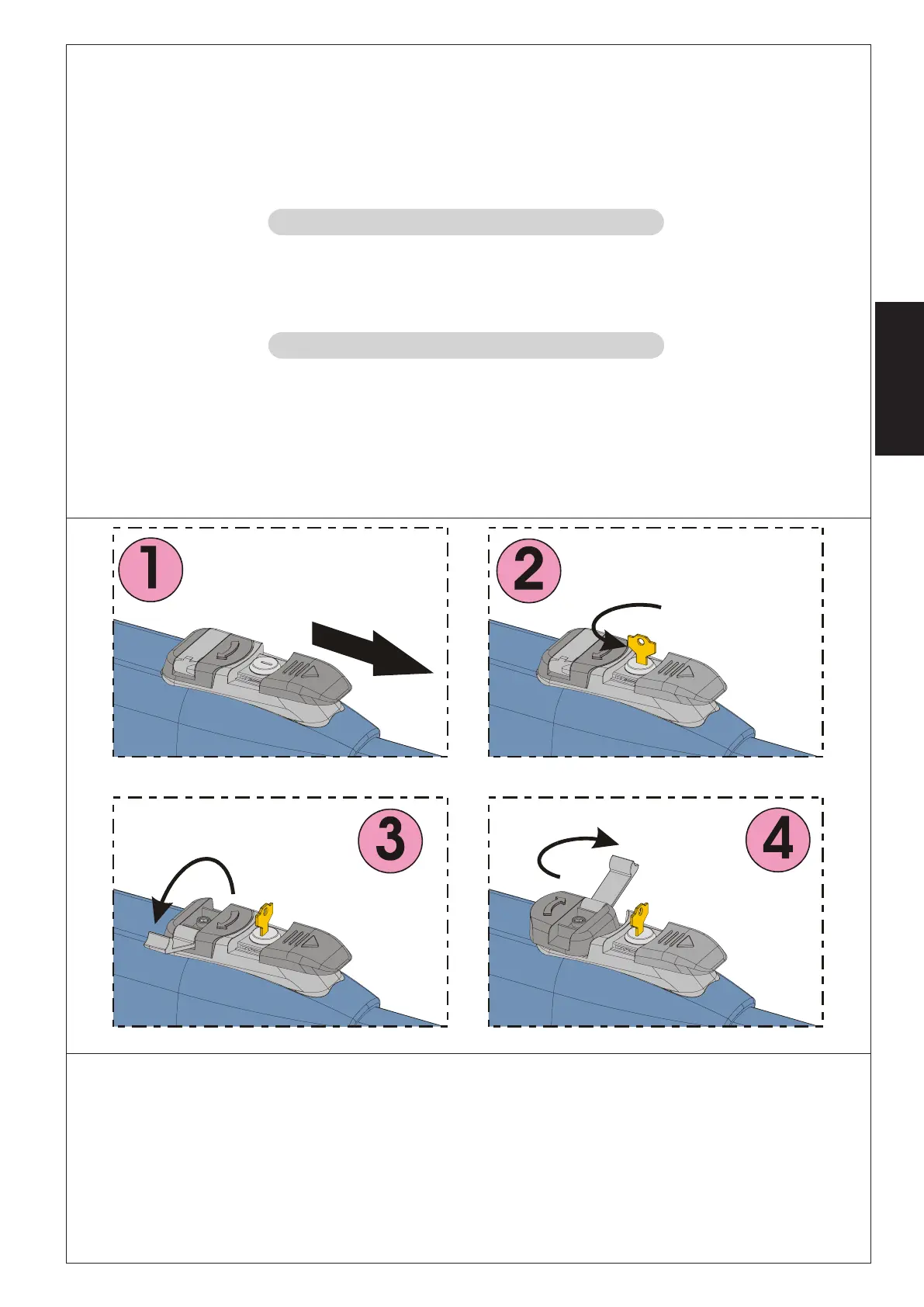
2) Slide the protective cap, Fig.22/1.
3) Insert the key and turn it 90°, Fig.22/2.
4) Lift the control lever, Fig.22/3.
5) To release the operator turn 180° the control lever to the direction indicated by the arrow on the release system, Fig.22/4.
6) Open and close the leaf manually.
Note: To hold the operator in manual operation the release device should be left in its current positions and the system should be
without power.
6.1. Restoring normal operation
To restore normal operating conditions, proceed as follows:
1) Turn the release system 180° in the opposite direction of the arrow.
2) Turn 90° the release key and remove it.
3) Close the control lever and the protection cover.
4) Power up the system and perform some movements in order to check the correct restoring of every function of the automated
system.
Fig. 22





 To Next Page