EasyManua.ls Logo

Gentex ZTVHL3 - User Manual

Default Icon
5 pages
Print Icon
To Next Page IconTo Next Page
Loading...
Automatic–Dimming Mirror
with Z-Nav™ Electronic Compass Display and HomeLink
®
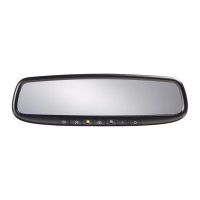
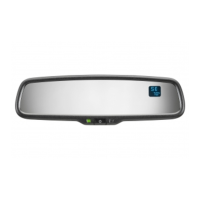
Your new vehicle comes with a Gentex Automatic-Dimming Mirror with a Z-Nav™
Electronic Compass Display and an Integrated HomeLink
®
Wireless Control System.
During nighttime driving, this safety feature will automatically detect and eliminate
dangerous rearview mirror glare while the compass indicates the direction the vehicle is
pointed. The HomeLink
®
Universal Transceiver allows you to activate your garage
door(s), estate gate, home lighting, etc.
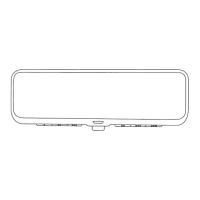
1. Channel 1 Button
2. Channel 2 Button
3. Status Indicator LED
4. Channel 3 Button
5. Rear Light Sensor
6. Dimming On/Off Button
7. Compass Control Button
8. Display Window
Automatic-Dimming Night Vision Safety™ (NVS
®
) Mirror
The NVS
®
Mirror in your vehicle is the most advanced way to eliminate dangerous and
annoying glare in the rearview mirror during any driving situation. For more information
regarding NVS
®
mirrors and other applications, please refer to the Gentex website:
www.gentex.com.
Precautions
The NVS
®
Mirror automatically reduces glare during driving conditions based upon light
levels monitored in front of the vehicle and from the rear of the vehicle. These light
sensors are visible through openings in the front and rear of the mirror case. Any object
that would obstruct either light sensor will degrade the automatic dimming control
feature.
Automatic-Dimming Function
To protect your vision during nighttime driving, your mirror will automatically dim upon
detecting glare from the vehicles traveling behind you. The auto-dimming function can
be controlled by the Dimming ON/OFF Button:
1. Pressing the button turns the auto-dimming function OFF which is indicated by
the green Status Indicator LED turning off.
2. Pressing the button again turns the auto-dimming function ON which is indicated
by the green Status Indicator LED turning on.
Note:
The mirror defaults to the "ON" position each time the vehicle is started.
1
2
4
6
7
3 5
8
Question and Answer IconNeed help?

Do you have a question about the Gentex ZTVHL3 and is the answer not in the manual?

Summary

Automatic-Dimming Night Vision Safety Mirror

Precautions

Obstruction of light sensors degrades automatic dimming control.

Automatic-Dimming Function

Explains how the mirror automatically dims based on light conditions and how to control it.

Z-Nav Compass Display

Compass Function

Details on turning the compass display on/off and its basic operation.

Zone Setting Adjustment

Procedure to determine and set the magnetic zone for accurate compass readings.

Compass Recalibration

Steps to recalibrate the compass due to magnetic field changes.

Integrated HomeLink Wireless Control System

Precautions

Safety warnings and recommendations before programming HomeLink.

Programming Notes

Important notes and recommendations for programming HomeLink devices.

Standard Programming

Step-by-step instructions for training most HomeLink devices.

HomeLink Programming Procedures

Rolling Code Programming

Instructions for programming devices that use rolling code technology.

Gate Operator & Canadian Programming

Specific steps for programming gate operators and Canadian devices.

Operating and Managing HomeLink

Operating HomeLink

How to use the programmed HomeLink buttons to activate devices.

Reprogramming a Single HomeLink Button

Steps to replace a device programmed to a specific HomeLink button.

Erasing HomeLink Buttons

Procedure to erase all programmed HomeLink buttons for security.

Gentex ZTVHL3 Specifications

General IconGeneral
BrandGentex
ModelZTVHL3
CategoryAutomobile Accessories
LanguageEnglish

Related product manuals