14/22
8 / Settings mode (SETTINGS)
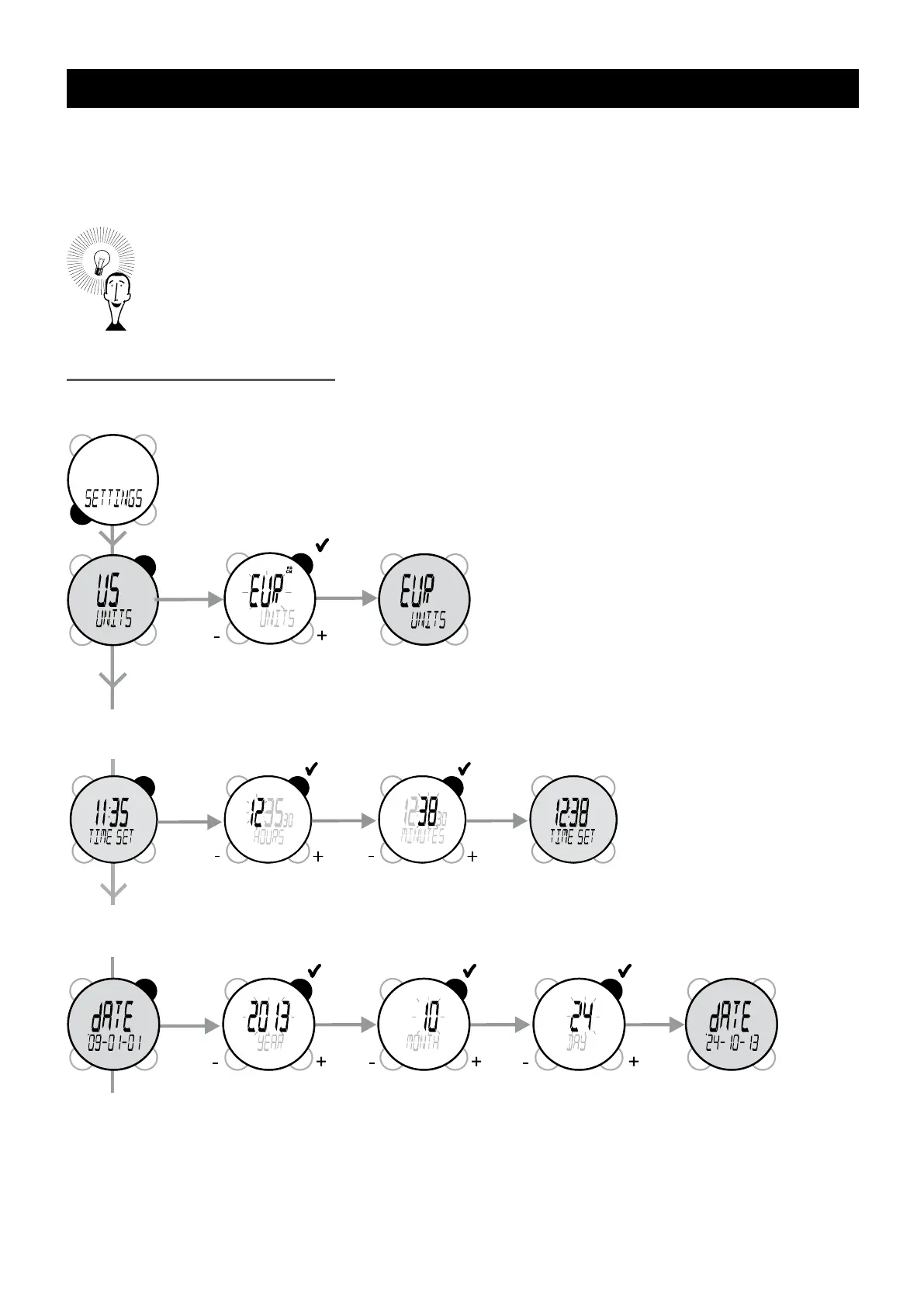
The general principal for adjusting settings is to select the one you wish to change by pressing VIEW several
times, then enter adjustment mode by pressing START/STOP, then increase or decrease the gure by
pressing MODE or VIEW and then validate by pressing START/STOP.
Practical information:
- When setting, the VIEW button increases values, while the MODE
button decreases them.
- For faster setting, you can press down on VIEW or MODE, the values will be scrolled through
faster.
- If no button is pressed for several seconds during settings, the watch automatically exits settings
mode.
The different adjustable settings:
Setting the system of units
VIEW
Setting the time
You can use the watch with Anglo-Saxon units
(weight in pounds, height in inches, time display
in 12 hour mode with AM and PM, and date
in YY-MM-DD order) or with European units
(weight in kg, height in cm, time in 24 hour
display, and date in DD-MM-YY order
Setting the date


 To Next Page