4.4.6.5.Auto-Water Supply
Click“ Auto-Water Supply”into Fig.4.4-31 interface.Press “ ” to start(Fig.4.4-32).If you need to stop halfway, press “ ”
to exit.
WARN:Before starting, please provide enough distilled water and plug in the inlet pipe to the valve.
4.5“SET UP 2” introduction
4.5.
4.5.
4.5.
4.5.
4.5.
4.5.
1. System information
2. Label Printer
3. USB Record
4. MINI-Printer
5. System Setting
6. Cellphone App
4.5.1. System information
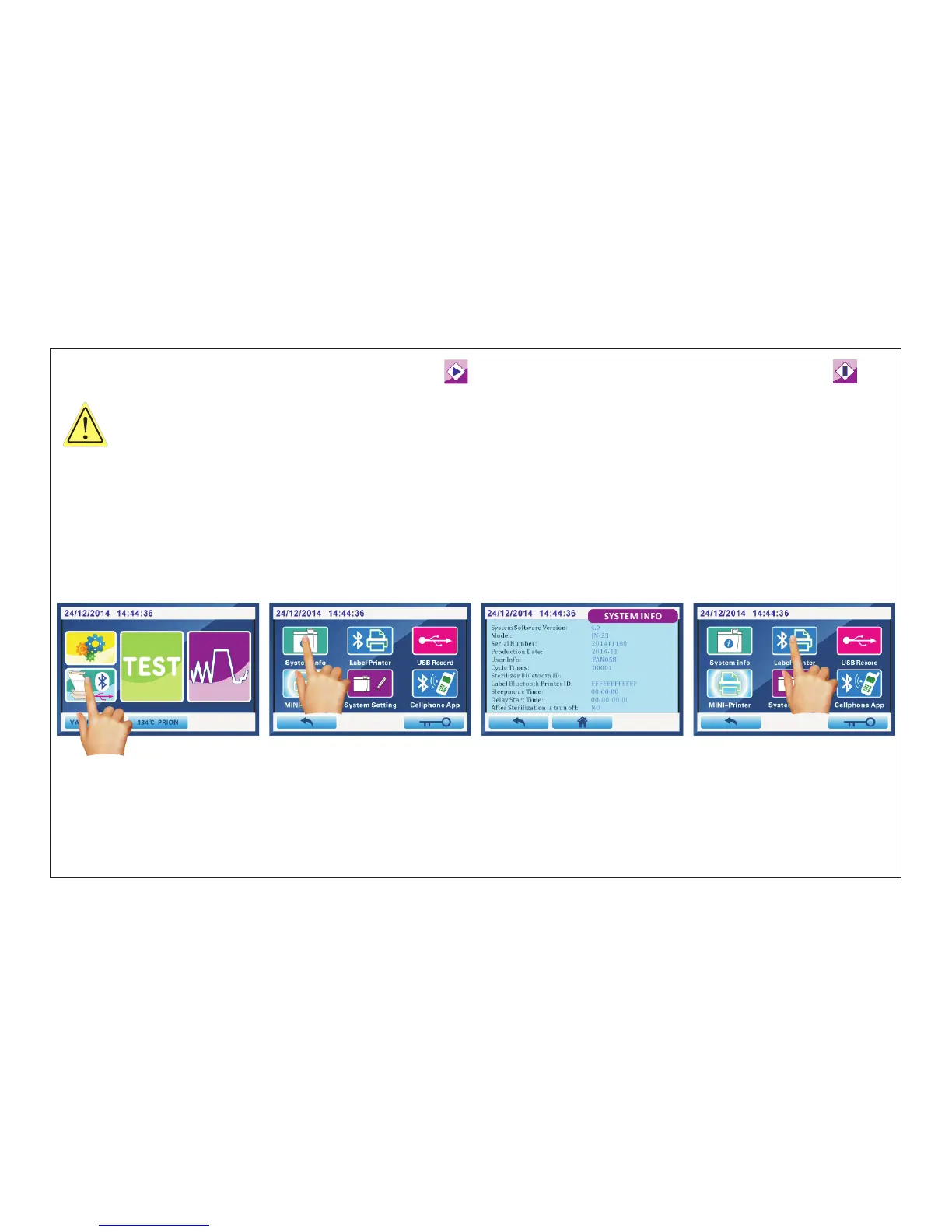
Fig.4.5-1 Fig.4.5-2 Fig.4.5-3 Fig.4.5-4
Click“ system info”into Fig.4.5-3 interface.
You can see the software version/serial number/production date and other information.
Click“SET UP 2”(Fig.4.5-1)into Fig.4.5-2 interface.Select the program you want and click to enter.
4.5.2. Label Printer
Print the label, paste in each package.It is convenient for doctors. to trace back the sterilization information
When the first time you use label printer, you must enter the label printer's Bluetooth ID into the machine.
For details, see Fig.4.5-15 and Fig.4.5-16 of
ATTENTION:
“4.5.5.System Setting”.
Page 23 of 58


 To Next Page