4 5
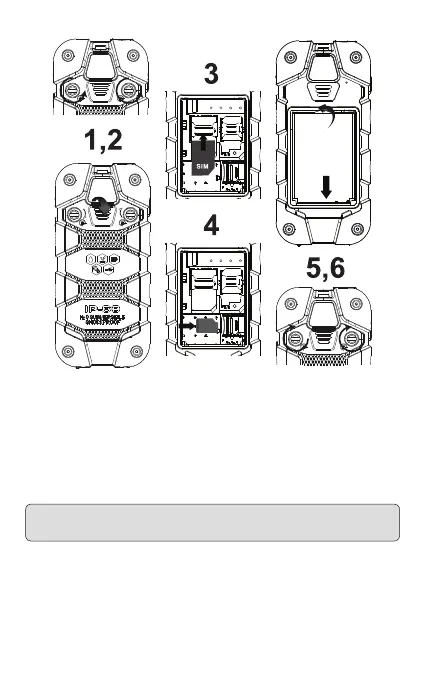
Turn both screws counter-clockwise to release the cover� Remove the cover using
the slot� Insert one or both SIM cards and the memory card into the phone as
demonstrated�
Position the battery lugs, and insert the battery�
Next, position the cover’s lugs in the phone then close it up� While applying pressure
to the cover beneath the screw heads, turn the screws clockwise until resistance
is felt, then turn a quarter length more� The cover must be secure to ensure a
watertight seal� Take care not to over-tighten�
WARNING: Use the Micro SIM card for the SIM1 card slot and the Mini SIM (the
regular SIM card) for the SIM2 card slot�


 To Next Page