2423
8. Care & Cleaning
1
2
1
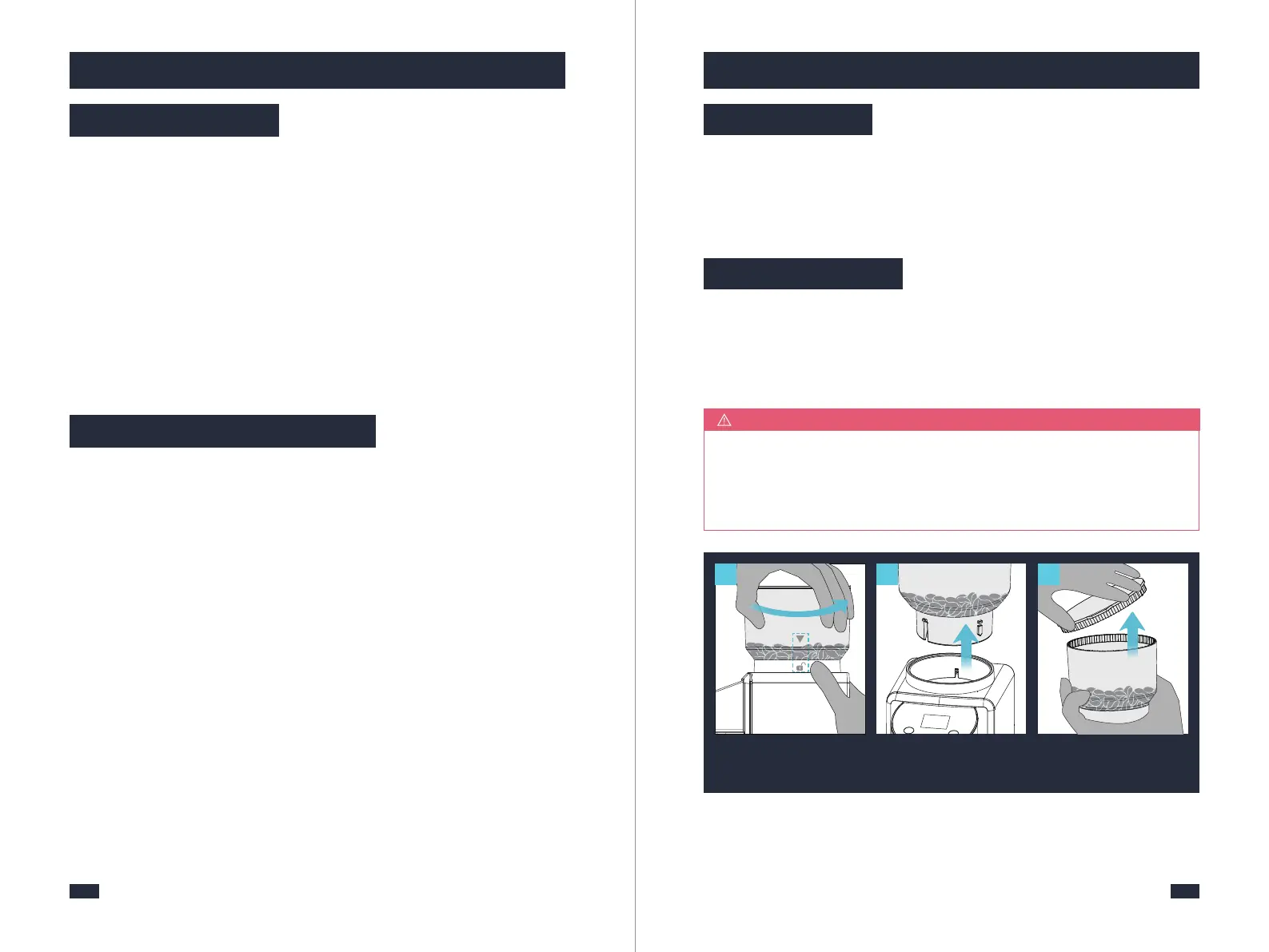
Align
1
Rotate
Hold the bean hopper and
rotate it counterclockwise
until it stops.
Hold the bean hopper by
hand and take it out.
Remove bean hopper
lid
from bean hopper.
3
7. Other Functions
7.2 Switch On/Off
7.3 Overheating Protection
2-Whether it is unplugged or long pressed for 4s, the grinder will switch off. The
grinder has no memory function when the power is unplugged, but long press
for 4s to switch off and can remember the last operation.
1-When it is plugged again into a power outlet, for safety purposes, the machine
will automatically enter safety-lock mode in which the Start/Stop icon will flash.
In this case, long press the Start/Stop icon for 2 seconds to unlock.
1-To protect its motor and increase its lifespan, the grinder will automatically
switch off due to overheating after continuous operation over 3 minutes at a
time.
3-Long press the Start/ Stop icon for 4 seconds to switch it off and after 2 beeps
the three icons will turn off.
4-If it is switched off without unplugging the power, Long press the Start/ Stop
icon for 4 seconds to switch on and start grinding beans.
2-The grinder will not start regardless of any operation until it cools down for
30 minutes.
1-Make sure to unplug grinder from power outlet.
NOTE
Make sure to clean the ground coffee from the Powder Outlet after each use, as
some older coffee dust may be sitting inside your Grinder and will affect the
quality of your next batch. For operation guide, refer to page 14, steps 13-20
in section “6.1 Operation By Cup Mode - Use Powder Chamber”.
8.1 Each Using
If the grinder is used frequently like everyday, dark, oily beans will leave some
oil residue in the feeder channel. Over time this can slow down the flow of
ground coffee, regular cleaning helps the burrs achieve consistent grinding
results, which is especially important when grinding for coffee.
8.2 Weekly Using
2-Do not immerse the grinder in water.
3-Do not use alkaline cleaning agents, abrasives or metal scourers to prevent
damage to the grinder.


 To Next Page