24
PULLTOOPEN
©Ghost Controls 2019
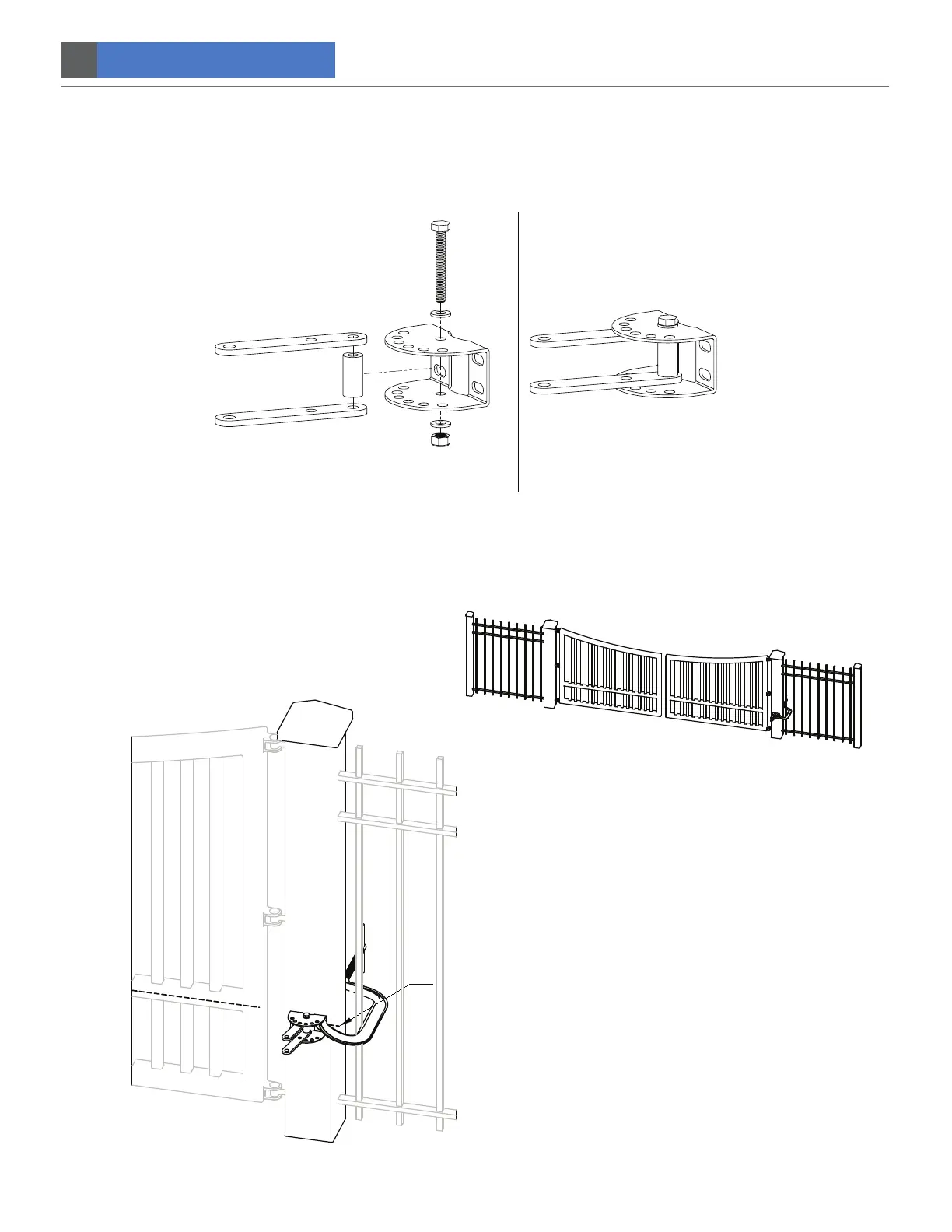
STEP 2. Post bracket pre-assembly.
Insert the M10x1.5x75mm bolt and M10 washer through the hole that is closest to the post on the post bracket. Bolt should
then go through first pivot bracket, pivot spacer, second pivot bracket, and exit bottom hole of post bracket as shown below.
Fasten a M10 washer and M10 locknut on the end of the bolt. DO NOT overtighten the nut because the post bracket may
need to be adjusted later.
STEP 3. Clamp post bracket to post for alignment.
After the post bracket is pre-assembled and the horizontal centerline has been marked on the post as referred to in
STEP 2 and 3, then proceed to CLAMP THE POST BRACKET TO THE MARKED CENTER LINE on the post.
CL


 To Next Page