
 To Next Page
M
Mark SmithJul 28, 2025
What to do if AutoClose feature is not functioning on my Ghost Controls TDS2?
- BBrandy CookJul 28, 2025
If the AutoClose feature isn't working, make sure the gate is completely open and then verify the AutoClose settings.

What to do if AutoClose feature is not functioning on my Ghost Controls TDS2?
If the AutoClose feature isn't working, make sure the gate is completely open and then verify the AutoClose settings.
Why is the battery condition LED yellow on my Ghost Controls TDS2 Gate Opener?
A yellow battery condition LED indicates that you should replace or recharge the battery.
Essential information and checks prior to system installation.
Diagram illustrating accessory placement and system configuration.
Instructions and form for registering your gate opener system.
Details on operating voltage, current, stroke, speed, and temperature.
Critical warnings for safe installation, operation, and user interaction.
Information on safety standards and entrapment zone prevention.
Ensuring the gate is properly prepared for automation.
Guidance on choosing the optimal location for operator mounting.
List of tools necessary for installing the gate opener.
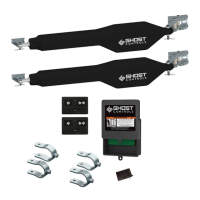
Components included in the kit for the first gate operator.
Components included in the kit for the second gate operator.
Steps for mounting the gate operator arm to the post and gate.
Installing the control box, battery, and connecting operator cables.
Configuring DIP switches, testing controls, and system settings.
Attaching front mount brackets and programming gate limits.
Setting the desired closed position for the gate.
Instructions for connecting the AC transformer for power.
Instructions for connecting a solar panel for power.
Adjusting the duration the gate remains open.
Procedure to disable the automatic closing feature.
Steps for mounting the operator arm to the post and gate.
Installing the control box, battery, and connecting operator cables.
Configuring DIP switches, testing controls, and system settings.
Attaching front mount brackets and programming gate limits.
Setting the desired open position for the gate.
Steps for preparing the control box for accessory connections.
Connecting cycle, open, and reverse inputs for devices.
Procedure to manually open or close the gate.
Overview of remote controls, keypads, and mounting options.
Details on solar panels, battery kits, and gate locks.
Information on vehicle sensors, push buttons, and photo eyes.
 General
| Power Supply | 12V DC |
|---|---|
| Max Gate Weight | 850 lbs |
| Battery Backup | Yes |
| Solar Compatible | Yes |
| Motor Type | DC Motor |
| Number of Remotes | 2 |
| Weather Resistance | Yes |
| Battery | Not included |
| Operating Voltage | 12V |
| Opening Speed | Adjustable |
| Closing Speed | Adjustable |
| Safety Features | Obstruction Sensing |
| Max Gate Length | 20 feet |