35
PULL-TO-OPEN
©Ghost Controls
®
2021
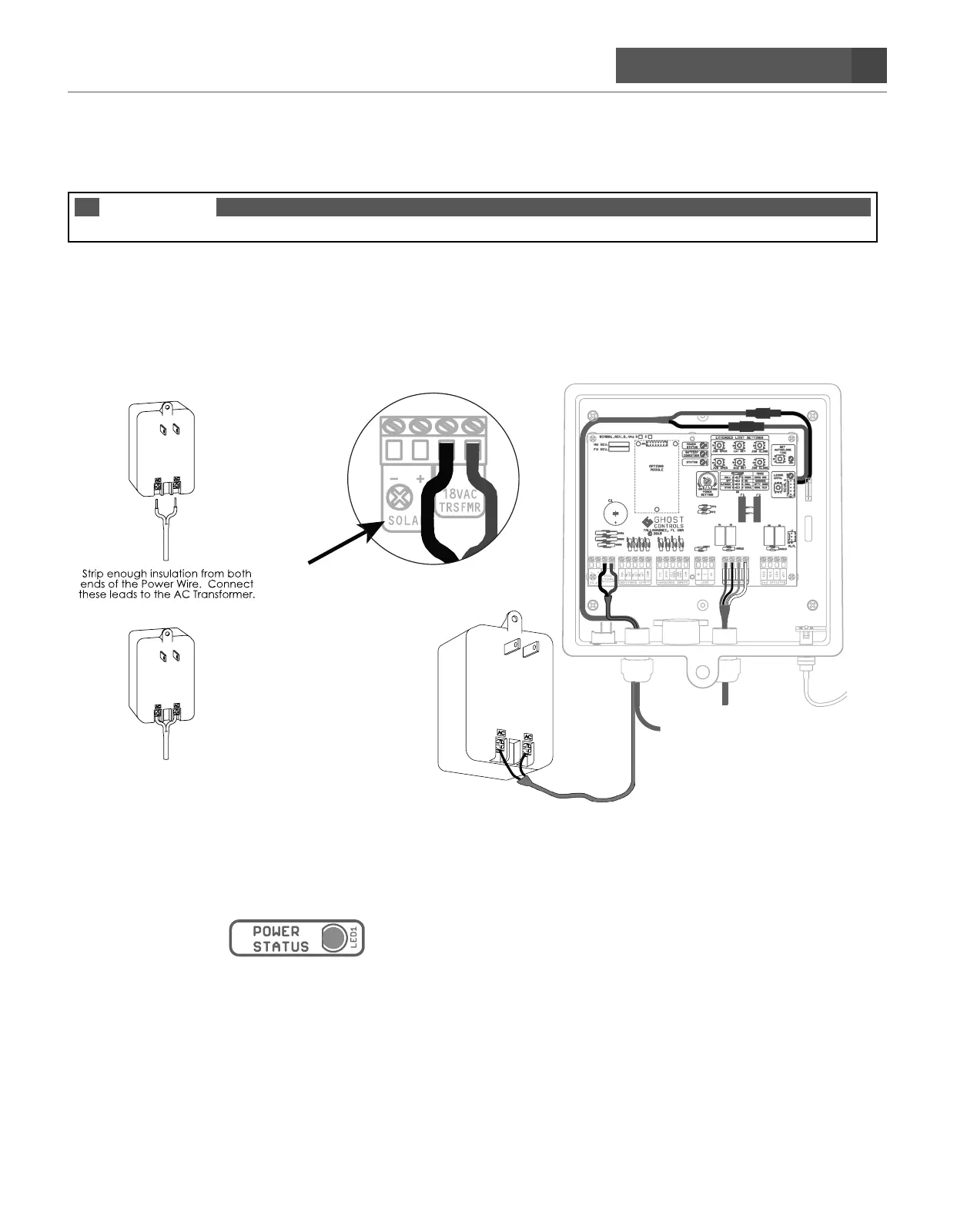
POWERING THE SYSTEM WITH THE AC TRANSFORMER
*You will need 16 gauge stranded low voltage, two-conductor wire to connect the transformer to the control board.
NOTE
DO NOT USE THE AC TRANSFORMER AND SOLAR POWER AT THE SAME TIME!
STEP 21. Route the AC transformer cable into the control box.
A. When wiring the AC Transformer you will need to insert the AC wires into the 18VAC TRSFMR SCREW
TERMINALS which are located on the PWR INPUT section of the main control board. Once inserted then
tighten each screw so that the wires do not come loose and fall out. The transformer is not polarity sensitive
so either wire can go to either transformer terminal. The left terminal will not be used. Do not plug in the
transformer during this step.
B. Connect AC Transformer to outdoor outlet. Make sure you connect AC Transformer wires to control board
prior to plugging in AC Transformer into weatherproof outdoor outlet.
C. Check that green LED (Power status) on top center of control board is on. This indicates that the battery is
being charged.
DO NOT PLUG IN THE AC
TRANSFORMER DURING THIS STEP.
DO NOT USE this terminal
if using AC Transformer
Black
Battery Harness
Operator Arm
Red


 To Next Page