Need help?
Do you have a question about the Ghost Casper and is the answer not in the manual?
General safety and connection guidelines for the unit, conforming to European directives.
Critical precautions for safe installation, operation, and maintenance to prevent damage or injury.
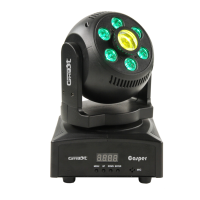
Description of the Casper moving head's features, design, and versatility.
Explanation of MENU, UP, DOWN, and ENTER button functions for device control.
Configuring DMX address, pan inversion, and tilt inversion.
Setting auto modes, sound sensitivity, and performing a projector reset.
Instructions for DMX and mains electrical connections, including cable requirements.
Detailed breakdown of DMX channels 1-7 and their functions, including color wheel effects.
Details DMX channels for gobo wheel, wash effects, and special functions like reset/sound mode.
Procedures for fuse replacement and cleaning the device for optimal performance.

 To Next Page
 General