
 Need help?
Do you have a question about the GIGA-BYTE TECHNOLOGY Z790 AERO G and is the answer not in the manual?
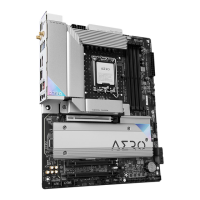
Overview of motherboard components and their placement.
Visual representation of motherboard components and their interconnections.
List of items included in the product package.
Important safety and preparation guidelines before installing hardware.
Detailed technical specifications of the motherboard and its components.
Step-by-step guide for installing the CPU and its cooling solution.
Instructions for installing RAM modules, including dual-channel configuration.
Guide to installing expansion cards like GPUs or other peripherals.
Detailed description of ports and connectors located on the motherboard's back panel.
Explanation of motherboard's onboard buttons and status indicator LEDs.
Identifies and explains various internal connectors on the motherboard.
Procedures for updating the BIOS using Q-Flash and Q-Flash Plus utilities.
Steps for installing the operating system, including necessary drivers.
Guide to installing system drivers and GIGABYTE applications using GCC.
Instructions and information on setting up RAID arrays on the motherboard.
Link and instructions for submitting technical or sales inquiries to GIGABYTE.
 General
| Socket | LGA 1700 |
|---|---|
| Chipset | Intel Z790 |
| Form Factor | ATX |
| Memory Type | DDR5 |
| Memory Slots | 4 |
| Max Memory Capacity | 128 GB |
| PCIe x1 Slots | 2 |
| Wi-Fi | Wi-Fi 6E |
| Storage Interfaces | 6 x SATA 6Gb/s, 4 x M.2 |
| Bluetooth | Bluetooth 5.2 |
| Audio | Realtek ALC4080 |
| RGB Headers | 2 x addressable LED, 2 x RGB LED |
| USB Ports | 1 x USB 3.2 Gen2x2 Type-C, 1 x USB 3.2 Gen2 Type-C, 5 x USB 3.2 Gen1, 4 x USB 2.0 |
| LAN | 2.5GbE |






 To Next Page