
 Need help?
Do you have a question about the Gigabyte A520M K and is the answer not in the manual?
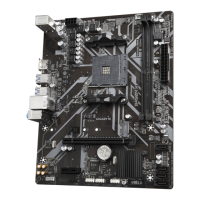
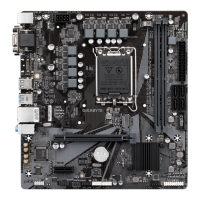
Diagram showing the physical arrangement of motherboard components and connectors.
Lists the items included in the product packaging.
Safety guidelines and warnings to follow before and during hardware installation.
Step-by-step guide and precautions for installing the CPU onto the motherboard socket.
Instructions and guidelines for installing RAM modules into the motherboard's memory slots.
Procedure for installing expansion cards like graphics cards or network cards into PCI-e slots.
Steps for installing the operating system, including driver loading if necessary.
Instructions for setting up RAID arrays using SATA hard drives or SSDs.
This document serves as the User's Manual for the GIGABYTE A520M K motherboard, revision 1001. It provides comprehensive instructions for hardware installation, BIOS setup, operating system installation, and driver installation, along with regulatory notices and contact information.
The GIGABYTE A520M K motherboard is designed to be the central component of a computer system, facilitating communication and power distribution among various hardware components. Its primary function is to provide a platform for the CPU, memory, storage devices, and expansion cards to interact, enabling the computer to perform its tasks. The motherboard supports AMD Ryzen™ 5000 Series, 5000 G-Series, 4000 G-Series, and 2000 Series Processors, making it suitable for a range of computing needs from everyday use to more demanding applications. It features an AMD A520 chipset, which manages data flow between the CPU and other components.
Key usage features of the A520M K motherboard include its support for dual-channel DDR4 memory, allowing for efficient data processing and multitasking. The motherboard is equipped with an HDMI port for integrated graphics output, supporting high resolutions and modern display technologies like HDCP 2.3 and HDR. This makes it suitable for systems intended for multimedia consumption or light gaming without the need for a dedicated graphics card. For network connectivity, it includes a Realtek® GbE LAN chip, providing reliable Gigabit Ethernet for internet access and local network communication.
The motherboard offers various expansion slots, including a PCI Express x16 slot for graphics cards and a PCI Express x1 slot for other expansion cards, allowing users to customize their system with additional functionalities. Storage options are robust, with an M.2 connector supporting both SATA and PCIe SSDs, as well as multiple SATA 6Gb/s connectors for traditional hard drives and SSDs. The M.2 connector also supports RAID configurations, offering enhanced data redundancy or performance. USB connectivity is extensive, with USB 3.2 Gen 1 ports on the back panel and internal headers, along with USB 2.0/1.1 ports, ensuring compatibility with a wide range of peripherals.
Internal connectors are thoughtfully laid out, including a 24-pin ATX main power connector and an 8-pin ATX 12V power connector for stable power delivery. Fan headers (CPU_FAN and SYS_FAN1) are provided for cooling solutions, with support for fan speed control to optimize thermal performance and noise levels. Other internal headers include front panel audio, front panel control (power switch, reset switch, power LED, hard drive activity LED), and a Trusted Platform Module (TPM) header for enhanced security features.
The BIOS setup is a critical usage feature, allowing users to configure basic system settings, manage boot options, and activate various system features. The manual guides users on how to access the BIOS Setup program and highlights the Q-Flash and @BIOS utilities for convenient BIOS updates. These utilities simplify the process of keeping the motherboard's firmware current, which can improve system stability and compatibility.
For operating system installation, the manual provides detailed steps, especially for scenarios requiring additional RAID drivers. It emphasizes the importance of installing all required drivers and GIGABYTE applications via the APP Center after OS installation to ensure optimal system performance and compatibility. The APP Center is a central hub for managing drivers and utilities, making it easier for users to maintain their system.
Maintenance features are also covered, particularly regarding the BIOS and battery. The manual advises users on how to clear CMOS values by removing the battery, which can resolve system boot issues caused by incorrect BIOS settings. It also provides guidelines for replacing the battery, emphasizing the importance of using an equivalent one and noting the correct orientation.
The document also includes important installation precautions, such as always removing AC power before handling components, avoiding contact with metal leads, and wearing an electrostatic discharge (ESD) wrist strap. These precautions are crucial for preventing damage to the delicate electronic circuits and components of the motherboard. The manual also provides guidance on connecting various cables and devices, ensuring secure and correct connections to prevent electrical shorts or damage.
Overall, the GIGABYTE A520M K motherboard is presented as a versatile and user-friendly platform, designed with a focus on ease of installation, comprehensive connectivity, and robust performance for a variety of computing applications. The manual serves as an essential resource for users to effectively set up, configure, and maintain their system.
 General
| Processor manufacturer | AMD |
|---|---|
| Compatible processor series | AMD Ryzen 3 3rd Gen, AMD Ryzen 5 3rd Gen, AMD Ryzen 7 3rd Gen, AMD Ryzen 9 3rd Gen, AMD Ryzen Threadripper 3rd Gen, AMD Ryzen Threadripper Pro 3rd Gen |
| Supported processor sockets | Socket AM4 |
| Maximum internal memory supported by processor | 64 GB |
| ECC | Yes |
| Memory channels | Dual-channel |
| Memory slots type | DIMM |
| Number of memory slots | 2 |
| Supported memory types | DDR4-SDRAM |
| Supported memory clock speeds | 2133, 2400, 2667, 2933, 3200, 3333, 3600, 4000, 4600, 4866, 5000 MHz |
| Supported memory module capacities | 1GB, 2GB, 4GB, 8GB, 16GB, 32GB |
| Wi-Fi | No |
| Ethernet interface type | Gigabit Ethernet |
| Number of SATA III connectors | 4 |
| Number of Parallel ATA connectors | 0 |
| USB 3.2 Gen 1 (3.1 Gen 1) connectors | 1 |
| USB connector type | USB Type-A |
| USB 2.0 ports quantity | USB 2.0 ports have a data transmission speed of 480 Mbps, and are backwards compatible with USB 1.1 ports. You can connect all kinds of peripheral devices to them. |
| RAID levels | 0, 1, 10 |
| Supported storage drive types | HDD & SSD |
| Supported storage drive interfaces | M.2, PCI Express 3.0, SATA III |
| Cables included | SATA |
| Bundled software | Norton® Internet Security (OEM version) LAN bandwidth management software |
| BIOS type | UEFI AMI |
| ACPI version | 5.0 |
| BIOS memory size | 128 Mbit |
| Desktop Management Interface (DMI) version | 2.7 |
| Maximum resolution | 4096 x 2160 pixels |
| Parallel processing technology support | - |
| Audio chip | Realtek ALC887 |
| Cooling type | Active |
| Component for | PC |
| Power source type | ATX |
| Motherboard chipset | AMD A520 |
| PC health monitoring | CPU, FAN, LED, Power supply, Temperature, Voltage |
| Audio output channels | 7.1 channels |
| Motherboard form factor | micro ATX |
| Windows operating systems supported | Windows 10 x64 |
 Weight and Dimensions
| Depth | 198 mm |
|---|---|
| Width | 233 mm |


 To Next Page