4
Lombok A150-A150A-A250-A250A / BE-NL en / A31008-M2702-M201-1-3F19 / Lombok.fm / 22.08.2016
Version 4, 16.09.2005
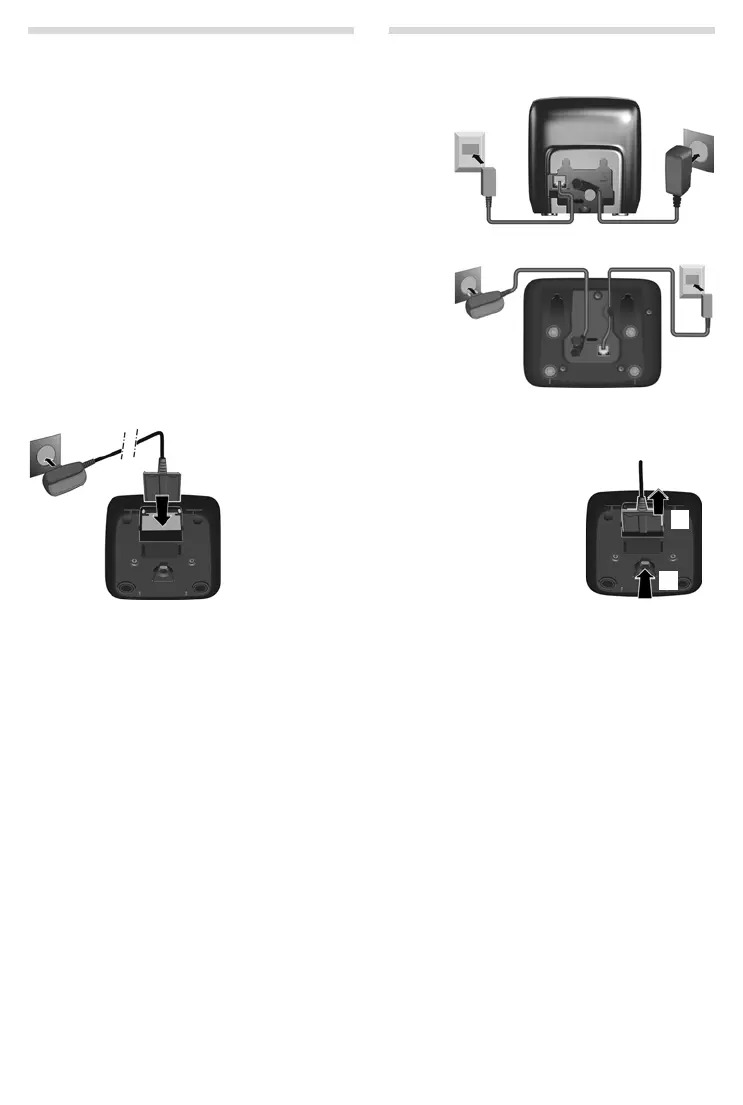
Connecting the base station
Connecting the charging cradle (if included)
¤ First connect the mains adapter 1.
¤ Then connect the telephone jack 2 and insert the cables into the
cable ducts.
Please note:
◆ The mains adapter must always be connected, as the phone will not
operate without mains connection.
◆ Use only the mains adapter and phone cord supplied. Pin connec-
tions on telephone cables can vary.
◆ The answer machine (A150A/A250A only) is ready for use approx.
30 seconds after the base has been connected.
¤ Connect the flat plug to the power
supply
1.
¤ Plug the mains adapter into the plug
socket
2.
If you need to disconnect
the plug from the charg-
ing cradle, press the
release button
3 and
disconnect the plug
4.
1
2
3
4



 To Next Page