Lombok / Australien_Neuseeland / A31008-M2401-C401-1-7619 / Lombok.fm / 26.03.2012
Version 4, 16.09.2005
3
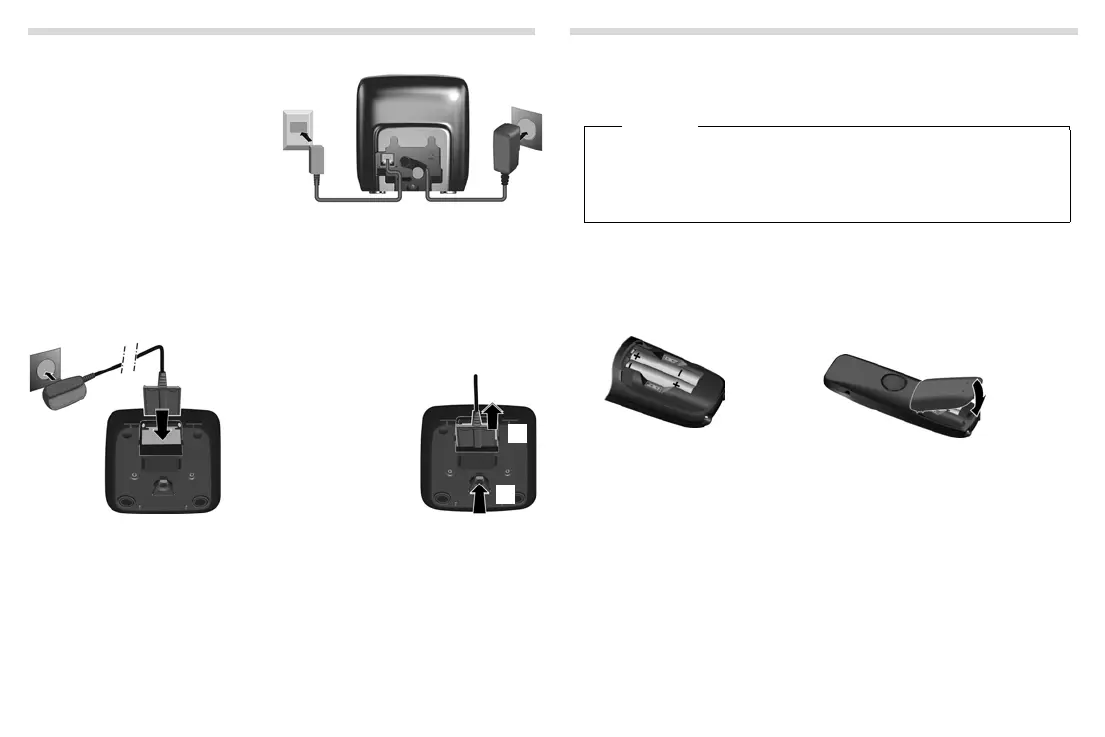
Connecting the base station
¤ First connect the mains adapter
1.
¤ Then connect the telephone
jack
2 and insert the cables
into the cable ducts.
Please note:
◆ The mains adapter must always
be connected, as the phone will
not operate without mains con-
nection.
◆ Use only the mains adapter and phone cord supplied. Pin connections on tele-
phone cables can vary.
◆ The answering machine (A220A only) is ready for use approx. 30 seconds after the
base has been connected.
Connecting the charging cradle (if included)
¤ Connect the flat plug to the power
supply
1.
¤ Plug the mains adapter into the plug
socket
2.
If you need to disconnect
the plug from the charg-
ing cradle, press the
release button
3 and
disconnect the plug
4.
1
2
3
4
Setting up the handset for use
The display is protected by a plastic film. Please remove the protective film!
Inserting the batteries and closing the battery cover
Warning
Use only the rechargeable batteries recommended by Gigaset Communications
GmbH (
¢ page 13), i.e. never use conventional (non-rechargeable) batteries as
this could result in significant health risks and personal injury. For example, the
batt
eries could explode. The phone could also malfunction or be damaged as a
result of using batteries that are not of the recommended type.
¤ Insert the batteries with
the polarity in the correct
direction.
The polarity is indicated in the
battery compartment.
¤ First insert the battery cover at the top a.
¤ Then press the cover b until it clicks into
place.
¤ To reopen the battery cover, grip into the
cavity on the casing, then pull the battery
cover in an upward direction.
a
b


 To Next Page