This document describes the Gigaset AL110/AL110A cordless telephone, covering its functions, technical specifications, usage, and maintenance.
Handset Overview
The handset features a display for information such as charge status, date, time, and menu options. Key components include:
- Charge status indicator (1): Displays the battery level.
- Answer machine icon (2): (AL110A only) Indicates new messages.
- Display keys (3): Context-sensitive keys whose functions are shown on the display.
- Message key (4): Flashes to indicate new messages in the calls list or answer machine list.
- Directory key (5): Accesses the phone's directory.
- Control key (6): Used for navigation and adjusting settings (up/down/left/right).
- Talk key (7): Initiates or accepts calls.
- End call key/On/Off key (8): Ends calls or switches the handset on/off (press and hold).
- Ringer tone on/off (9): Toggles the ringer (press and hold in idle status).
- Keypad lock on/off (10): Locks/unlocks the keypad (press and hold).
- Recall key (11): Used for consultation calls (flash) or dialling pauses (press and hold).
- Microphone (12): Captures audio during calls.
- "Microphone off" key (13): Mutes the microphone during a call.
The display shows the date, time, and internal handset number (if multiple handsets are registered). A flashing display indicates new messages in the calls list, answer machine, or network mailbox.
Display Key Functions
- INT: Calls other registered handsets.
- MENU: Opens the main/submenu, providing access to various settings and features (see Menu tree on page 15).
- Back arrow: Goes back one menu level.
- Up/Down arrows: Scrolls up/down or adjusts volume.
- Left/Right arrows: Moves the cursor left/right.
- C (Backspace): Deletes one character at a time.
- OK: Confirms menu functions or saves entries.
ECO DECT Features
The Gigaset AL110/AL110A incorporates ECO DECT technology for environmental protection:
- Reduced energy consumption: Uses an energy-saving adapter plug and less power.
- Reduced transmission power: Automatically adjusts handset transmission power based on distance to the base station. If only one handset is registered and in the base station, base station transmission power is reduced to nearly zero.
- Eco Mode: Reduces transmission power by 80% in standby and during calls, though this reduces the base station's range.
- Eco Mode+: Deactivates transmission power by 100% in standby mode (indicated by the top-left display icon). The talk key can be pressed and held to check if the base station is reachable.
Safety Precautions
- Mains unit: Only use the supplied mains unit.
- Batteries: Use only recommended rechargeable Nickel-metal-hydride (NiMH) batteries (V30145-K1310-X383). Conventional batteries can cause health risks or damage.
- Medical appliances: Be aware of potential interference with medical devices.
- Hearing: Avoid holding the rear of the handset to your ear when it rings to prevent hearing damage. The handset may cause humming in hearing aids.
- Environment: Do not install in bathrooms or shower rooms (not splashproof). Avoid environments with explosion hazards (e.g., paint shops).
- User guide: Provide the user guide if the phone is given to someone else.
- Faulty base stations: Remove faulty base stations from use or have them repaired to prevent interference with other wireless services.
- Emergency numbers: Cannot be dialled if the keypad lock is active.
Care and Maintenance
- Cleaning: Wipe the base station, charging cradle, and handset with a damp cloth (no solvents) or an antistatic cloth. Avoid dry cloths to prevent static.
- Liquid contact: If the handset comes into contact with liquid, immediately switch off, remove the battery pack, drain liquid, pat dry, and place in a dry, warm place for at least 72 hours (not in a microwave or oven). Do not switch on until completely dry.
First Steps
- Pack contents: Includes Gigaset AL110/AL110A base station, mains adapter, Gigaset AL110H handset, phone cord, battery pack, battery cover, and user guide. Additional handsets come with their own battery pack, cover, and charging cradle.
- Base station setup: Designed for dry rooms (+5 °C to +45 °C). Place centrally on a flat, non-slip surface. Can be wall-mounted.
- Connections: Connect the mains adapter (1) and phone jack (2) to the base station, routing cables through ducts. Only use supplied components. The mains adapter must always be connected.
- Charging cradle setup (if included): Connect the flat plug from the power supply (1) to the plug socket (2). To disconnect, press the release button (3) and pull the plug (4).
- Handset setup: Remove the protective plastic film from the display.
- Battery insertion: Place battery leads in lead guides. Insert the plug into the socket, then the battery pack. Place the cover on the battery compartment and slide up until it clicks. To open, press down on the cover below its upper end and slide down.
- Initial charging: Place the handset in the base/charging cradle for 7 hours. Then remove and do not replace until fully discharged. This ensures correct charge level display. After the first cycle, the handset can be returned to the cradle after every call. Repeat if batteries are removed and reinserted. Batteries may warm up during charging.
- Date and time: Set date and time (MENU → Settings → OK → Date/Time → OK) for accurate call logging and alarm functionality. Use the control button to move the cursor when entering.
Idle Status Display
Once registered and time set, the idle display shows:
- Date and time (e.g., 11.12. 11:56).
- Charge status (flat to full, flashing if almost flat or charging).
- Internal handset number (e.g., 2) if multiple handsets are registered.
- Eco Mode+ icon ( ) if activated.
- Answer machine icon ( ) (AL110A) if activated, indicating a pre-recorded announcement.
Activating/Deactivating Handset
Press and hold the End call key (8) to activate or deactivate the handset. Placing a deactivated handset in the base station or charging cradle will automatically activate it.
Making Calls
- External calls: Enter the phone number and press the Talk key (7). Alternatively, press and hold the Talk key for a dial tone before entering the number. Adjust earpiece volume with the control key during a call. End calls with the End call key (8). A network provider dialling code can be automatically inserted (see Menu tree "Preselection" on page 16).
- Accepting calls: The handset rings and displays the incoming call. Press the Talk key (7) to accept. If "Auto Answer" is active, simply remove the handset from the cradle. Adjust call volume in idle status using the control key.
- Calling Line Identification (CLIP): Displays the caller's number (and name if stored in the directory). Requires network provider activation of CLIP for your line and CLI for the caller's number. "<<" appears if CLIP is not requested, "Withheld" if CLI is withheld, and "Unavailable" if CLI is not requested.
- Muting: During external calls, press the "Microphone off" key (13) to mute/unmute your handset.
Directory and Lists
-
Directory: Open with the Directory key (5). Stores up to 40 numbers (max. 32 digits) with names (max. 14 characters).
- Saving: "New Entry?" → OK → (enter number) → OK → (enter name) → OK.
- Selecting: Scroll with up/down arrows or enter the first character of the name.
- Dialling: Select an entry and press the Talk key (7).
- Other functions (MENU): Save new number, display number, edit/add number, delete entry, send entry to another handset (p. 8), delete all entries, assign to shortcut key.
- Shortcut keys: Assign directory entries to keys 0 and 2–9. Press and hold the shortcut key to dial.
-
Last number redial list: Stores the ten last dialled numbers.
- Dialling: Press the Talk key briefly, then select an entry and press the Talk key.
- Managing entries (MENU): Edit/add number, copy to directory, delete entry, delete all entries.
-
Calls list/Answer machine (network mailbox) list: The Message key (4) flashes and an advisory tone sounds for new entries. Pressing the Message key displays all lists; if only one has new messages, it opens automatically.
- Calls list: Requires CLIP (p. 7). Contains answered, missed, or answer machine recorded calls (AL110A). Stores up to 25 incoming calls or just missed calls, depending on settings (p. 16).
- Display: "CallsList 01+02" (new + old entries).
- Opening: Select "CallsList 01+02" → OK.
- Functions (MENU): Delete current entry, copy to directory, view date/time, check status (New Call, Old Call, Answ.), delete all entries.
- Calling back: Select entry → OK → Talk key.
- Answer machine list (AL110A only): Listen to messages.
- Display: "VoiceMail 01+02" (new + played messages).
- Opening: Select "VoiceMail 01+02" → OK. Playback starts with the first new message.
- Functions (MENU): Resume paused playback, set volume, copy to directory, delete all old messages.
Operating the Answer Machine (AL110A)
The answer machine is operated from the handset. It comes with a pre-recorded announcement; custom announcements can be recorded. If memory is full, it switches off automatically and reactivates when old messages are deleted.
- Activating/Deactivating: MENU → Voice Mail → OK → Answer Mach. → OK (✓ = on). The icon appears when active.
- Recording announcement: MENU → Voice Mail → OK → Announcements → OK → Rec announce → OK → Speak after OK → OK. Speak for at least 3 seconds. Press OK to confirm or Back arrow to reject. Playback follows. Recording ends automatically after 170 seconds or 2 seconds of silence.
- Playing/Deleting announcements: Open the answer machine list.
- Stopping/Controlling playback: During playback: Press 2 to stop/resume. Press 2 twice to go to the start of the current message. Press 3 to skip to the next message. Press 2x3 to skip to the next message but one.
- Deleting individual messages: During paused playback, press the C display key.
- Deleting all old messages: During playback or pause: MENU → Delete all old → OK (confirm).
- Picking up a call: Press the Talk key while the answer machine is recording to accept the call. Recording stops.
- Setting up: Preset at factory. Delay time, recording length, and call screening can be set via the Menu tree (p. 15).
- Assigning key 1 for fast access (network mailbox): Press and hold key 1 to connect to the network mailbox. See Menu tree (p. 15).
- Remote operation: Check and activate from any other phone. Requires a system PIN other than 0000 (p. 16) and touch-tone dialling.
- Calling and playing messages: Dial your own number, then during the announcement, press 9 and enter the system PIN.
- Remote control keys: 1 (start of current message, twice for previous), 2 (stop/resume), 3 (skip to next), 0 (delete current).
- Activating remotely: Dial your number, let it ring until "Please enter PIN", then enter system PIN.
Locating a Handset ("Paging")
Briefly press the registration/paging key on the base station (p. 1). All registered handsets will ring. End paging by pressing the registration/paging key again or the Talk key on a handset.
Registering Handsets
Up to four handsets can be registered to the base station.
- On handset: MENU → Settings → OK → Handset → OK → Register HS → Enter system PIN (default 0000) → OK. "Registering" flashes.
- On base station: Within 60 seconds, press and hold the registration/paging key (p. 1) for at least 3 seconds.
Registration takes about 1 minute. Handsets are assigned internal numbers 1-4. If all are taken, number 4 is overwritten.
De-registering Handsets
Handsets can only be de-registered by resetting the base station to its default settings (p. 11), which also resets all other settings. For GAP-compatible devices, a hardware reset (p. 11) is needed.
Using Several Handsets
- Internal calls: Free calls between registered handsets.
- To call a specific handset: Press INT → (1...4, internal number) → OK.
- To call all handsets: Press INT → star key * → OK.
- Internal consultation call/connecting a call: During an external call, press INT, call another handset. The external caller hears hold music.
- Before answer: Press End call key to divert call.
- After answer: Talk internally. Press End call key to divert or Display key to reconnect to external caller.
- Listening in to an external call (conference): Requires "Listening in" function to be activated (MENU → Settings → OK → Base → OK → Listening in → OK (✓ = on)).
- To listen in: Briefly press and hold the Talk key during an external call. All participants hear a signal tone.
- To end: Press the End call key. If the first internal participant presses the End call key, their handset remains connected to the external call.
Setting the Alarm Clock
- Activating/Deactivating: MENU → Alarm Clock → OK → Activation → OK (✓ = on).
- Setting wake-up time: MENU → Alarm Clock → OK → Wake-up time → OK. Enter time in HHMM format.
When the alarm rings, press any key to switch it off for 24 hours. The wake-up icon and time will display instead of the date.
Phone Settings
- Audio settings: See Menu tree (p. 15).
- System PIN: See Menu tree (p. 16).
- Changing display language: MENU → Settings → OK → Handset → OK → Language → OK → select language → OK. The current language has a ✓. If accidentally changed: MENU → 4 2 1 → select correct language → OK.
- Resetting handset: Resets individual settings, but retains directory, calls list, and registration. MENU → Settings → OK → Handset → OK → Reset Handset → OK. Cancel with Back arrow.
- Restoring base station to factory settings: De-registers all handsets, resets individual settings, deletes all lists, resets system PIN to 0000. Date and time are retained.
- Software reset: MENU → Settings → OK → Base → OK → Base Reset → OK.
- Hardware reset: Disconnect power, hold down registration/paging key (p. 1), reconnect power, release key after ~5 seconds.
- Repeater mode: Increases base station range. Activate (p. 16). Repeater mode and Eco mode/Eco mode+ are mutually exclusive.
Operating the Base Station on the PABX
These settings are only needed if your PABX requires them. Enter digits slowly.
- Changing dialling mode: MENU → 4 3 9 1 1. Flashes: 0 = touch tone (DTMF), 1 = dial pulsing (DP). Enter number → OK.
- Setting recall: MENU → 4 3 9 1 2. Flashes: 0 = 80ms, 1 = 100ms, 2 = 120ms, 3 = 400ms, 4 = 250ms, 5 = 300ms, 6 = 600ms, 7 = 800ms. Enter number → OK.
- Changing pause after line seizure: MENU → 4 3 9 1 9. Flashes: 1 = 1 sec, 2 = 3 sec, 3 = 7 sec. Enter number → OK.
- Changing pause after recall key: MENU → 4 3 9 1 4. Flashes: 1 = 800ms, 2 = 1600ms, 3 = 3200ms. Enter number → OK.
Appendix
- Entering letters/characters: Press the relevant key multiple times. Briefly press # to switch between "Abc", "123", and "abc" modes.
Questions and Answers
For queries, visit www.gigaset.com/uk/service. Common problems and solutions:
- No display: Handset not switched on (press End call key for ~5s or place in base station), flat batteries (charge/replace), handset out of range (move closer), handset not registered (register, p. 10), base station not turned on (check mains connector, p. 3).
- No ringer/dial tone: Incorrect phone cord (use supplied cord or ensure correct pin connections: 3-4 assignment of telephone leads/EURO CTR37).
- Error tone after system PIN prompt: Incorrect system PIN (reset to 0000, p. 11; this de-registers handsets and resets settings/lists).
Customer Service & Assistance
Register your phone at www.gigaset.com/uk/service for better service and warranty claims. The online service provides:
- Product information
- FAQ compilations
- Keyword search
- Compatibility database
- Product comparison
- User manual/software downloads
- Email contact form
For advanced questions, contact the Gigaset helpdesk: UK: 0845 367 0812 (local call cost).
Note: If the product is not sold by authorised dealers in the national territory, it may not be fully compatible with the national telephone network. Check the box near the CE mark and the base station bottom for country information. Inconsistent use may affect warranty claims.
For warranty, submit a receipt proving purchase date and product type.
Authorisation
This device is for analogue phone lines in the UK and meets country-specific requirements. Gigaset Communications GmbH declares compliance with Directive 1999/5/EC. The Declaration of Conformity is available at www.gigaset.com/docs.
CE 0682
The menu tree provides a comprehensive overview of all functions and settings, accessible via MENU and navigation keys or digit combinations.
1 Alarm Clock
- 1-1 Activation: Activates/deactivates the alarm clock.
- 1-2 Wake-up time: Input format: HHMM.
2 Audio Settings
- 2-1 Handset Volume: 3 levels.
- 2-2 Ringer Volume: 5 levels + "crescendo".
- 2-3 Ringer Melody:
- 2-3-1 External Calls: 10 ringer tones.
- 2-3-2 Internal Calls: 10 ringer tones.
- 2-3-3 Alarm Clock: 10 ringer tones.
- 2-4 Advis. Tones: During a conversation.
- 2-5 Battery Low: Warning tone for low battery.
- 2-5-1 Off: Never.
- 2-5-2 On: Always.
- 2-5-3 During Call: Only during a call.
3 Voice Mail
- 3-1 Set Key 1 (all devices):
- 3-1-1 Netw. Mailbx: Assign key 1 to network mailbox and enter number.
- 3-1-2 Answer Mach.: Assign key 1 to answer machine.
- 3-2 Answer Mach.: Activates/deactivates the answer machine.
- 3-4 Announcements:
- 3-4-1 Rec announce: Record your announcement (p. 9).
- 3-4-2 Play announce: Play your announcement.
- 3-4-3 Del announce: Delete your announcement.
- 3-5 Message Length:
- 3-5-1 Maximum: No limit.
- 3-5-2 1 Minute: Limit to 1 minute.
- 3-5-3 2 Minutes: Limit to 2 minutes.
- 3-5-4 3 Minutes: Limit to 3 minutes.
- 3-6 Ring Delay:
- 3-6-1 Immediately: Answer immediately.
- 3-6-2 10 sec: Answer after 10 seconds.
- 3-6-3 18 sec: Answer after 18 seconds.
- 3-6-4 30 sec: Answer after 30 seconds.
- 3-6-5 Auto: If no new messages, answer after 18 seconds. If new messages, answer after 10 seconds.
4 Settings
- 4-1 Date/Time: Enter date (DDMMYY) and time (HHMM).
- 4-2 Handset:
- 4-2-1 Language: Set display language (p. 11).
- 4-2-2 Auto Answer: Activate/deactivate auto answer (p. 7).
- 4-2-3 Register HS: Manually register handset (p. 10).
- 4-2-4 Reset Handset: Reset handset (p. 11).
- 4-3 Base:
- 4-3-2 Call list type:
- 4-3-2-1 Missed Calls (p. 8).
- 4-3-2-2 All Calls (p. 8).
- 4-3-3 System PIN: Change system PIN (default 0000).
- 4-3-4 Base Reset: Restore factory settings (p. 11).
- 4-3-5 Additional:
- 4-3-5-1 Repeater: Activate/deactivate (p. 11).
- 4-3-5-2 Eco Mode+: Activate/deactivate (p. 1).
- 4-3-5-3 Eco Mode: Activate/deactivate (p. 1).
- 4-3-6 Listening in: Activate/deactivate the function (p. 10).
- 4-3-7 Preselection:
- 4-3-7-1 Presel. Number: Network provider dialling code inserted automatically.
- 4-3-7-2 With Preselect: First digits dialled with preselection.
- 4-3-7-3 Without Presel: First digits dialled without preselection.
Technical Specifications
- Recommended batteries: Nickel-metal-hydride (NiMH) V30145-K1310-X383.
- Base station power consumption:
- Standby (handset in base): ~1.0 W (AL110), ~1.2 W (AL110A).
- Standby (handset outside base): ~0.8 W (AL110), ~1.0 W (AL110A).
- During a call: ~1.0 W (AL110), ~1.2 W (AL110A).
- General specifications:
- DECT standard: Supported.
- GAP standard: Supported (Gigaset handset operates only with a Gigaset base).
- Range: Up to 300 m outdoors, up to 50 m indoors.
- Base station power supply: 230 V ~/50 Hz.
- Environmental conditions: +5 °C to +45 °C, 20% to 75% relative humidity.
This user guide is made from 100% recycled paper.

 Need help?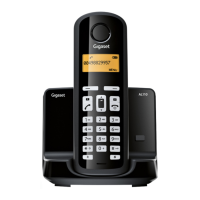

 To Next Page
 General