3
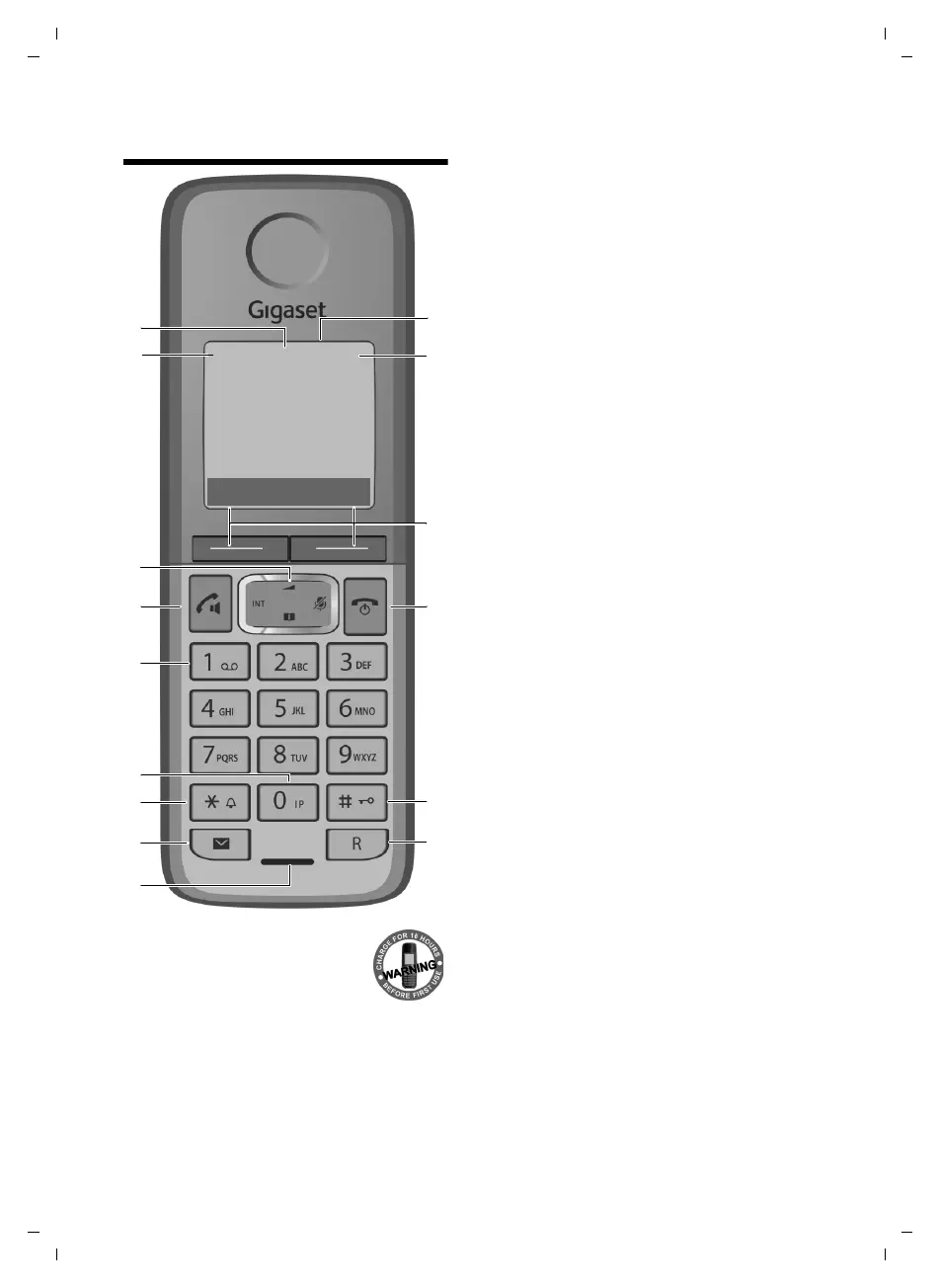
The handset at a glance
Gigaset C330/330 A / CHN chn/ A31008-M2410-Y101-1-7619 / overview.fm / 22.03.2013
Version 4, 16.09.2005
The handset at a glance
1 Display in idle status
2 Battery charge status
(
¢page 5)
3 Display keys (
¢page 25)
4 End call key, On/Off key
End call, cancel function, go back one menu
level (press briefly), back to idle status (press
and hold), activate/deactivate handset (press
and hold in idle status)
5 Hash key
Keypad lock on/off (press and hold in
idle status);
toggles between upper/lower case and digits
6 Recall key
– Consultation call (flash)
– Insert a dialling pause (press and hold)
7 Microphone
8 Message key (
¢page 38)
Access to calls and message lists;
Flashes: new message or new call
9 Star key
Ringtone on/off (press and hold);
with an open connection: switch between dial
pulsing/tone dialling (press briefly);
10 Priority key (
¢page 33)
Memory key for IP code (press and hold)
11 Key 1 (
¢page 46)
Dial answering machine (C330 A only) (press
and hold)
12 Talk key
Flashes: incoming call;
Accept a call (press briefly);
13 Control key (
¢page 25)
u initiate an internal call;
v mute the microphone during a call;
t open audio settings;
s open the directory;
14 Signal strength symbol of the connection to
the base
15 Answering machine symbol (C330 A only)
(
¢page 46)
Answering machine switched on;
Flashes: Answering machine is recording a
message or is being operated by another inter-
nal party.
You can register up to four handsets to the
Gigaset C330/330 A (
¢ page 29).
ÐÃ U
INT 1
07:15
10.14
Menu
Þ
§§2§§
§§3§§
§§4§§
§§5§§
§§6§§
§§1§§
§13§
§12§
§§7§§
§§8§§
§§9§§
§11§
§14§
§15§
§10§



 To Next Page