11
Gigaset C430-C430A-C530-C530A / LUG - UK-IE / A31008-M2502-L101-2-7619 / starting.fm / 8/23/13
Template Borneo, Version 1, 21.06.2012
Getting started
Changing the display language
You can also change the display language via the menu:
v
¤ Ï ¤ OK ¤ q Language ¤ OK ¤ q Select language ¤ Select
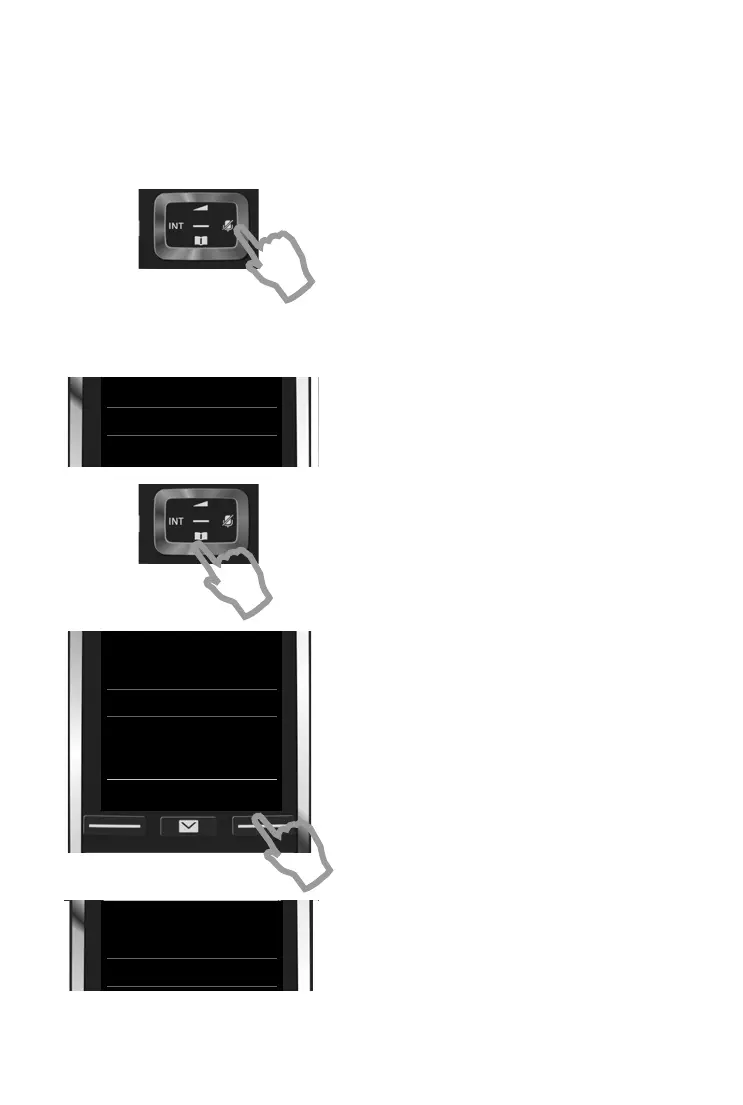
or, if you do not understand the language currently set, go to:
¤ Press and hold the End call key a to return to idle status.
¤ Press right on the control key.
¤ Press keys L and 5 slowly one after the
other.
The language selection display appears.
The current language (e.g. English) is selected.
¤ Press the down control key s ...
... until the language you wish to use is
displayed e.g. French.
¤ Press the right key, directly under the
display, to select the language.
The selection is marked with Ø.
Deutsch
±
English
Ø
Francais
±
Deutsch
±
English
Ø
Francais
±
Deutsch
±
English
Ø
Francais
±
Italiano
±
Espanol
±
x
Back Select
Deutsch
±
English
Ø
Francais
±
Deutsch
±
English
±
Francais
Ø



 To Next Page