EasyManua.ls Logo

Gigaset DA510 - Connecting the Telephone; Connection Steps; Wall Mounting Guide

Gigaset DA510
12 pages
Print Icon
To Next Page IconTo Next Page
To Previous Page IconTo Previous Page
Loading...
2
en
Gi
gaset
DA
510
/
IM
1 en
/
A
30054-
M
6530-
R
101-3-7
W
19
/
DA
510_en.
f
m
/
17.01.2012
Connecting the telephone
Wall mounting
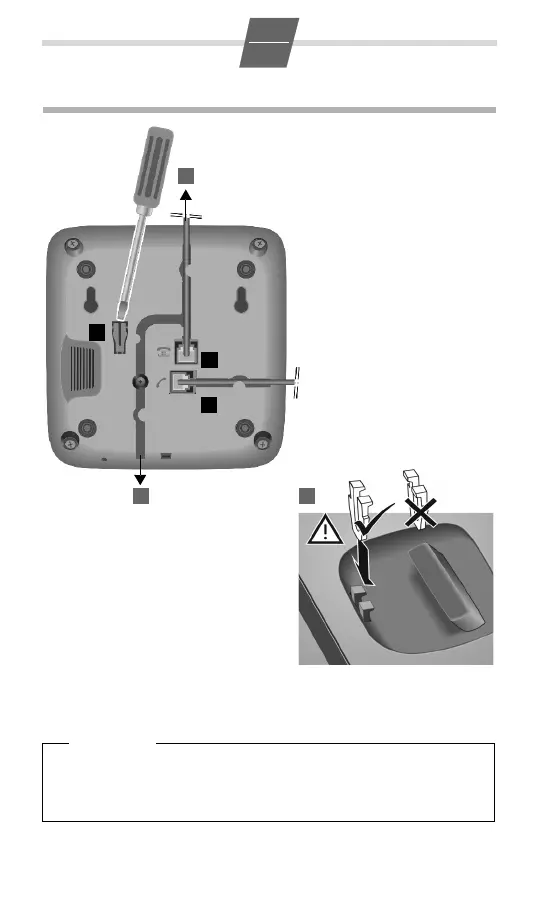
¤ Drill two dowel holes into the wall
at a distance of 99.4 mm and fix
two screws.
¤ Lift out the handset bracket (5)
with a screwdriver and clip it into
the handset cradle (6).
¤ Hang the telephone on the pro-
jecting screw heads.
¤ Connect the handset to the
telephone using the coiled
cable (4).
4
1
5
2
3
¤ Connect the telephone connector (1) to
the main phone socket using the sup-
plied telephone cable.
¤ Guide the cable through the
cable channel of the hand-
set cradle: upwards for
operating the phone on the
table (2); downwards when
mounting the phone on the
wall (3).
6

Please note
Once you have installed your Gigaset, lift the handset for approx. 5 seconds
to make sure it is working properly. You should also do this after a power fail-
ure in the telephone network. In the event of a power failure, your settings
will not be lost.

Related product manuals