EasyManua.ls Logo

Gigaset Repeater HX - User Manual

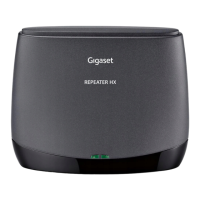
Gigaset Repeater HX
11 pages
Print Icon
To Next Page IconTo Next Page
Loading...
Repeater HX / BA IM all / A31008-N603-R101-1-SU19 / Cover_front_bw.fm / 2/14/19
Repeater HX

Questions and Answers

  • J
    James ConwayJul 28, 2025
    What to do if there is no reception of the handset in the area of the Gigaset HX Repeater?
    • J
      James WalkerJul 28, 2025
      If you're experiencing no reception of your handset in the Gigaset Repeater's area, it could be due to a few reasons. First, the repeater might not be registered; in this case, repeat the registration process. Second, there might be no radio connection to the base station, so try selecting a new location for the repeater. Finally, the handset might not be finding the repeater, so try switching the handset off and on again.
  • S
    Sophia WilliamsAug 3, 2025
    Why does the left LED not light up on my Gigaset HX?
    • M
      Mark HallAug 3, 2025
      If the left LED on your Gigaset Repeater doesn't light up at all, the power supply might be off. Check the power point to ensure it's working correctly.
  • D
    Danielle OlsonAug 9, 2025
    What does it mean if the right LED is constantly lit on my Gigaset HX Repeater?
    • R
      Rodney JonesAug 9, 2025
      If the right LED on your Gigaset Repeater is constantly lit, it indicates that the base station hasn't been properly prepared for repeater operation. Review the necessary preconditions and preparatory steps for registering a repeater as specified by your base station, and then repeat these steps to register the repeater.
  • P
    phillipskristineAug 14, 2025
    What to do if the left LED flashes continuously at a selected location on my Gigaset HX?
    • J
      Joseph GarciaAug 14, 2025
      If the left LED on your Gigaset Repeater flashes continuously at a selected location, it suggests there's no radio connection to the base station. Try selecting a new location for the repeater.
  • X
    xgrayAug 21, 2025
    What does it mean if the left LED flashes continuously after registration of Gigaset HX Repeater?
    • R
      Ronald GarciaAug 21, 2025
      If the left LED flashes continuously on your Gigaset Repeater after the registration procedure, it indicates there's no radio connection to the base station. Try repeating the registration process.

Summary

Important Information

Product Application

Details the intended use of the Gigaset Repeater HX with Gigaset cordless phones and routers.

Safety Precautions

Provides essential safety guidelines for using the Gigaset Repeater HX, including environmental and handling advice.

Package Contents

Lists the items included in the Gigaset Repeater HX package: the repeater, power supply, and user guide.

Introduction to Repeater HX

Repeater HX Features

Highlights key functionalities of the Repeater HX, such as encrypted calls and number of repeaters supported.

Preparation and Registration

Device Overview

Describes the front and back views of the Gigaset Repeater HX, detailing its LEDs and power supply socket.

Automatic Registration Process

Explains the step-by-step process for automatically registering the Gigaset Repeater HX to a base station.

Device De-registration

Provides information on how to de-register the Gigaset Repeater HX, including methods via base station or reset procedure.

Device Operation

Repeater Installation

Guides on how to install the Gigaset Repeater HX after successful registration to extend reception range.

LED Indicators Explained

Details the meaning of LED indicators on the Gigaset Repeater HX for registration, operation, and handset traffic.

Troubleshooting and Maintenance

Reset Repeater

Instructions on how to reset the Gigaset Repeater HX, including the button press sequence and LED indications.

Check Handset Accessibility

Explains how to use a verification tone to check handset functionality in the extended reception area.

Troubleshooting Guide

Lists common problems with the Gigaset Repeater HX, their causes, and recommended actions for resolution.

Device Care

Provides guidance on how to clean and maintain the Gigaset Repeater HX, advising against harsh chemicals and dry cloths.

Technical and Legal Information

Technical Data

Lists detailed technical specifications of the Gigaset Repeater HX, including standards, frequency, power, and dimensions.

Customer Care Support

Information on how to get support from Gigaset Customer Care, including website, FAQs, and contact numbers.

Product Authorisation

Details the intended use, compliance with EU directives, and availability of declarations of conformity for the Gigaset Repeater HX.

Warranty Certificate for Switzerland

Outlines the warranty conditions, coverage, exclusions, and claims process for Gigaset Repeater HX purchased in Switzerland.

Environmental Information

Discusses Gigaset's environmental statement, certified management systems (ISO 14001, ISO 9001), and proper disposal of the product.

Gigaset Repeater HX Specifications

General IconGeneral
Maximum range50 m
Number of handsets supported (max)-
Product colorBlack
Input voltage230 V
AC input frequency50 Hz
Power consumption (typical)0.9 W
Operating temperature (T-T)-10 - 45 °C
Harmonized System (HS) code85177900
RF power10 mW
Cable length1.8 m
On/off buttonYes
Brand compatibilityGigaset
Compatible productsRepeater 2.0 N510 IP PRO
Maximum outdoor range300 m
Radio Frequency (RF) range1880 - 1900 MHz
Number of simultaneous calls (max)2
Weight and Dimensions IconWeight and Dimensions
Depth131 mm
Width111 mm
Height50 mm
Weight154 g
Dimensions (WxDxH)131 x 50 x 111 mm

Related product manuals