1
Brief overview
Gigaset SL1 colour / englisch / A31008-M1570-R211-1-QF19 / covers_I-II.fm / 16.04.2004
Brief overview
ÐÙ
INT 1
20.05.04 09:45
• §§§§§§§SMS§§§§§§
Open directory
End call key, On/Off key
◆ End call
◆ Cancel function
◆ One menu level back
(short press)
◆ Back to idle status
(press for approx. 1
second)
◆ Handset on/off (press
for approx. 2 seconds)
Message key
◆ Access to calls and
messages list
◆ Flashes: new
messages and calls
Star key
◆ Ringer on/off (press for
approx. 2 seconds)
◆ Toggles between upper/
lower case and digits for
text input
Charge status
×
flat
Ú
fully charged
×
flashes: battery is
almost flat or is charging
Control key
Opens the menu,
directory, voice dialling.
Navigation in the input
field
Current functions and
display keys
The display keys give you
access to the functions
shown in the display.
Key 1
Select network mailbox/
answering machine (press
for approx. 2 sec.)
Microphone
Talk key
◆ Answer a call
◆ Initiate dialling
◆ Switch from handsfree
to "earpiece" mode
Recall key
Insert a dial pause (hold
key down)
Display (display screen)
Speed dial list key
Open the speed dial list
(short press)
Hash key
Keypad lock on/off (press
for approx. 1 second)
Handsfree key
◆ Switch from "earpiece"
to handsfree mode
◆ Lights up: Handsfree
is activated
◆ Flashes: incoming call,
automatic last number
redial
Signal strength
Ð 100 % i 75 %
Ñ 50 % Ò poor signal
| no signal (flashes)
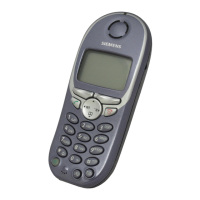
Illustration of a handset that is registered to a base with SMS functionality.
Socket for headset
and PC interface

 Need help?
 General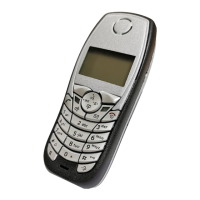

 To Next Page