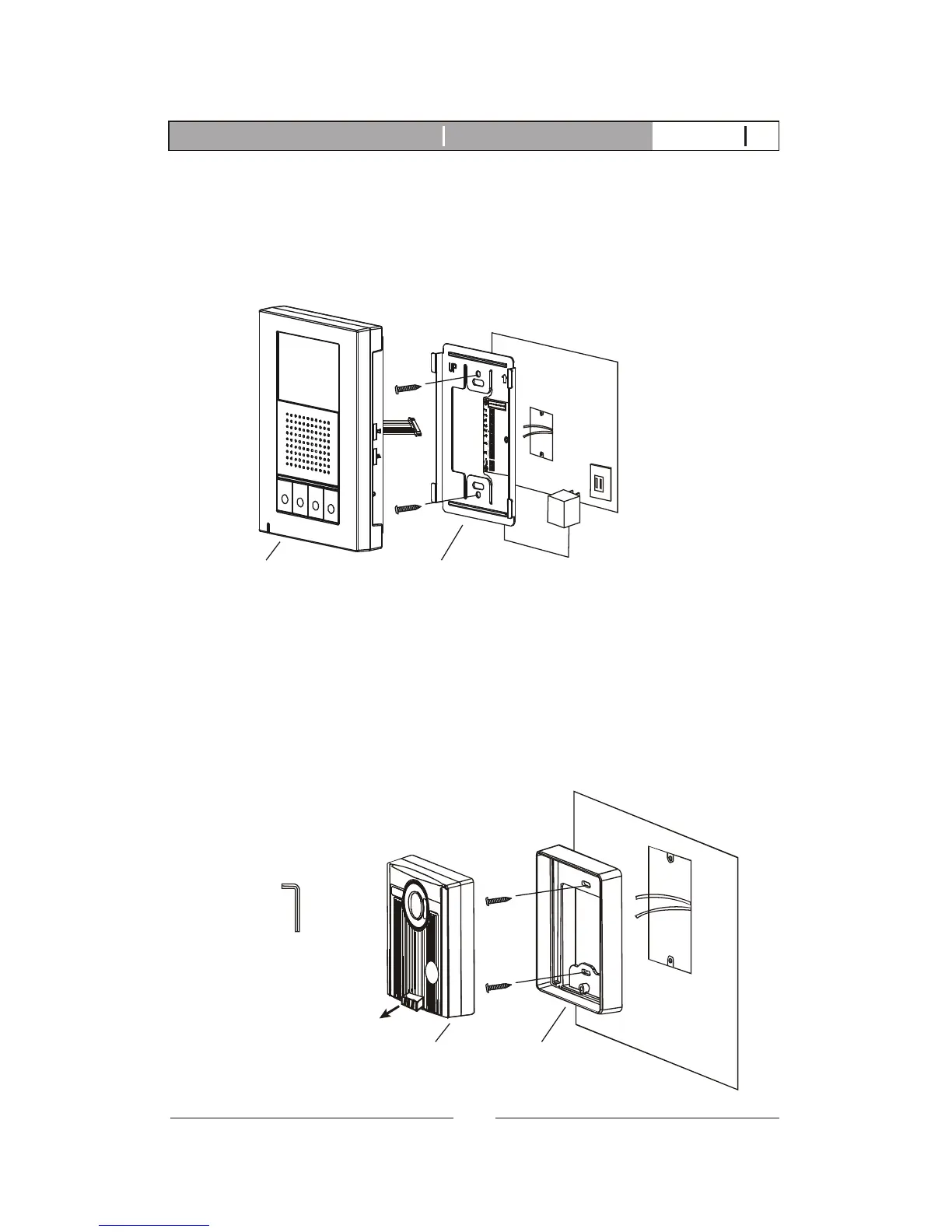
A. Fasten the wall mount bracket using the provided hardware.
B.Fasten wires on terminals accordingly. (Refer to STAGE 3)
C. Plug pin wires and mount the monitor unit on bracket.
3.2. Installation
STAGE 1: Installation of main monitor
Do not plug power
at this stage.
Wall mount bracketMonitor
A. Use security screw wrench disassemble screw and remove door camera
unit from bracket.
B. Fasten wall mount bracket on position.
C. Fasten wires on terminals and select jumpers for desired function.
(refer to STAGE 3)
D. Mount door camera unit on bracket, secure the assembly screw.
STAGE 2: Installation of the door cameras
Door camera Bracket
Pull out screw cover
to access the screw
security screw wrench
6
K-350R Video intercom systemIntroduction V12011-01



 To Next Page