EasyManua.ls Logo

Gigaware 2603143 - User Manual

Gigaware 2603143
16 pages
Print Icon
To Next Page IconTo Next Page
Loading...
TM
2603143
User’s Guide
Please read this users guide before using your new touchpad
keyboard.
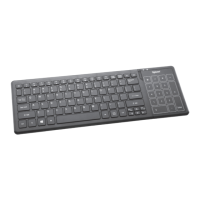
Wireless Touchpad Keyboard
Question and Answer IconNeed help?

Do you have a question about the Gigaware 2603143 and is the answer not in the manual?

Summary

Install Batteries

Plug in the Receiver

Sleep Mode

Standard Operations

Multimedia Function Keys

Lists Fn key combinations for media playback control.

Internet Function Keys

Lists Fn key combinations for internet browser and email functions.

Caps Lock

Explains how to use the Caps Lock key and its indicator light.

Function Keys

Internet Keys

Lists Fn key combinations for internet browser functions.

Mail Key

Lists Fn key combinations for email functions.

Search Key

Lists Fn key combinations for search functions.

Scroll Lock

Power Indicator

Num Lock

Touchpad

Basic Touchpad Functions

Explains gestures for cursor movement, clicking, opening files, and right-clicking.

Windows 8 Functions

Swipe Page Gesture

Explains three-finger gestures for page navigation in Windows 8.

Application Gestures

Toggle App Navigation

Explains gestures for switching between apps and bars.

Rotating Gesture

Describes clockwise or counterclockwise two-finger rotation gesture.

Zoom Gesture

Explains two-finger gestures for zooming in and out.
Supported Applications and Gestures

Troubleshooting

Class 1 Laser Product

Important Information

Specifications

FCC Information

Limited Warranty

Gigaware 2603143 Specifications

General IconGeneral
BrandGigaware
Model2603143
CategoryKeyboard
LanguageEnglish